ii
Ii
8
2, 3,4, 5, 6
Recorded Pfxels 2592×1944
Qlla Mty Level Y_ "lt-
White Ba_a nee AWB
Focusing Ar_a Wide
AE Metering
1/3 _ Exit _OK
iiiiiiiiiiiii!_711:i
iiiiiiiiiiii,i_zi;ii
iiiiiiiiiiiii_iii!i
iiiiiiiiiiiii_ili!ii
iiiiiiiiiiiii_Tii2
iiiiiiiiiiiii!_iiiiii:ii3
M Tv Av I_ PICT_ @USER
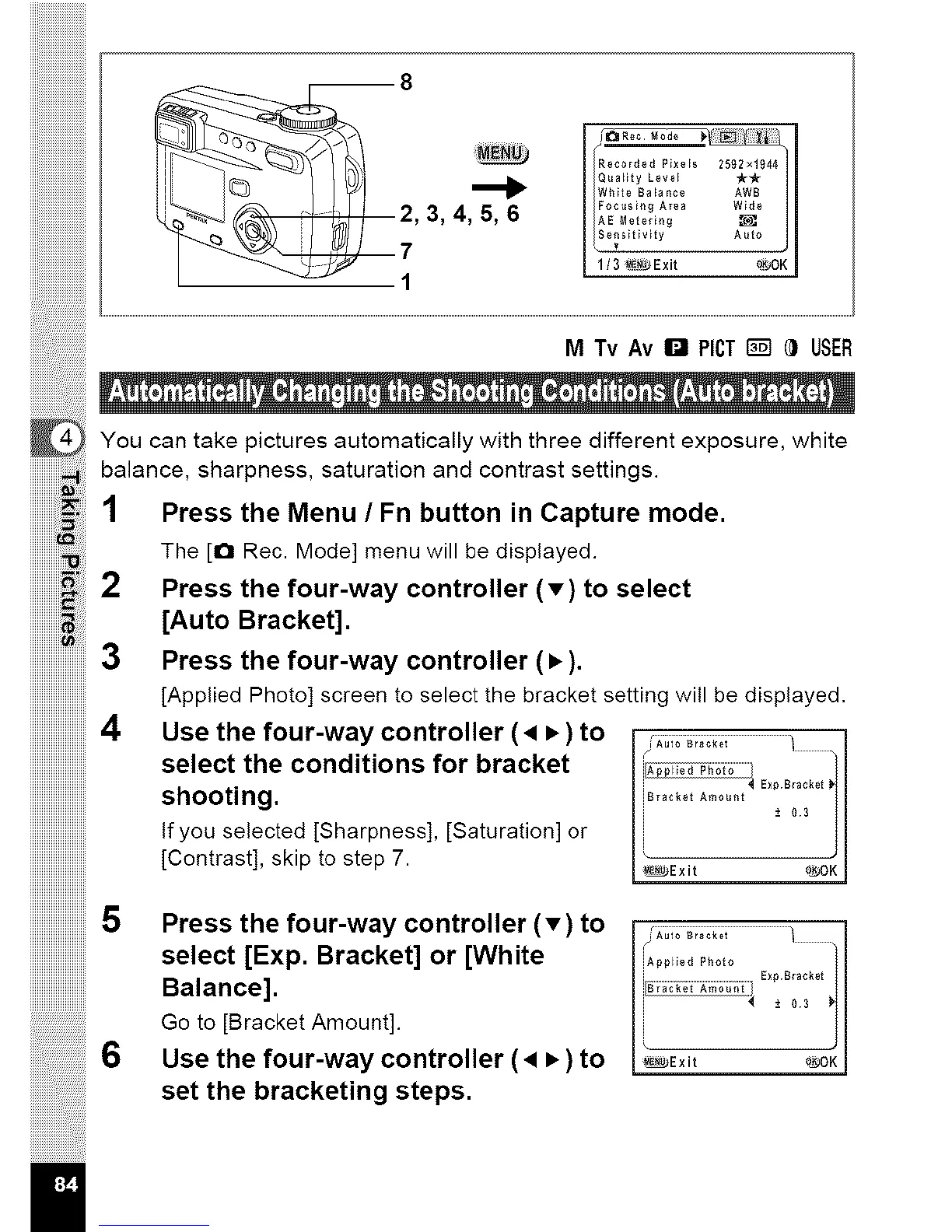
You can take pictures automatically with three different exposure, white
balance, sharpness, saturation and contrast settings.
Press the Menu / Fn button in Capture mode.
The [O Rec. Mode] menu will be displayed.
Press the four-way controller (T) to select
[Auto Bracket].
Press the four-way controller (•).
[Applied Photo] screen to select the bracket setting will be displayed.
iiiiiiiiiiiiiiiiiiiiiiiii4
iiiiiiiiiiiiiiiiiiiiiiiii
iiiiiiiiiiiiiiiiiiiiiiiii
iiiiiiiiiiiiiiiiiiiiiiiii
iiiiiiiiiiiiiiiiiiiiiiiii
iiiiiiiiiiiiiiiiiiiiiiiii
6
II
Use the four-way controller (• • ) to
select the conditions for bracket
shooting.
If you selected [Sharpness], [Saturation] or
[Contrast], skip to step 7.
iA_'a" b1oio........... j
Ii Exp Bracket
rl
iiirack_t a...... -*03 l
[ _Exit o_OKJ
Press the four-way controller (T) to
select [Exp. Bracket] or [White
Balance].
Go to [Bracket Amount].
Use the four-way controller (• • ) to
set the bracketing steps.
iApplled Photo
i _* O3 _j
[ _Exit 0_OKJ



 To Next Page