Taking Still Pictures
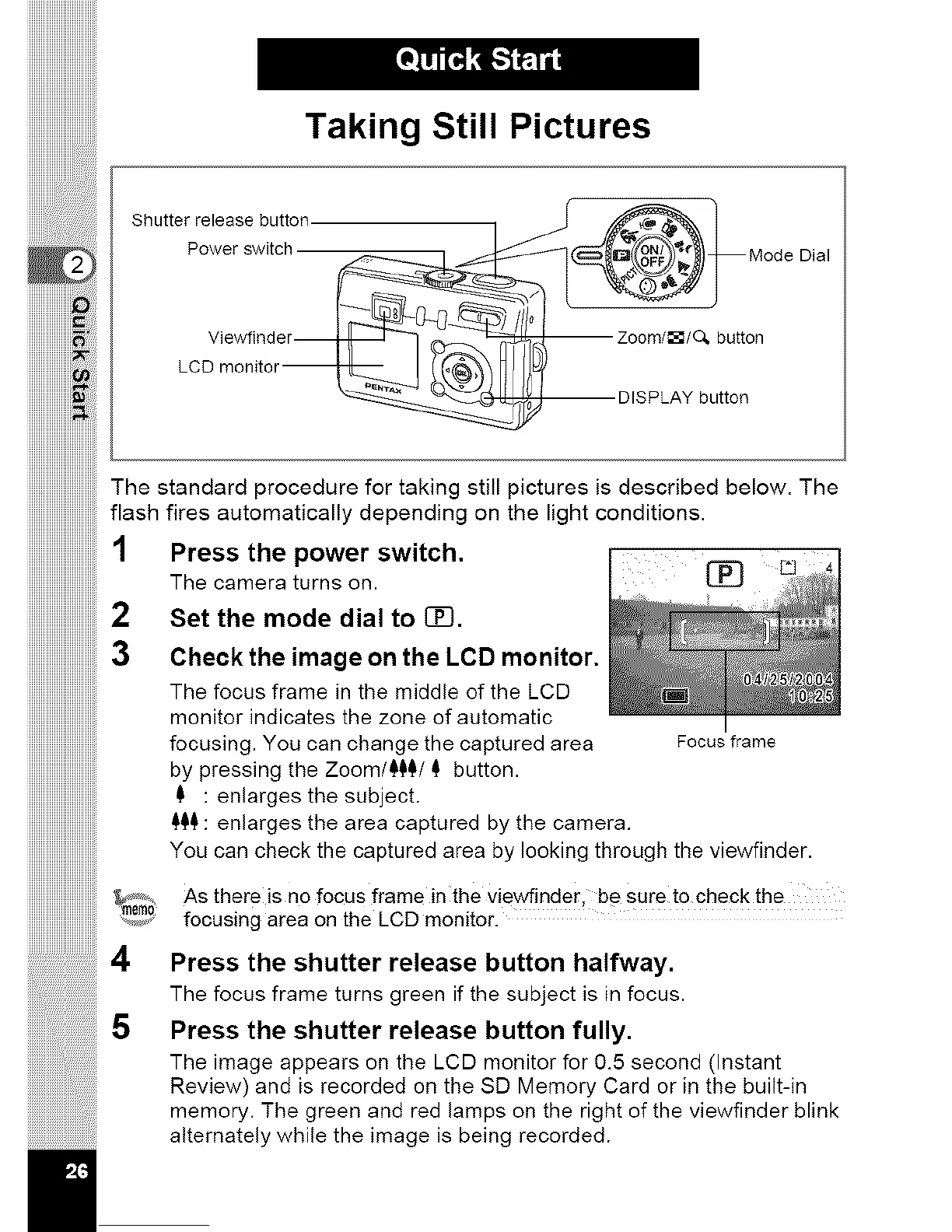
Shutter release butto_
Power switch Mode Dial
Viewfinder_'] _Zoom/Z/O. button
LCD monitor__._ _r_L_/ _ I Jft_'
_ DISPLAY button
The standard procedure for taking still pictures is described below. The
flash fires automatically depending on the light conditions.
1 Press the power switch.
Thecameraturnson
Set the mode dial to (_.
iiiiiiiiiiiiiiiii2
iiiiiiiiiiiiiiiiiiiiiiiiiiiiiiii
iiiiiiiiiiiiiiii
iiiiiiiiiiiiiiii
iiiiiiiiiiiiiiii
iiiiiiiiiiiiiiii
iiiiiiiiiiiiiiiiiiiiiiiiiiiiiiii
iiiiiiiiiiiiiiiiiiiiiiiiiiiiiiii
4
5
Check the image on the LCD monitor.
The focus frame in the middle of the LCD
monitor indicates the zone of automatic
focusing. You can change the captured area Focus frame
by pressing the Zoom/€€el € button.
€ : enlarges the subject.
€€€ : enlarges the area captured by the camera.
You can check the captured area by looking through the viewfinder.
As there is no focus frame in the viewfinder, be sure to check the
focusing area on the LCD monitor.
Press the shutter release button halfway.
The focus frame turns green if the subject is in focus.
Press the shutter release button fully.
The image appears on the LCD monitor for 0.5 second (Instant
Review) and is recorded on the SD Memory Card or in the built-in
memory. The green and red lamps on the right of the viewfinder blink
alternately while the image is being recorded.


 To Next Page