Playing Back Still Pictures
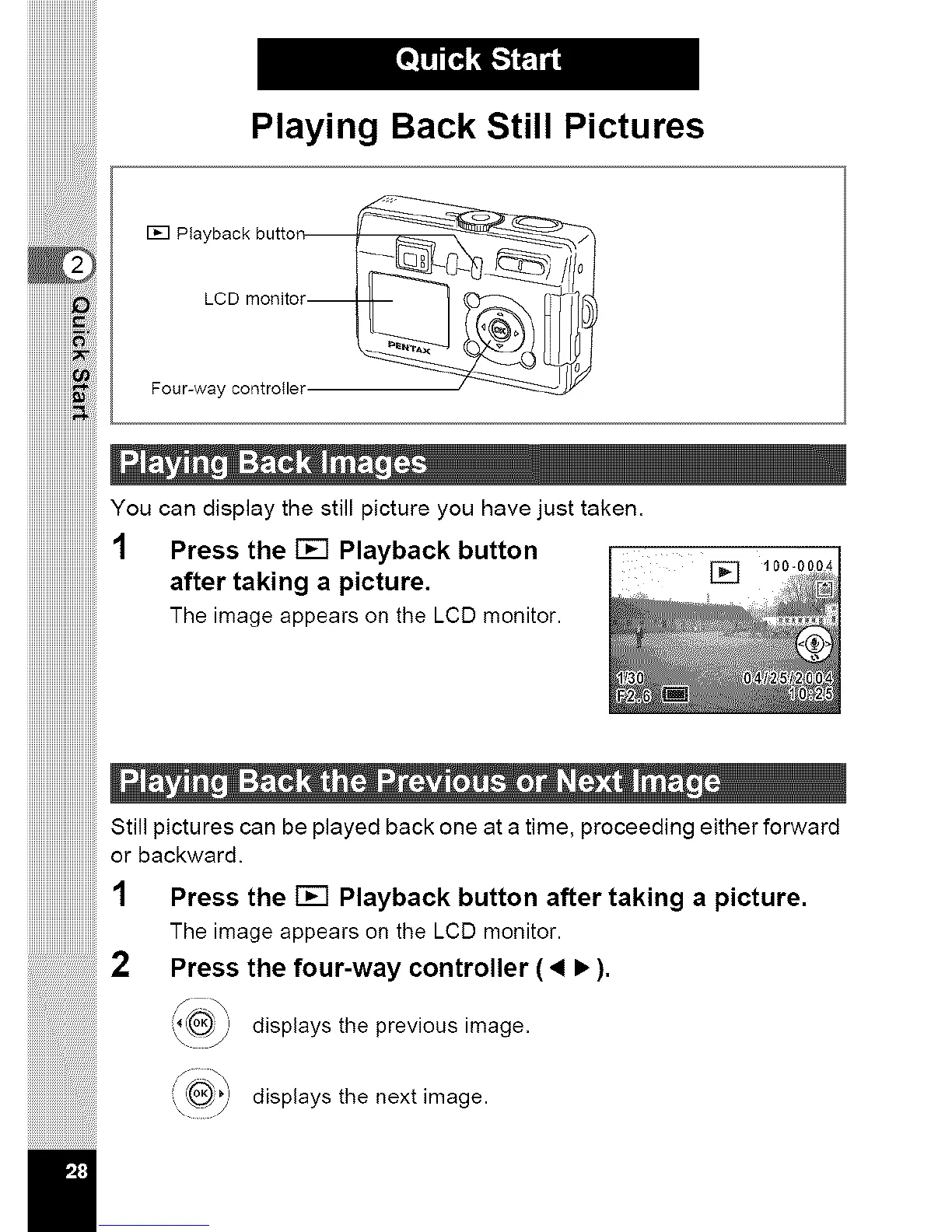
[]E]Ptayback button_
LCD monitor--
Four-way controller
iiiiiiiiiiiiiiiiiiiiiiiiiiiiiiiiYoucandisplaythestillpictureyouhavejusttaken.
iiiiiiiiiiiiiiiiiiiiiiiiiiiiiiii1 Pressthe F_ Playbackbutton
iiiiiiiiiiiiiiiiiiiiiiiiiiiiiiiiaftertakingapicture. [] 10
iiiiiiiiiiiiiiiiiiiiiiiiiiiiiiii TheimageappearsontheLCDmonitor.
iiiiiiiiiiiiiiiiiiiiiiiiiiiiiiii
iiiiiiiiiiiiiiiiiiiiiiiiiiiiiiii
iiiiiiiiiiiiiiiiiiiiiiiiiiiiiiii
iiiiiiiiiiiiiiiiiiiiiiiiiiiiiiiiStillpicturescanbeplayedbackoneatatime, proceedingeitherforward
iiiiiiiiiiiiiiiiiiiiiiiiiiiiiiiiorbackward.
2
Press the F_ Playback button after taking a picture.
The image appears on the LCD monitor.
Press the four-way controller (_ • ).
_ ) displays tile previous image.
_ displays the next image.



 To Next Page