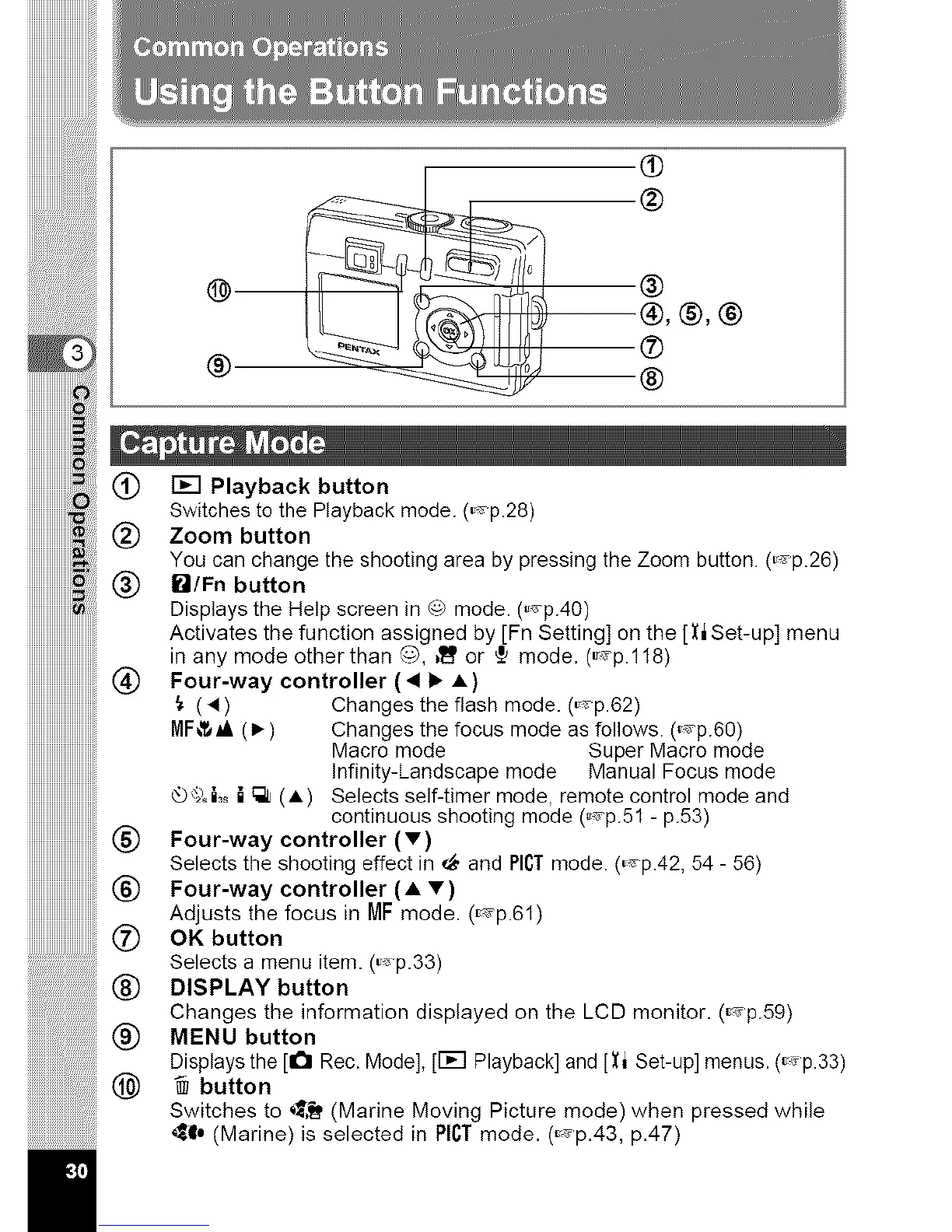
®® _ ,®,®®®
iiiiiiiiiiiiiiiiiiii'_!i!;_i_iii_!{i!!ill
iiiiiiiiiiiiiiiiiiii=_i_;,(_ _ Playback button
iiiiiiiiiiiiiiiiiiii61{ii Switches to the Playback mode. (7p.28)
iiiiiiiiiiiiiiiiii_iiiiiii
'"'"'"'"'"'""_';iiiiiiiiiiiiiiiiiiii_!i!_i!;J(_) Zoombutton
You can change the shooting area by pressing the Zoom button. (,_p.26)
iiiiiiiiiiiiiiiiiiiii_!ii!i!i!:i(_) li_/Fn button _
iiiiiiiiiiiiiiiiiiii_iliiiiiiiiii!iDisptaystheHeIpscreenin #) mode. (p.40)
iiiiiiiiiiiiiiiiiiiiiiiiiiiiiiii Activates the function assigned by [Fn Setting] on the [:(i Set-up] menu
iiiiiiiiiiiiiiiiiiiiiiiiiiiiiiii in any mode other than ©, _ or '_ mode. (_._p.1t8)
® Four-waycontro,,er,,,-,
ii
ii
iiiiiiiiiiiiiiiiiiiiiiiiiiiiiiii
®
®
®
®
®
®
(_) Changes the flash mode. (_p.62)
MF_, ,i (_.) Changes the focus mode as follows. (._p.60)
Macro mode Super Macro mode
Infinity-Landscape mode Manual Focus mode
@52_i_i _ (A) Selects self-timer mode, remote control mode and
continuous shooting mode (._p.51 - p.53)
Four-way controller (T)
Selects the shooting effect in _, and PICr mode. (_p.42, 54 - 56)
Four-way controller (A T)
Adjusts the focus in MF mode. (,_p.6t)
OK button
Selects a menu item. (_p.33)
DISPLAY button
Changes the information displayed on the LCD monitor. (_p.59)
MENU button
Displays the [1_1 Rec. Mode], [I-_"1Playback] and [I_ Set-up] menus. (_-_p.33)
button
Switches to *_,_ (Marine Moving Picture mode) when pressed while
_qle (Marine) is selected in PICTmode. (,-7p.43, p.47)


 To Next Page