When you press the MENU button, the menus appear on the LCD
monitor. You can set functions, save the settings and change the camera
settings on these menus.
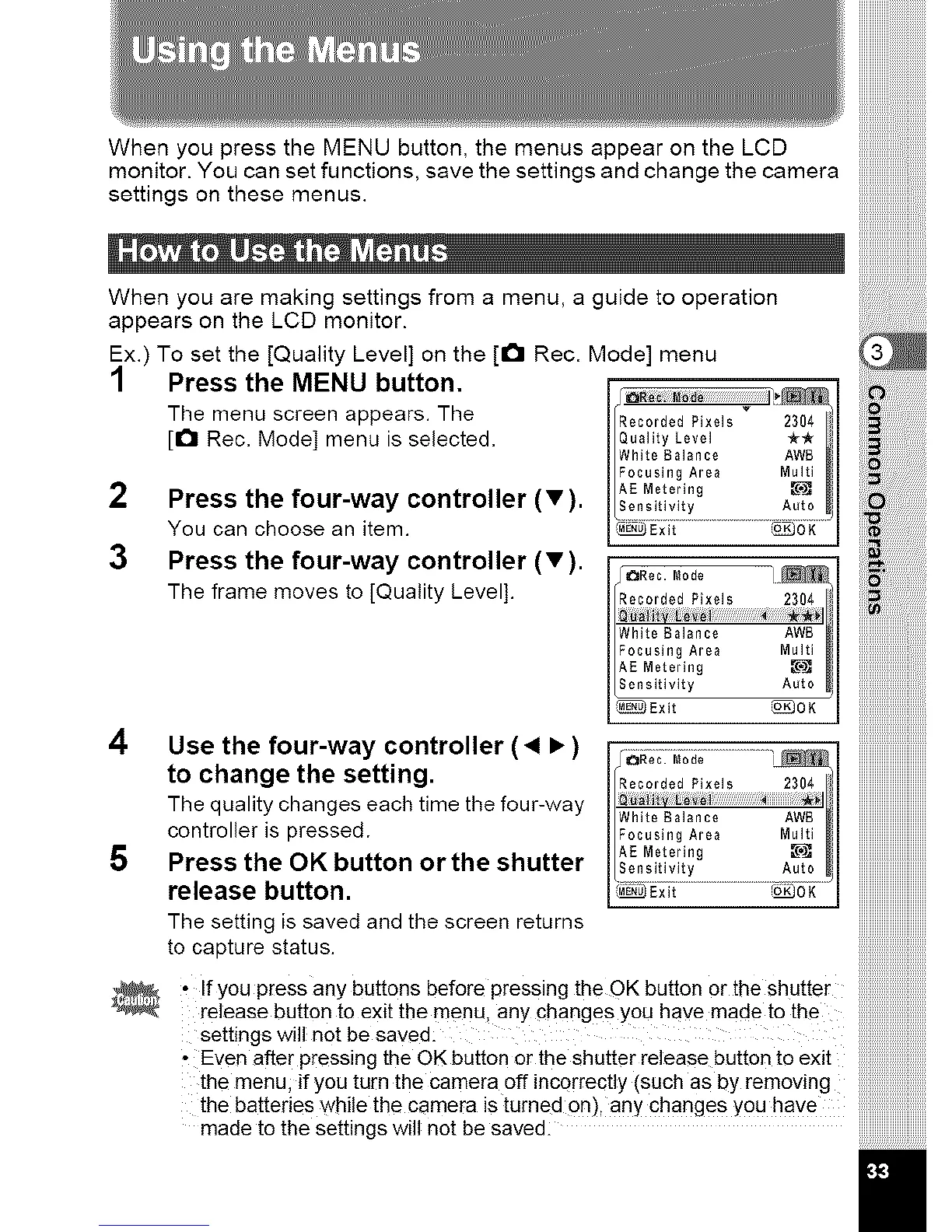
When you are making settings from a menu, a guide to operation
appears on the LCD monitor.
Ex.) To set the [Quality Level] on the [1_ Rec. Mode] menu
1 Press the MENU button. _
The menu screen appears. The I[ReuCa_,ideLde_els_ _tl
[1_1 Rec. Mode] menu is selected. I/Q y ..1. Bil
White Bal ..... AWB ]
• AE Metering _ l
2 Press the four-way controller ( ). sensitivity Auto
You can choose an item. I_E_[t ................................I
3 Press the four-way controller (•).
Theraovesto.uateve
4 Use the four-way controller ( 4 • )
5
to change the setting.
The quality changes each time tile four-way
controller is pressed.
Press the OK button orthe shutter
release button.
The setting is saved and the screen returns
to capture status.
Recorded Pixels 2304 i
White Balance AWB
Focusing Area Multi Ij]
AE Metering _ i
_Exit _OK
iiiiiiiiiiiiiiiiiiiiiiiiiiiiiih
iiiiiiiiiiiiiiiiiiiiiiiiiiiiiii;;
, IfyoupressanybuttonsbeforepressingtheOKbuttonortheshutter
release button to exitthe menu any changesyou have made to the
settings will not be Saved:
• Even after pressing the OKbutton or the shutter release button to exit
the menu; if you turn the camera off incorrectly (such as by removing
the batteries while the camera is turned on) any changes you have
made to the settings will not be saved:


 To Next Page