PHONE MODELS AND SUPPORT
INFORMATION
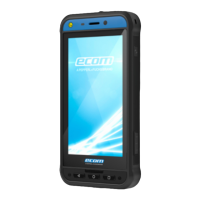
Congratulations on the purchase of a Smart-Ex® 03 dual-SIM smartphone. This phone is GSM/UMTS/4G/5G enabled handset.
This phone has call capabilities including Voice over Wi-Fi® (VoWi-Fi). It has an intuitive, feature-rich user interface, which allows
you to make the best use of the functions offered in it. This Smartphone is intended for professional users.
Phone Models Covered
This user guide covers the different variants of Smart-Ex® 03. The model name of the device can be found on the packaging.
Network Services
These are additional services that you can avail through your network service provider. To make the best of these services, you
must subscribe to them through your service provider and obtain instructions for its use from them.
Pepperl+Fuchs Support Information
For additional product and support information, visit https://www.pepperl-fuchs.com.
Use the Guide effectively
Familiarize yourself with the terminology and symbols used in the guide to help you use your phone effectively.
HOME SCREEN This is the screen displayed when the phone is in idle condition.
TOUCH & HOLD Touch and hold an item on the screen by touching it and not lifting your finger until an action occurs.
DRAG Touch and hold an item for a moment and then, without lifting your finger, move your finger on the screen until you reach the target position.
SWIPE OR SLIDE Quickly move your finger across the surface of the screen, without pausing from your first touch point. For example, you can slide a home
screen left or right to view the other home screens.
PINCH IN/OUT Pinch in/out on a web page, map or any other screen to zoom-in or out, respectively.
Common Actions
Actions commonly used when accessing the Menu items on the phone are:
BACK Displays the previous screen. Use the Left Selection Key to perform this function.
HOME Moves the current working application to the recent applications list/background and displays the home screen.
RECENT Displays recently used applications
Limited Feature Description: Disclaimer
Your Smart-Ex® 03 smartphone comes with a feature-rich Android operating system and Google applications. This document
intends to address the basic features of the phone and the applications integrated there-in. We recommend that you refer to the
help and support documentation associated with each application to explore the latest features offered by them.
The Android operating system receives frequent updates. It is recommended to download and install these updates to
ensure best use of your Smart-Ex® 03.
Avoid High Temperatures
Leaving the phone in hot or cold places, such as in a closed car in summer or winter conditions, reduces the capacity and lifetime
of the built-in battery. For the best results, try to keep the phone between -20°C and +60°C (-4°F and +140°F). A phone with a hot
or cold battery may not work temporarily, even when the battery is fully charged. Battery performance is particularly limited in
temperatures well below freezing.
6


 To Next Page
 Loading...