Touch Key Functions Touch Key Functions
4 Keys Monitor Angel Adjusting
Press and to adjust the monitor angels within its variation scope.
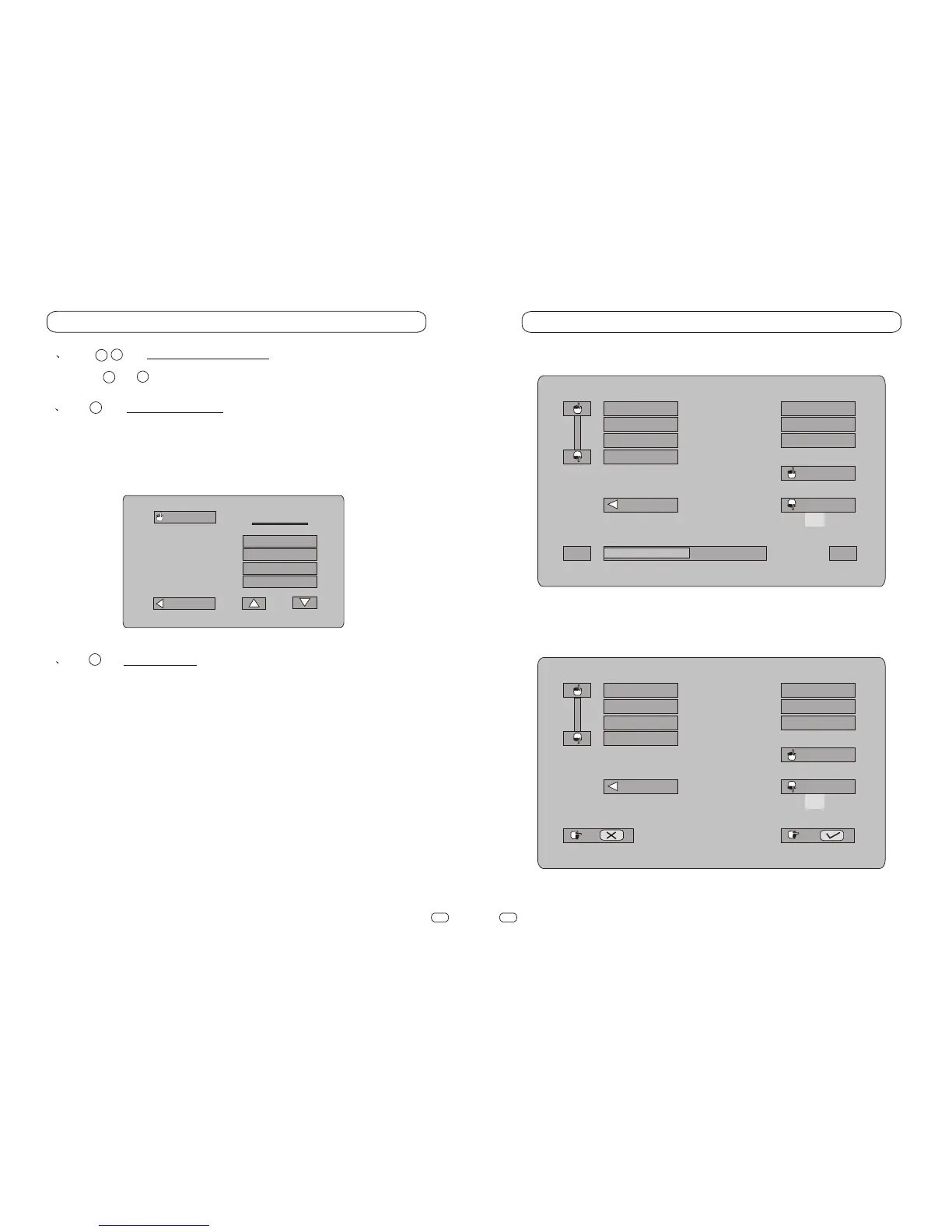
5 Key Picture Mode Menu
Touch this key to activate picture mode menu.Touch and select wanted
picture mode. Four modes are preset here:
STANDARD,NIGHT,CUSTOM,and BRIGHTNESS.
CUSTOM
NIGHT
STANDARD
BRIGHT
PIC MODE
LAST
EXIT
6 Key System Menu
Touch this key to activate System Menu, which has 3 pages, each item of
the menu can be touched and selected freely.
Among them are PIC item on page 1:
BRIGHT
CONTRAST
COLOR
RESET
and SETUP item on page 2:
MIRROR
BLUE
CLOCK
TUNE
and MODEitem on page 3:
Picture Modes
BRIGHT
CONTRAST
COLOR
RESET
EXIT
15
- +
PIC
SETUP
MODE
LAST
NEXT
MIRROR
BLUE
CLOCK
TUNE
EXIT
PIC
SETUP
MODE
LAST
NEXT
4
8
5
6
9
10
4
8
System Menu Page 1
System Menu Page 2


 To Next Page