ON
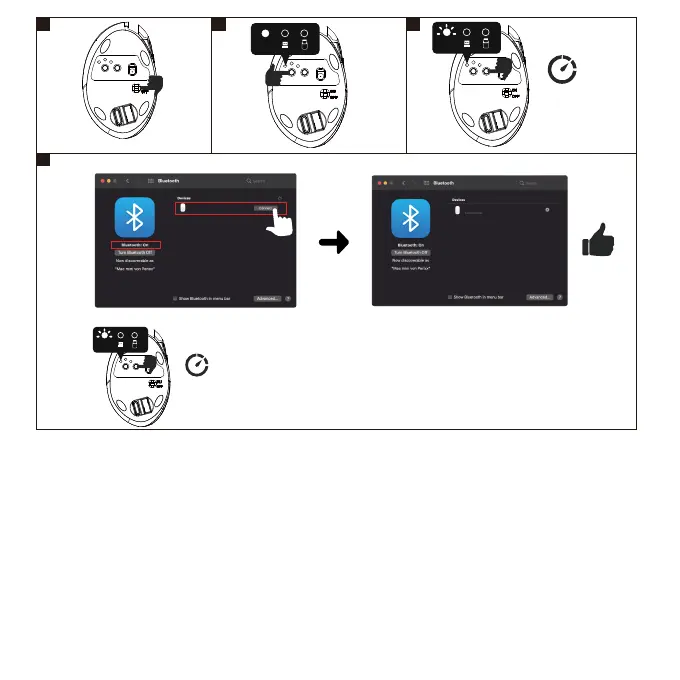
If the Bluetooth pairing fails, please remove PERIMICE-819 from the list of paired devices and redo it from
Step-1.
Wenn die Bluetoothkopplung scheitert, enernen Sie bie PERIMICE-819 aus der Liste der gekoppelten
Geräte und wiederholen Sie den Kopplungsprozess ab Schri 1.
Si el emparejamiento de Bluetooth falla, elimine el PERIMICE-819 de la lista de disposivos emparejados e
inicie nuevamente desde el Paso 1.
Si le jumelage Bluetooth échoue, veuillez supprimer le PERIMICE-819 de la liste d’appareils jumelés de votre
appareil et recommencez à l'étape 1.
Se la sincronizzazione Bluetooth non fosse andata a buon fine, rimuovere PERIMICE-819 dall'elenco dei
disposivi associa e ripetere il processo dal Punto 1.
如果蓝牙配对失败,请从配对设备列表中删除PERIMICE-819,然后从步骤1重新执行。
如果藍芽配對失敗,請從已配對的藍芽清單中刪除PERIMICE-819並從步驟一開始重新操作,謝謝。
EN
DE
ES
FR
IT
JA
SC
TC
1
5
2 3
System preferences -> Bluetooth
4
PERIMICE-819
PERIMICE-819
MacOS
Bluetooth
10 seconds
BT
BT
If there’s no PERIMICE-819 on the list, please press connect buon for 10 seconds.
10 seconds
BT



 To Next Page