17” CDT Color Monitor 107S7
17
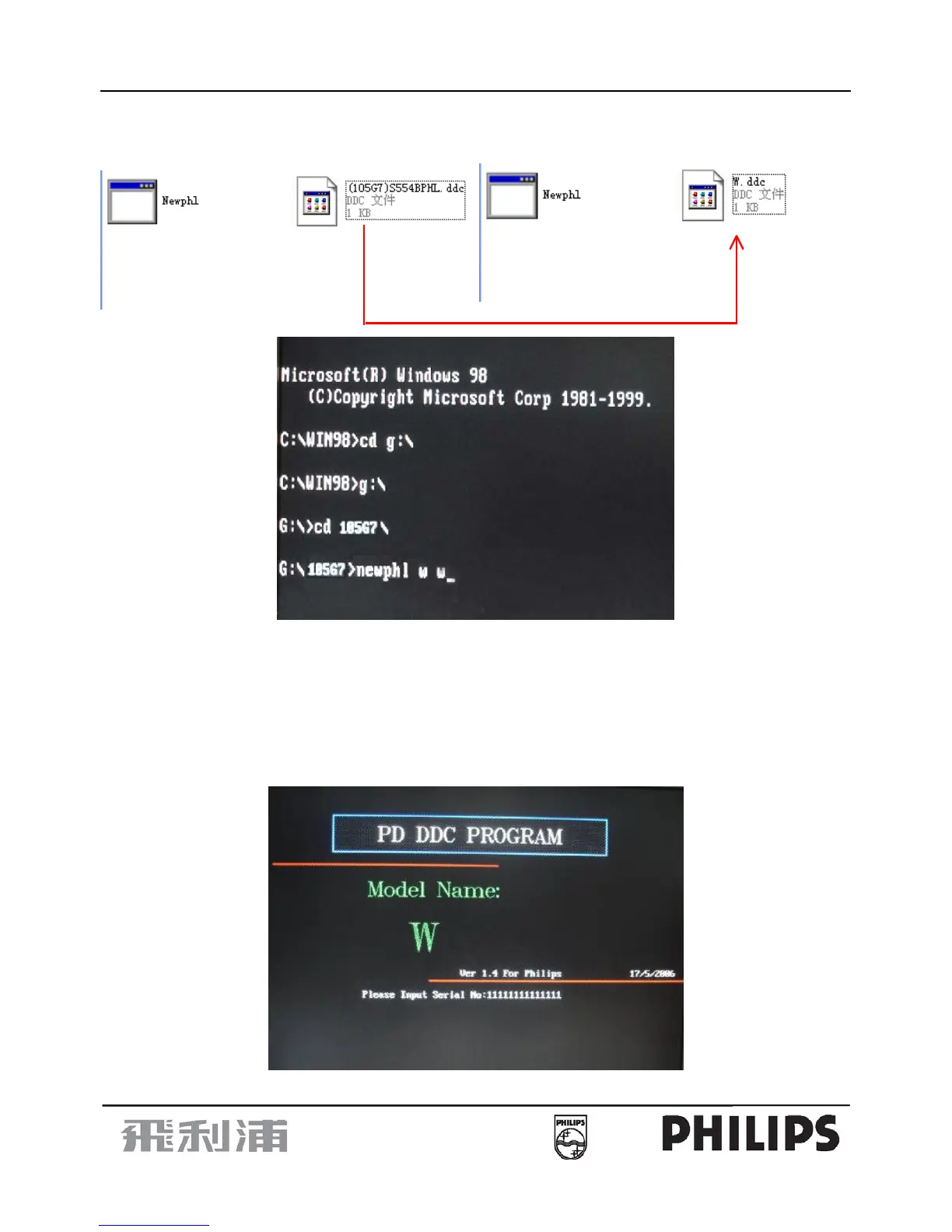
Step 1: Put the “Newphl.exe” and “(105G7) S554BPHL.ddc” to a special folder, such as 105G7. And rename the
“(105G7) S554BPHL.ddc” as “W.ddc”
Step 2: Access to MS-DOS program, Input the command as shown fig 2
Note: g: is the disk position for 105G7
Fig 2
Step 3: Press Enter into the next screen as shown Fig 3.
a. Input 14 byte digital Serial No. such as “11111111111111” as shown Fig 3.
b. Enter and press “F3” key to input Serial No. again as shown Fig 4. Enter
The Serial No. length is”14” as shown Fig 4.
c. If you correctly input, there will appear” The Barcode length: 14 is OK” as shown Fig 5.
d. And if you incorrectly input, there will appear “The Barcode length: 9 is NG” as shown Fig 6.
You have to input again.
Fig 3


 To Next Page