6
4
Power Delivery
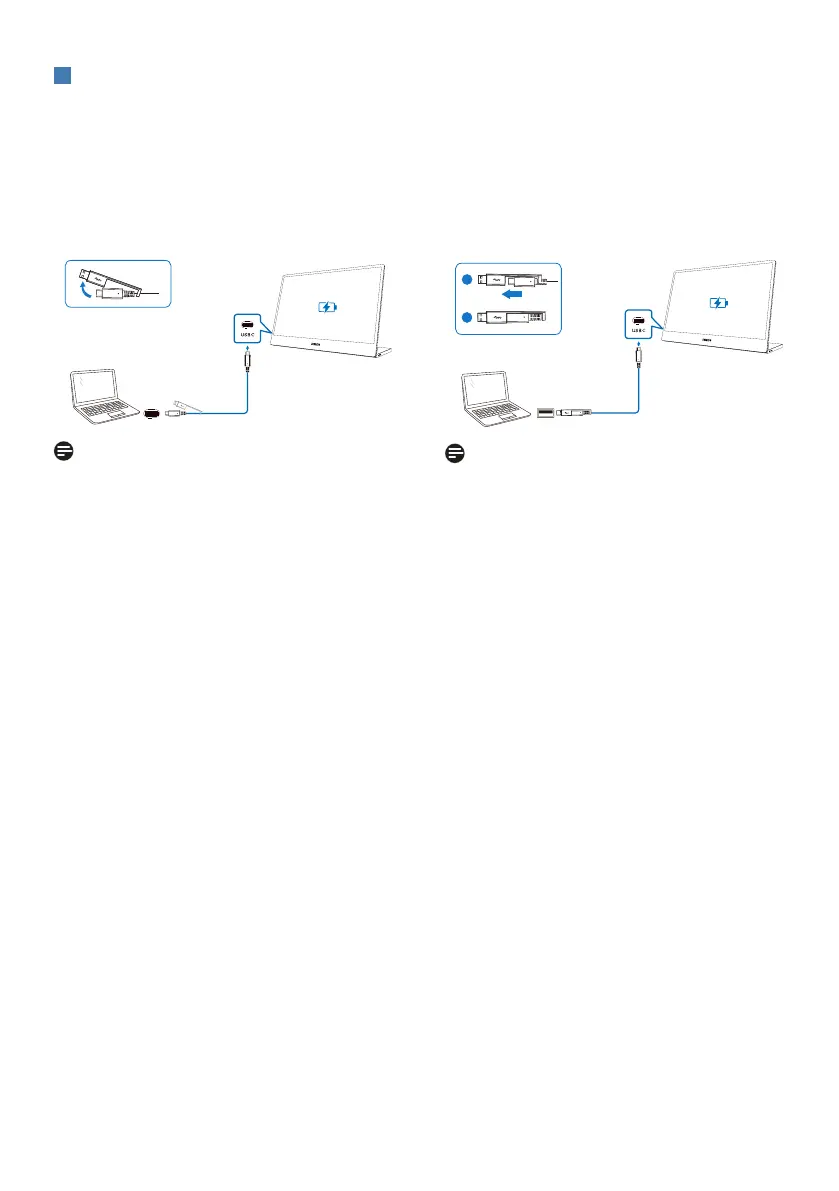
This monitor is powered through the USB port. There is 2 kinds of connection to
empower this monitor: USB C-C and USB A-C.
1. Connect the USB-C port of notebook
and the monitor with a USB type-C
cable. (Electronically marked cable,
current rating: 5A)
Note
• The devices connected to this
monitor need to support video signal
and power output of 15 W (5V/3A).
• There is various devices in the market
that may differ from design or setting
on specification. As your device may
have different power requirements
than the monitor’s USB-C port is
able to deliver, we are unable to
ensure our monitor’s USB-C with
15W (5V/3A) can comply the power
delivery to your device.
2. Connect the USB-A port of notebook
and the monitor with a USB A-C
cable. (Electronically marked cable,
current rating: 5A)
USB A-C (DisplayLink)
1-1
1-2
USB Type-A + DisplayLink driver
Note
• This monitor is with DisplayLink
technology. Download and install
DisplayLink driver then USB Type A
port of your device can be connected
to a DisplayLink enabled USB-C of
this monitor.
• The devices connected to this
monitor need to be USB 3.2 or above.



 To Next Page