MDnY times while watching movies fi'om a
VD player the image is shown in
"letter box" Jbrmat. This is theJbrmat that is
shown in movie theaters. When shown on a TV
screen, the image will have areas of black on
top and bottom of the screen. The FORMAT
Control can help to display the image as close
as possible to its original aspect ratio.
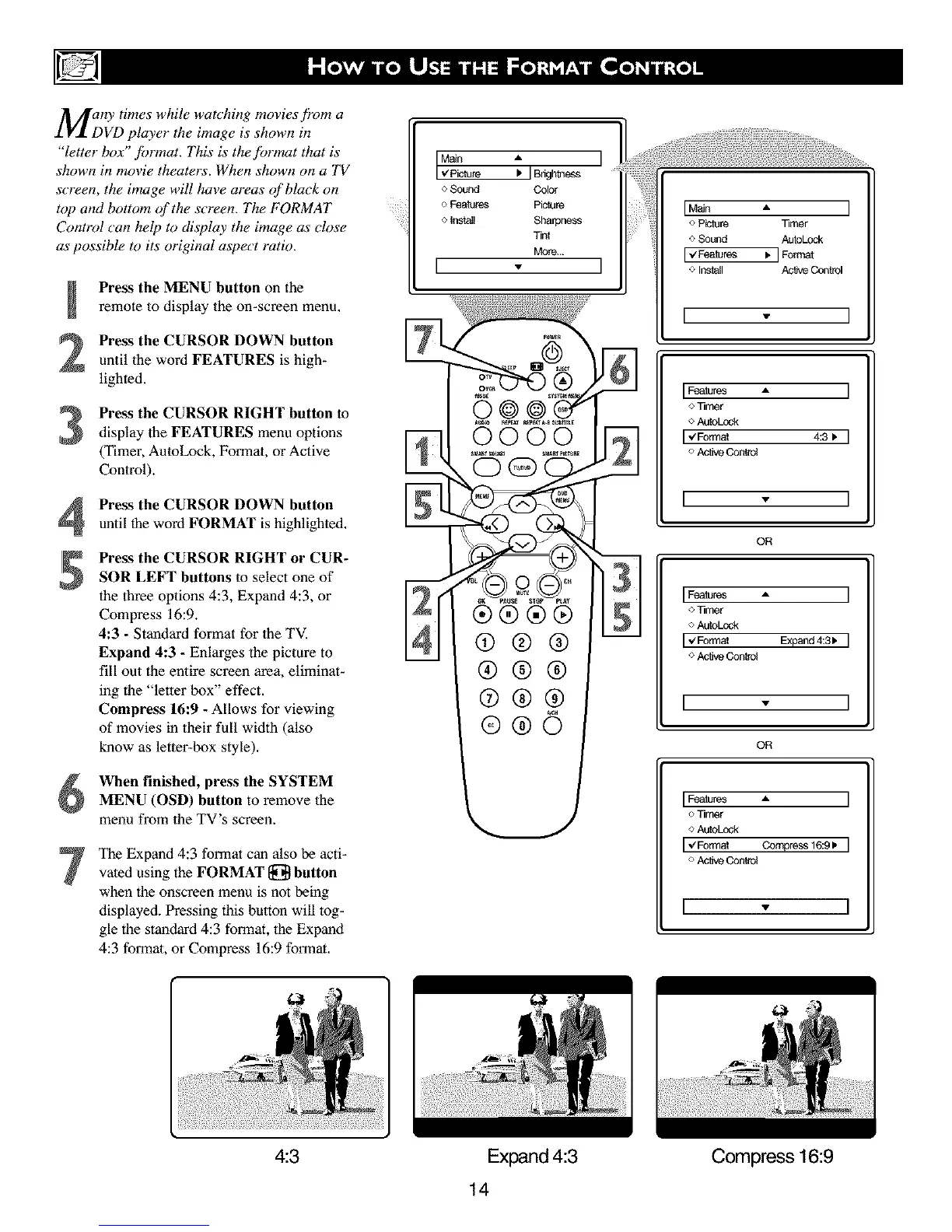
Press the MENU button on the
remote to display the on-screen menu,
Press the CURSOR DOWN button
until the word FEATURES is high-
lighted.
Press the CURSOR RIGHT button to
display the FEATURES menu options
(Timer, AutoLock, Format, orActive
Control).
Press the CURSOR DOWN button
until the word FORMAT is highlighted,
Press the CURSOR RIGHT or CUR-
SOR LEFT buttons to select one of
the three options 4:3, Expand 4:3, or
Compress 16:9.
4:3 - Standard format for the TV.
Expand 4:3 - Enlarges the picture to
fill out the entire screen area, eliminat-
ing the "letter box" effect.
Compress 16:9 - Allows for viewing
of movies in their full width (also
know as letter-box style).
When finished, press the SYSTEM
MENU (OSD) button to remove the
menu from the TV's screen.
The Expand 4:3 format can also be acti-
vated using the FORMAT [_ button
when the onscreen menu is not being
displayed. Pressing this button will tog-
gle the standard 4:3 format, the Expand
4:3 formal, or Compress 16:9 format.
I %ure '
o Sound Color
o Features Picture
o Insta_ Sharpness
Tint
More...
I - I
IMaJn • I
o Picture Tin',er
o Sound AutuLock
I_F_tu_ _ ] Fotrr_t
o Insla_l Ac_ve Control
I - I
IFeatures ,, I
o Timer
o AutuLock
I,€'Fonnat 4:3_ I
o Ac_ve Conlrol
I - I
OR
I Features • I
o Timer
o AutuLock
1.4Format Expand4:31_ I
o Ac_ve Conlrol
I - I
OR
IFeatures • I
O Timer
<>AutuLock
I,,Fo._ Co_ress16:9_I
o Ac_ve Control
I • I
4:3
Expand 4:3
14
Compass16:9



 To Next Page