O_ve you ever fallen asleep in front of the
V only to have it wake you up at two in
the morning with a test pattern screeching in
your ears? Well, your TV can save you all
that trouble by automatically turning itself off
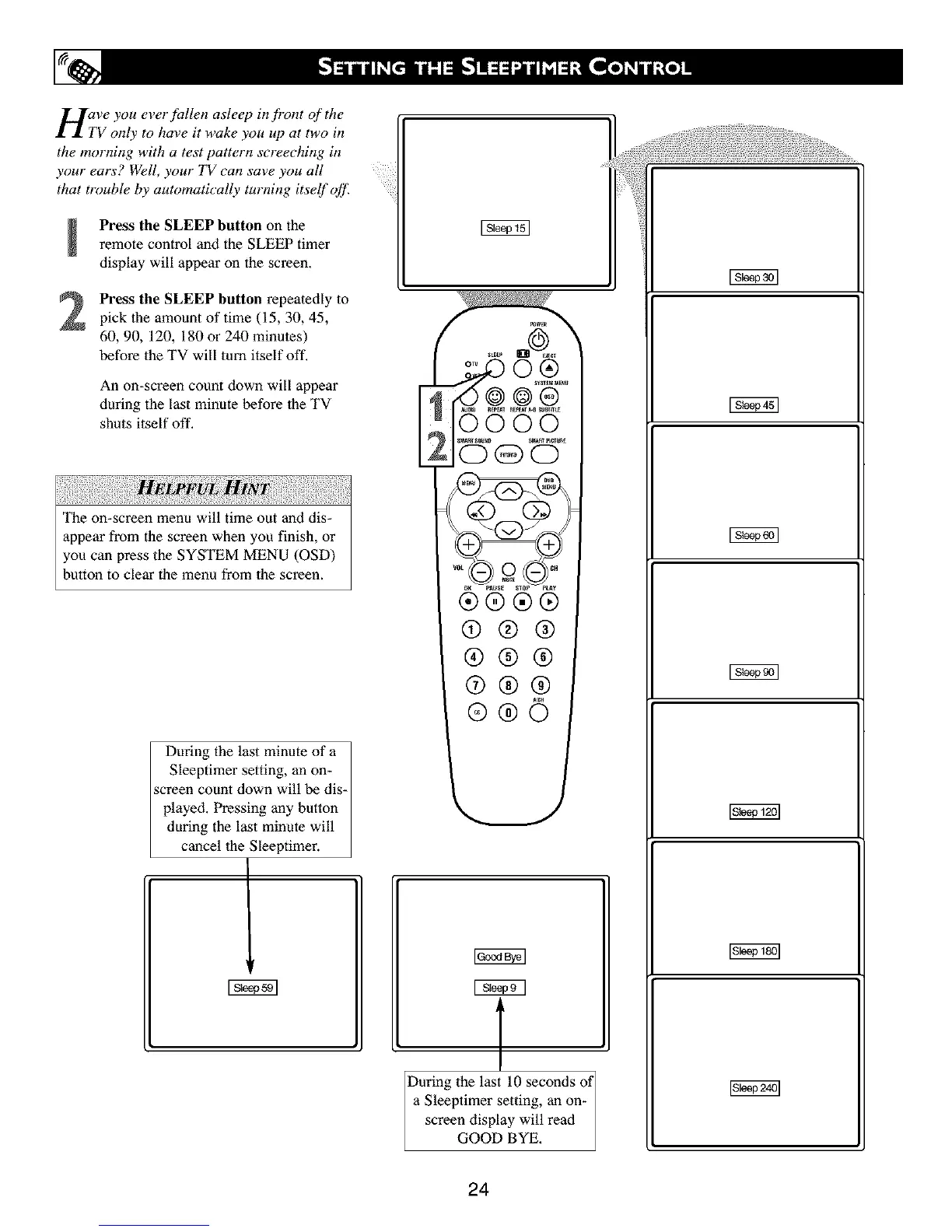
Press the SLEEP button on theremote control and the SLEEP timer
display will appear on the screen.
Press the SLEEP button repeatedly to
pick the amount of time (15, 30, 45,
60, 90, 120, 180 or 240 minutes)
before the TV will turn itself off.
An on-screen count down will appear
during the last minute before the TV
shuts itself off.
The on-screen menu will time out and dis-
appear from the screen when you finish, or
you can press the SYSTEM MENU (OSD)
button to clear the menu from the screen.
During the last minute of a
Sleeptimer setting, an on-
screen count down will be dis-
played. Pressing any button
during the last minute will
cancel 1he Sleeptimer.
E
®®®®
@®®
®®®
@®®
@@6
T
During the last 10 seconds of
a Sleeptimer setting, an on-
screen display will read
GOOD BYE.
24



 To Next Page