W_pether you' re watching a movie or a
orting event, your TV has automatic"
video control settings matched for your cur-
rent program source or content. The
SmartPicture TM feature quickly resets your
TV's video controls for a number of different
types of programs and viewing conditions you
may have in your home. Each SmartPicture TM
setting is preset at the /actory to automatical-
ly adjust the TV's Brightness, Cohn; Picture,
Shalpness, Tint, Color Temperature, DNR and
Contrast+ levels.
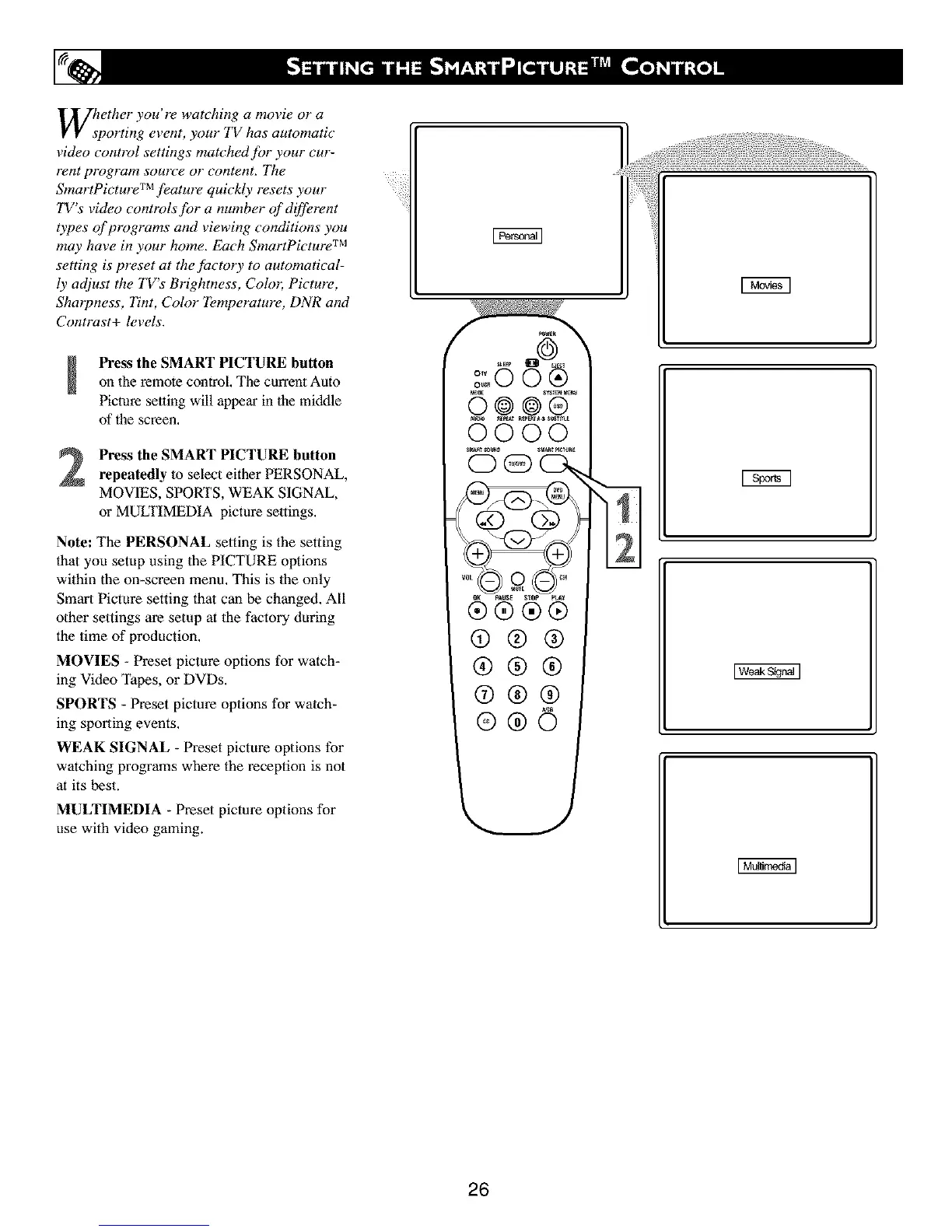
Press the SMART PICTURE buttonon the remote control, The current Auto
Picture setting will appear in the middle
of the screen,
Press the SMART PICTURE button
repeatedly to select either PERSONAL,
MOVIES, SPORTS, WEAK SIGNAL,
or MULTIMEDIA picture settings,
Note: The PERSONAL setting is the setting
that you setup using the PICTURE options
within the on-screen menu. This is lhe only
Smart Picture setting that can be changed. All
other settings are setup at the factory during
the time of production.
MOVIES - Preset picture options for watch-
ing Video Tapes, or DVDs.
SPORTS - Preset picture options for watch-
ing sporting events.
WEAK SIGNAL - Preset picture options for
watching programs where the reception is not
at its best.
MULTIMEDIA - Preset picture options for
use with video gaming.
®
0000
®®®®
@®®
®®®
I WeakSkjnaJ]
26



 To Next Page