<
<
<
<
<
<
Over the next.fbw pages you'll learn
how to block channels and get a
better understanding of the rating terms
.[br certain programming.
First, let2 start by learning how to set a
personal access code:
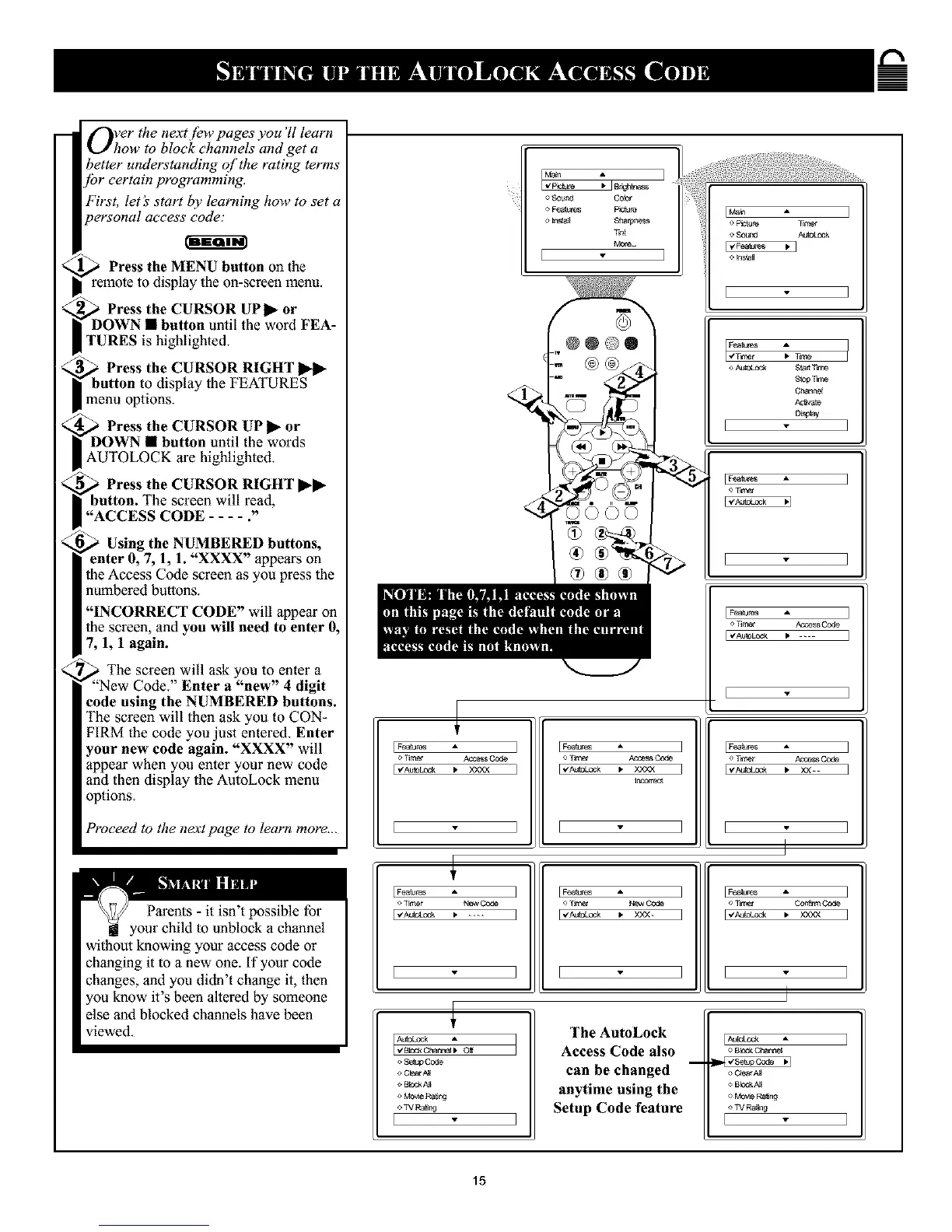
_ Press the MENU button on the
remote to display the on-screen menu.
,_D Press the CURSOR UP 1_ or
OWN • button until the word FEA-
TURES is highlighted.
Press the CURSOR RIGHT
button to display the FEATURES
menu options.
Press the CURSOR UP _- or
DOWN • button until the words
AUTOLOCK are highlighted.
,_ Press the CURSOR RIGHT I1_11_
button. The screen will read,
"ACCESS CODE .... 2'
Using the NUMBERED buttons,
enter 0, 7, 1, 1. "XXXX" appears on
the Access Code screen as you press the
numbered buttons.
"INCORRECT CODE" will appear on
the screen, and you will need to enter 0,
7, 1, 1 again.
' The screen will ask you to enter a
_"New Code." Enter a "new" 4 digit
code using the NUMBERED buttons.
The screen will then ask you to CON-
FIRM the code you just entered. Enter
your new code again. "XXXX" will
appear when you enter your new code
and then display the AutoLock menu
options.
Proceed to the next page to learn more...
Parents- it isn't possible for
ill your child to unblock a channel
without knowing your access code or
changing it to a new one. If your code
changes, and you didn't change it, then
you know it's been altered by someone
else and blocked channels have been
viewed.
o SOU_!_ COlOr
o F_liurl2s plc,-lule
o IriNNI $t_r_
TFlt
More¸¸
[
Feagles I
l.Too, t
Slop T_
Chanr,_l
nay
]
[ Fea_tes ]
[Fea_ A ]
el]i_ Ao_s Cede
[vAu_k _ XXXX ]
[ ]
[Fea_res _-
o lime" Ac_ss Code
[_Au_LOCk • XXXX
I Fea_res z,
o_lr_ AC_SSCode
I _AU_3LOCN _* ....
I
o TFnet #_ce_ Code
] I_A#_ _ _-- I
[Fe_ur_ A
_ TI_r Ne_ Code
[_A_toteek • ....
] [Fea_
] [
A
New Code
• Y,Y3< _
[F"e"e"e"e"e"e"e"e"e"_res• ]
o T_ns_ Co{Yarn/Code
[+_o_ , >aoa ]
]
t
o SetapCode
o C_rNI
o Blr,d<All
o MO_eRa_r_
o _V Rat_'g
{
The AutoLock
Access Code also
can be changed
anytime using the
Setup Code feature
[#_:Lock
o Cla_rA_
o BlOCk/_l
_ TVRa_ng
15










 To Next Page