<
<
<
<
<
<
Tihere are two types q[program rat-
ngs within the AutoLock feature.
One is based on the Movie lndustEv rat-
ings while the other is based on tile TV
Industry ratings. Both can be used to
block or censor programming that has
been rated in either manner:
Let _'first look at the Movie Rating
options of AutoLoek:
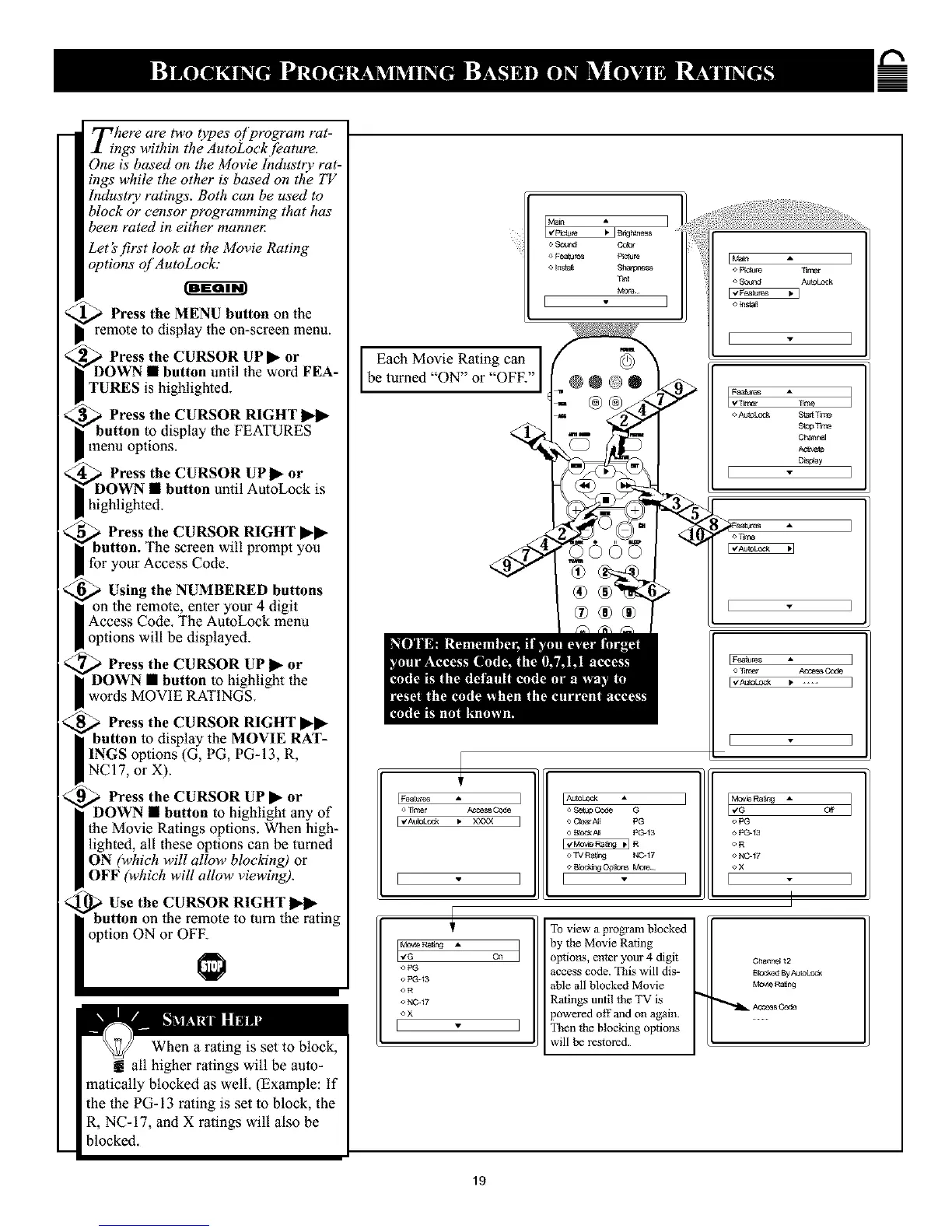
Press the MENU button oll the
remote to display the on-screen menu.
a Press the CURSOR UP• or
• button until the word FEA-
TURES is highlighted.
a Press the CURSOR RIGHT
the FEATURES
menu options.
Press the CURSOR UP _- or
until AutoLock is
highlighted.
Press the CURSOR RIGHT ••
screen will prompt you
for your Access Code.
Using the NUMBERED buttons
enter your 4 digit
Access Code. The AutoLock menu
options will be displayed.
Press the CURSOR UP _- or
• button to highlight the
words MOVIE RATINGS.
Press the CURSOR RIGHT l_-•
;play the MOVIE RAT-
INGS options (G, PG, PG-13, R,
NC 17, or X).
Press the CURSOR UP • or
button to highlight any of
the Movie Ratings options. When high-
lighted, all these options can be turned
ON (which will allow blocldng) or
OFF (which will allow viewing).
Use the CURSOR RIGHT 11_1_
on the remote to turn the rating
option ON or OFF.
When a rating is set to block,
all higher ralings will be auto-
matically blocked as well. (Example: if
the the PG-13 rating is set to block, the
R, NC-17, and X ratings will also be
blocked.
Each Movie Rating can,,
be turned ON or OFF.
_ B_h_ss I
o ,_u_ Gobr
o Fea_jn_ _n_
o [n_l_ Sha_
T_t
I I
I Maln A
<, _lcl Aut_ oek
OTtrrcar _e_ Cc_
E"gAImkOTk • XXY_
] IAUtoLock •
<'Scrap _ G
] o Clear_l PG
_R
o TV Ra_:3 i_247
o BbcCmg _ _
1 I "
FaRa_ng *,
oPG
o PC_13
OR
o NC_17
oX
[
On
To view a program blocked
by the Movie Rating
optim_s, enter your 4 digit
access code. This will dis-
able all blocked Movie
Ratings until the TV is
powered off and on again.
Then the blocking options
will be restored.
M_V_ RaRn_ _ Off
o1<3
Po_13
oR
o N_-17
OX
[ ]
Chani_ 12
B_x:lmd By AU_Lec_
Mov_ RNJOx3
ACCeSs Code
19










 To Next Page