TABLE OF CONTENTS
_t_} Getting Started
Warning/Important Notice ............. 1
Basic Cable Television Connection ....... 1
Basic Antenna Television Connection ............ 1
Basic VCR/Accessory Device Connection ........ 1
Basic Television Operation .................... 2
Basic Remote Control Operation ............... 2
Setting your TV for the first time ............. 3-4
Using the On-screen menu .................... 3
Using the Language Control .................. 3
Setting the Tuner Mode Control ............... 3
How to Automatically Program Channels ........ 4
How to Add and Delete Channels .............. 4
IMPORTANT
NOTE: This owner's manual is used with several
different television models. Not all features (and
drawings) discussed in this manual will necessar-
ily match those found with your television set.
This is normal and does not require you contact-
ing your dealer or requesting service.
WARNING: TO PREVENT FIRE OR SHOCK
HAZARD DO NOT EXPOSE THIS UNIT TO
RAIN OR EXCESSIVE MOISTURE.
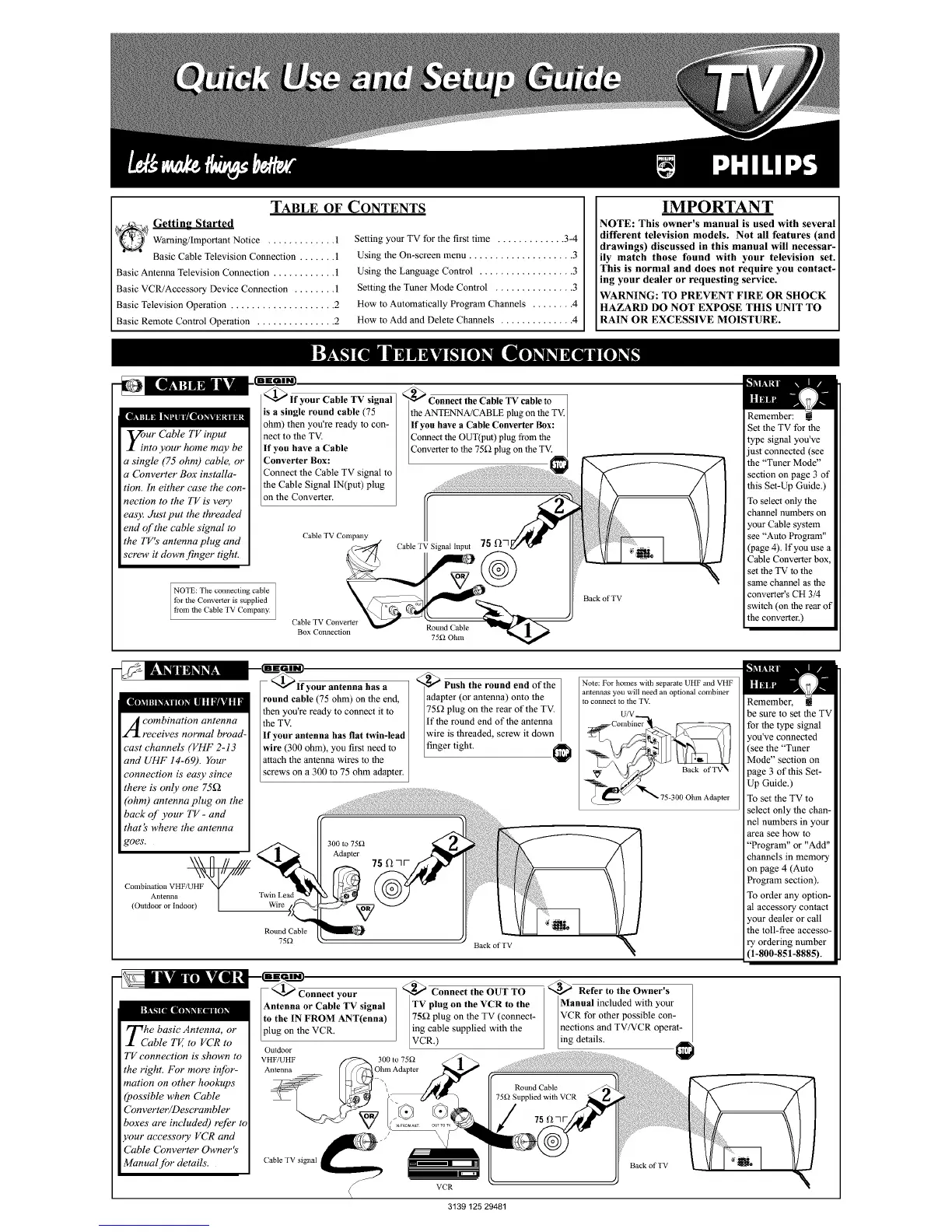
_o. ur Cable TV input
.l into your home may be
a single (75 ohm) cable, or
a Cbnverter Box installa-
tion. In either case the con-
nection to the TV is very
easy. Just put the threaded
end of the cable signal to
the TV's antenna plug and
screw it down finger tight.
NOTE: The connecting cable
tbr the Converter is supplied
ti'om the Cable TV Company.
@_lf your Cable TV signal
is a single round cable (75
ohm) then you're ready to con-
nect to the TV.
If you have a Cable
Converter Box:
Connect the Cable TV signal to
the Cable Signal IN(put) plug
on the Converter.
Cable TV Company
Cable TV Converter
Box Connection
_ Connect the Cable TV cable to
the ANTENNA/CABLE plug on the TV.
If you have a Cable Converter Box:
Connect the OUT(put) plug from the
Converter to the 75g2 plug on the TV.
Round Cable
75_2 Ohm
Back of TV
Remember:
Set the TV for the
type signal you've
just connected (see
the "Tuner Mode"
section on page 3 of
this Set-Up Guide.)
To select only the
channel numbers on
your Cable system
see Auto Program"
(page 4). if you use a
Cable Converter box,
set the TV to the
same channel as the
converter's CH 3/4
switch (on the rear of
the converter.)
A combination antenna
receives normal broad-
cast channels" (VHF 2-13
and UHF 14-69). Your
connection is"easy since
there is" only one 75f2
(ohm) antenna plug on the
back of your TV- and
that's where the antenna
goes'.
\\\ fl # ////
Combination VHF/UHF N_
(Out doAn,:;I:nI_,door)[
/our antenna has a
ound cable (75 ohm) on the end,
then you're ready to connect it to
the TV.
If your antenna has fiat twin-lead
wire (300 ohm), you first need to
attach the antenna wires to the
screws on a 300 to 75 ohm adapter.
Wire
Round Cable
75_
_Push the round end of the
adapter (or antenna) onto the
75_2 plug on the rear of the TV.
If the round end of the antenna
wire is threaded, screw it down
finger tight. I
Back of TV
Note: For homes with separate UHF and VHF
antennas you will need an optional combiner
to connect 1o the TV.
U/V
Remember,
be sure to set the TV
for the type signal
you've connected
(see the "Tuner
Mode" section on
page 3 of this Set-
Up Guide.)
To set the TV to
select only the chan-
nel numbers in your
area see how to
"Program" or "Add"
channels in memory
on page 4 (Auto
Program section).
To order any option-
al accessory contact
your dealer or call
the toll-free accesso-
ry ordering number
(1-800-851-8885).
Tcahe basic Antenna, or
ble TV, to VCR to
TV connection is"shown to
the right. For more infor-
mation on other hookups
(possible when Cable
Converter/Descrambler
boxes" are included) refer to
your accessory VCR and
Cable Cbnverter Owner's"
Manual for details..
your
Antenna or Cable TV signal
to the IN FROM ANT(enna)
plug on the VCR.
Outdoor
VHF/UHF 300 to 75_
Antenna Ol__/ilAdapter
)
_ Connect the OUT TO
TV plug on the VCR to the
75_ plug on the TV (connect-
ing cable supplied with the
VCR.)
<_ Refer to the Owner's
Manual included with your
VCR for other possible con-
nections and TV/VCR operat-
ing details.
Cable TV signal
Back of TV
7
J


 To Next Page
 Loading...








