EasyManua.ls Logo

Philips 24RF50S - Direct Access Method Setup

Philips 24RF50S
50 pages
Print Icon
To Next Page IconTo Next Page
To Previous Page IconTo Previous Page
Loading...
yOyUr remote eontrol is set to work
our TV and many #![?ared remote

(IR) control VCRs, Cable Boxes,
Satellite Systems, DBS, DVD, etc.
Howeve_ an easy onetime step may be
necessary be[bre the remote will work
your VCR.
Try this initial Direct Access Method to
see !['going on to the jbllowing section
is' necessary.
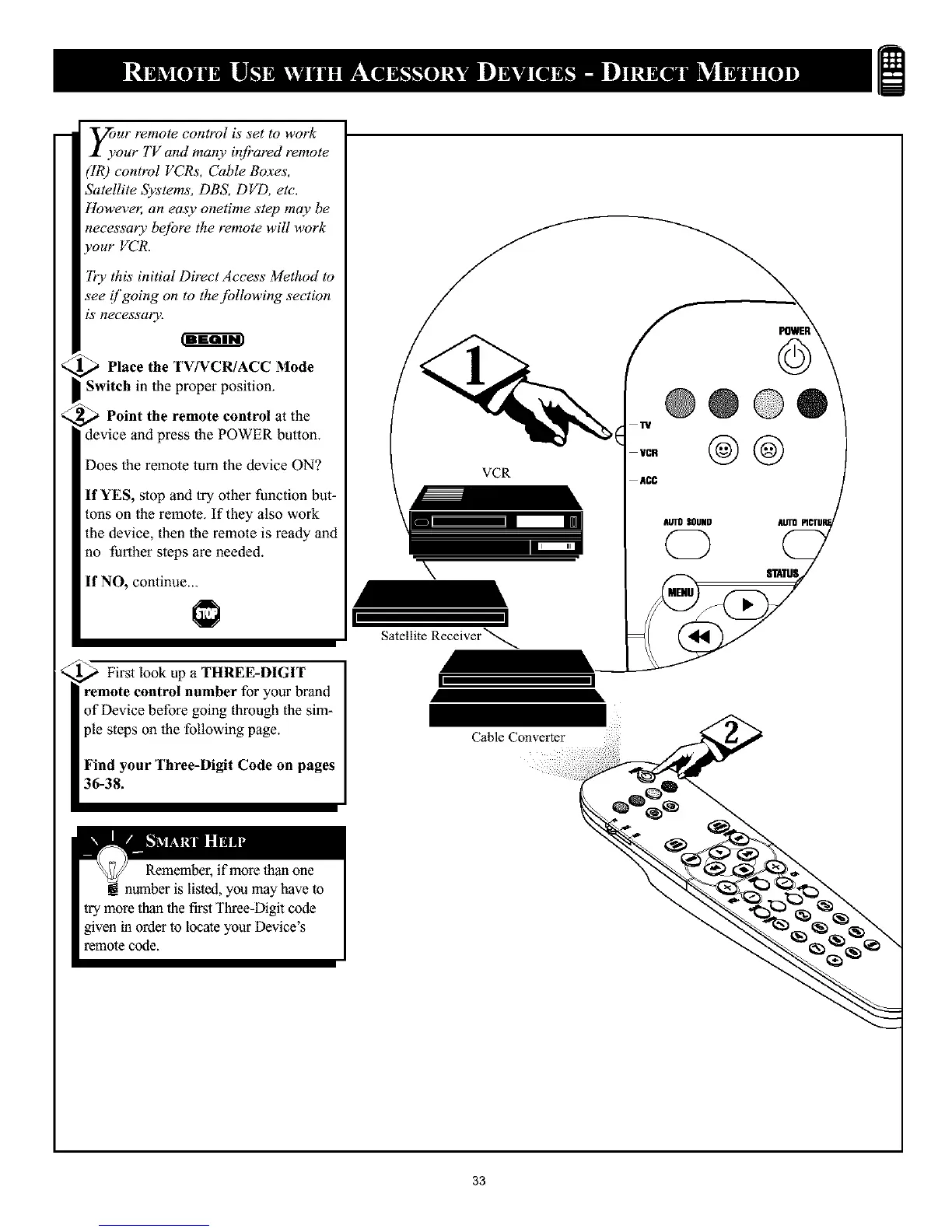
Place the TV/VCR/ACC Mode
I Switch in the proper position.
_ Point the remote control atthe
device and press the POWER button.
Does the remote turn the device ON?
If YES, stop and try other function but-
tons on the remote. If they also work
the device, then the remote is ready and
no further steps are needed.
If NO, continue...
First look up a THREE-DIGIT
remote control number for your brand
of Device before going through the sim-
ple steps on the following page.
Find your Three-Digit Code on pages
36-38.
VCR
\
I
Satellite Receiver _
I
Cable Converter
TV
VCR
ACC
@
@@@®
@@
AUTOSOUND
(2Z)
_ATUS
33

Other manuals for Philips 24RF50S

Related product manuals