your TV remote can be set to work
arious external devices such as
VCRs, Cable Boxes, Satellite Reeeh_ers,
DBS, DVD, etc. by what is called the
seareh method c_f remote control pro-
gramming. This programming method
can take a long time to pre[brm so we
receomend you use it as a last resort.
Please read all the steps below bejbre
beginning.
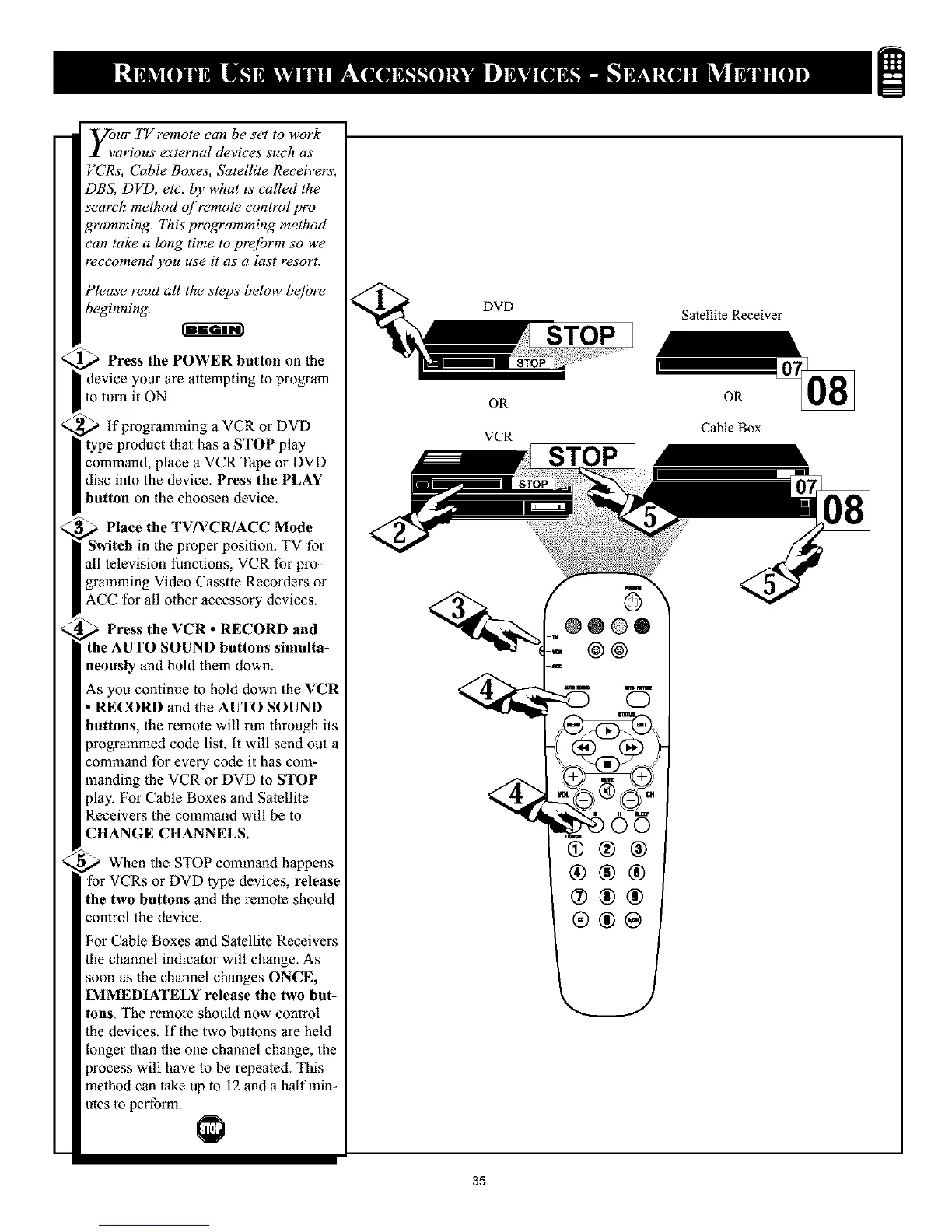
Press the POWER button on the
device your are attempting to program
to turn it ON.
,_ if programming a VCR or DVD
type product that has a STOP play
command, place a VCR Tape or DVD
disc into the device. Press the PLAY
button on the choosen device.
Place the TV/VCR/ACC Mode
Switch in the proper position. TV for
all television functions, VCR for pro-
gramming Video Casstte Recorders or
ACC for all other accessory devices.
Press the VCR • RECORD and
the AUTO SOUND buttons simulta-
neously and hold them down.
As you continue to hold down the VCR
• RECORD and the AUTO SOUND
buttons, the remote will run through its
programmed code list. It will send out
command for every code it has com-
manding the VCR or DVD to STOP
play. For Cable Boxes and Satellite
Receivers the command will be to
CHANGE CHANNELS.
When the STOP command happens
for VCRs or DVD type devices, release
the two buttons and the remote should
control the device.
For Cable Boxes and Satellite Receivers
the channel indicator will change. As
soon as the channel changes ONCE,
IMMEDIATELY release the two but-
tons. The remote should now control
the devices. If the two buttons are held
longer than the one channel change, the
process will have to be repeated. This
method can take up to 12 and a half min-
utes to perform.
DVD
OR
VCR
STOP
Satellite Receiver
OR
Cable Box
@0®®
@@
®®®
®@@
®@®
®®@
35










 To Next Page