EasyManua.ls Logo

Philips 25PT4223 - Page 23

Philips 25PT4223
31 pages
Print Icon
To Next Page IconTo Next Page
To Previous Page IconTo Previous Page
Loading...
Great user manuals database on UserManuals.info
23
23
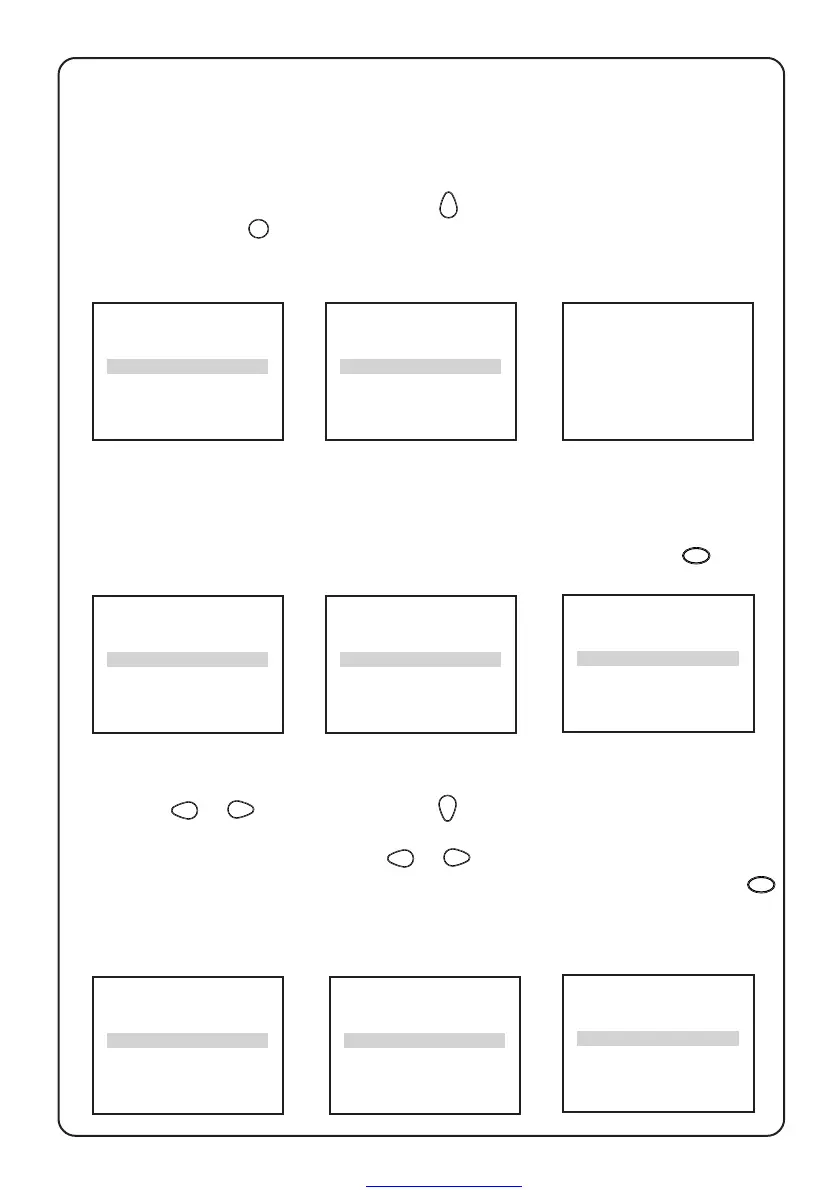
To change code
It is possible to change the pre-set universal code by the following steps.
…child lock – lock channels, change code
&Call up 1st level
menu with the
MENU
key.
é Press the
key to
highlight CHILD
LOCK.
BLUE MUTE OFF
INSTALLATION B
BRIGHTNESS
❙ ❙ ❙ ❙ ❙ ❙ ❙
■ ■ ■ ■ ■ ■ ■ ■
31
COLOUR
❙ ❙ ❙ ❙ ❙ ❙ ❙
■ ■ ■ ■ ■ ■ ■ ■
31
CONTRAST
❙ ❙ ❙ ❙ ❙ ❙ ❙
■ ■ ■ ■ ■ ■ ■ ■
31
AVL OFF
SLEEPTIMER OFF
CHILD LOCK B
CLOCK B
SURF A/CH
➧
➧
➧
➧
➧
ACCESS CODE
----
CHANGE CODE XXXX
CHANNEL 7
LOCK NO
CONFIRM CODE ----
CHANNEL 7
LOCK NO
“ Key in the universal
access code 0711
twice.
‘ Key in the new
4-digit code once
to enter.
( Key in again to
confirm change.
CHANNEL is
highlighted.
To lock channels
é Press the key to
highlight LOCK and
the
or key to
select YES to lock the
channel/channels
selected in step &.
§ Proceed to the next
section if you wish to
lock channels, other-
wise press
OSD
to exit.
➧
CHANGE CODE XXXX
CHANNEL 7
LOCK NO
CLEAR ALL B
& Press or key
to select ALL (to lock
all channels) or enter
a channel number
(to lock individual
channels).
➧
➧
CHANGE CODE XXXX
CHANNEL ALL
LOCK NO
CLEAR ALL B
CHANNEL 6
LOCK YES
CLEAR ALL B
“ Repeat steps & to
é for other channels
which you wish to
lock. Exit with the
OSD
key.
➧
CHANGE CODE XXXX
CHANNEL 3
LOCK NO