Great user manuals database on UserManuals.info
5
5
…connecting peripheral equipment
VIDEO 2
in
MONITOR
out
VIDEO 1
in
S-VIDEO
AUDIO
VIDEO
L
R
VIDEO 2
in
MONITOR
out
VIDEO 1
in
S-VIDEO
AUDIO
VIDEO
L
R
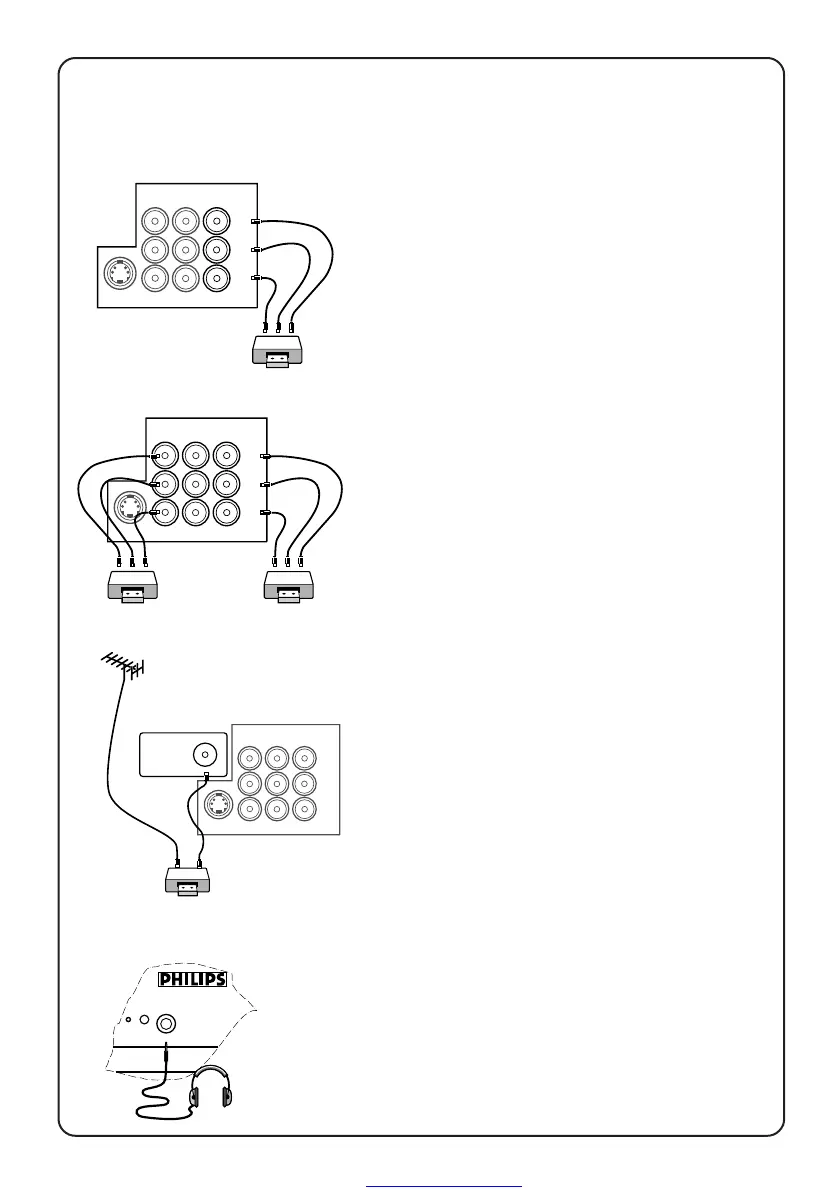
1. From the TV channel you are
watching
4 connect the corresponding sockets of
the VCR to the sockets at MONITOR out.
Note: For mono equipment, connect to
the VIDEO and L sockets only.
2. From one VCR to another VCR
4 connect the sockets of the VCR which
you wish to record from to the
corresponding sockets at either VIDEO
in 1 or VIDEO in 2.
4 connect the sockets of the receiving
VCR to the corresponding sockets at
MONITOR out.
Note: For mono equipment, connect to
the VIDEO and L sockets only.
3. From the TV antenna
4 connect the RF cable to the VCR’s “RF
in” and the “RF out” of the VCR to the
aerial socket of the TV.
VIDEO 2
in
MONITOR
out
VIDEO 1
in
S-VIDEO
AUDIO
VIDEO
L
R
g
Ω75
n
Connection for headphones
4 connect the headphones to the socket
at the front of the TV.
The headphones impedance must be
between 8 and 4000 ohms.
Connection for recording
VCR
VCR 1
VCR 2
VCR
Headphones






 To Next Page