There am two 07)es of program ratings
,ithin the AutoLock TM,f!,atur_< One is
based on the Movie bMustry ratings while the
other is based on the TV Industry ratings, Both
can be used to block or _ensor programming
that has been rated in either mamwl:
Letk first look at the Movie Rating options qf
AutoLock TM :
[
2
3
4
5
6
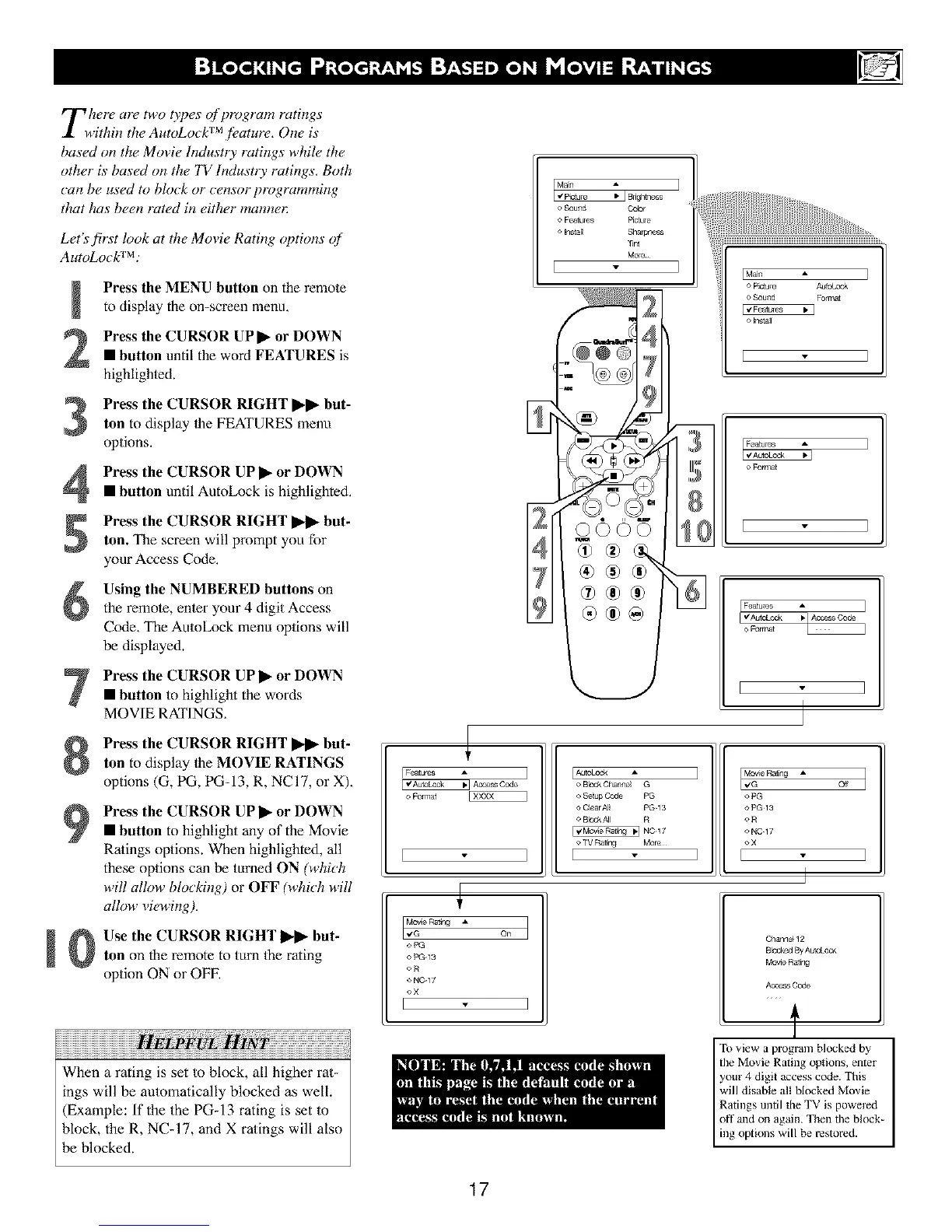
Press the MENU button on the remote
to display the on-screen menu,
Press the CURSOR UP II_ or DOWN
• button until the word FEATURES is
highlighted.
Press the CURSOR RIGHT _]l_ but-
ton to display lhe FEATURES menu
options.
Press the CURSOR UP II_or DOWN
• button until AutoLock is highlighted,
Press the CURSOR RIGHT II_ll_ but-
ton. The screen will prompt you for
your Access Code,
Using the NUMBERED buttons on
the remole, enler your 4 digit Access
Code, The Autol_)ck menu options will
be displayed.
Press the CURSOR UPI_ or DOWN
• button to highlight the words
MOVIE RATINGS,
[
9
Press the CURSOR RIGHT It,ll* but-
ton to display lhe MOVIE RATINGS
options (G, PG, PG-13, R, NCI7, orX),
Press the CURSOR UPI_ or DOWN
• button to highlight any of the Movie
Ra/ings options. When highlighted, all
these options can _ turned ON (whkh
will allow blocking) or OFF (whkh will
allow viewing),
Use the CURSOR RIGHT II_ll*but-
ton on the remote to turnthe rating
option ON or OFE
When a rating is set to block, all higher rat-
ings will be automatically blocked as well.
(Example: If the the PGq3 rating is set to
block, the R, NC-17, and X ra/ings will also
be blocked.
]
o Sound Color
o Featum£ Picture
e In.all Shafpne&_
Tint
More
I ]
mT
®®
®®@
.J
D
IMain
o pict um AutoLock
o Sound Format
[ ]
I
<>Format
[ ]
I I
Features I
l € AutokocX _ Ao'_s Code
o Format
I I
M_e Rating z_
o PG
oPG13
oR
ONC17
OX
[
On
AutoLock _*
o Block Channc_ G
o Setup Codv pG
o Clear All PG13
4>Block N[ R
N017
o TV Rating Mom
I
] M_,e Rating • Off
o PG
oPG13
OR
ONC17
oX
I [ ]
Channel12
Blookc_By AutoLoc_
MoNeRatlng
AccessCode
f
Toview a program blocked by
theMovie Rating options, enter
your 4 digit access code. This
will disable all blocked Movie
Ratings until theTV is powered
off and on again. Then theblock-
ing options will be restored.
17





 To Next Page