Features Menu • The Timer Control
fier you have set the TVg' clock,
you can ztse your TV to keel) up
with the time. The TIMER DISPLAY
control allows you to permanently dis-
plc O, the time in the upper right corner
of the screen.
cg-g-gr_
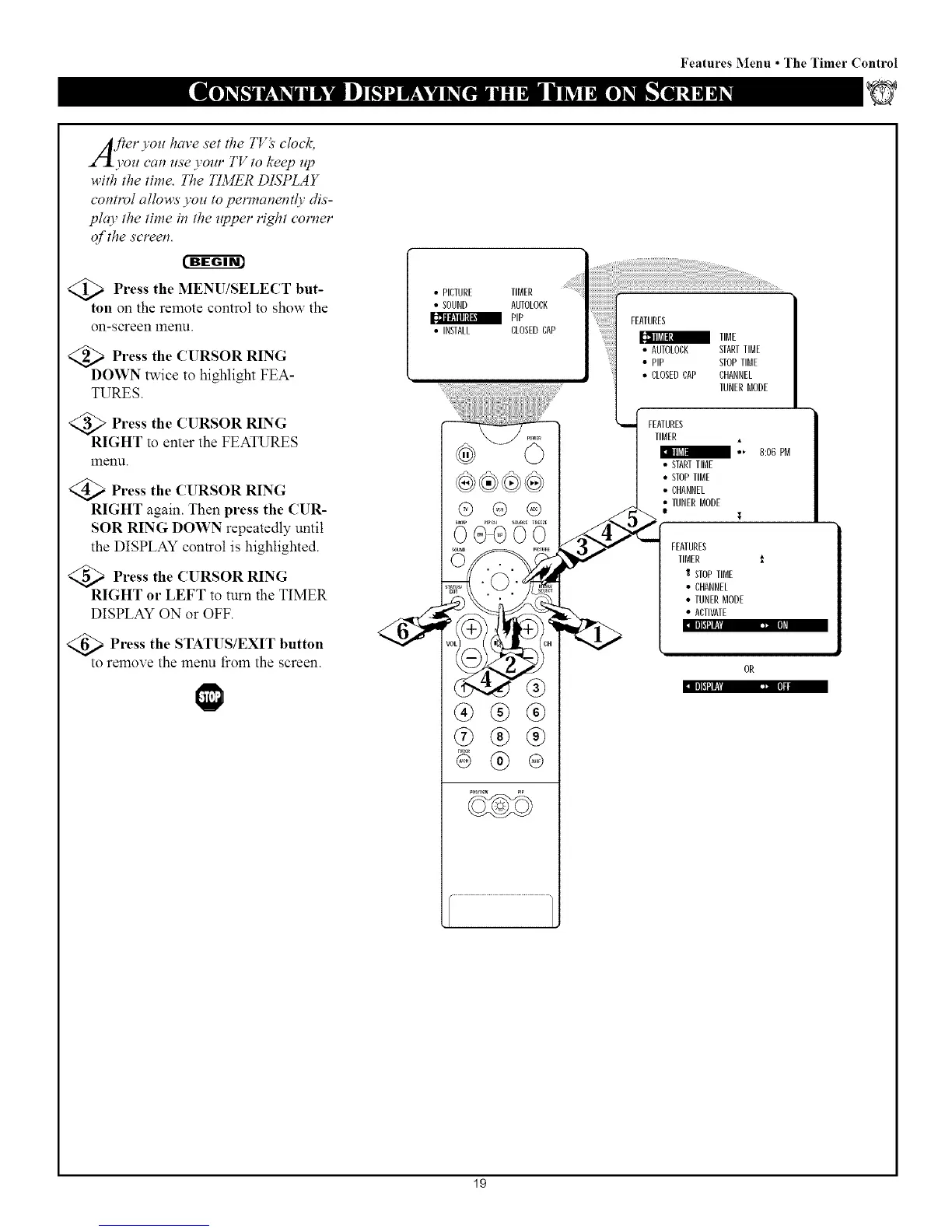
Press the MENU/SELECT but-
ton on the remote control to show the
on-screen menu.
<_ Press the CURSOR RING
DOWN twice to highlight FEA-
TURES.
>Press the CURSOR RING
RIGHT to enter the FEATURES
menu.
Press the CURSOR RING
RIGHT again. Then press the CUR-
SOR RING DOWN repeatedly until
the DISPLAY control is highlighted.
Press the CURSOR RING
RIGHT or LEFT to turn the TIMER
DISPLAY ON or OFF.
<_ Press the STATUS/EXIT button
to remove the menu fioln the screen.
• PICTURE TIBER
• SOUND AUTOLOCK
PiP
• INSTALL CLOSEDCAP
J
@ @ @
4:#
®®®
®®®
® ®
FEATURES
TUNERBODE
TIBER
/ "_ 8:06 PB
STARTTIBE
STOPTIME
CHANNEL
TUNERBODE
FEATURES
TIMER I
STOPTIME
• CHANNEL
• TUNERBODE
• ACTIVATE
OR
Illh_l!l' ,. Hill
19


 To Next Page
 Loading...







