Features :_lenu • The AutoLock Control
t_
fter you have set yoztr personal
access code (see the previozts
page), you are readr to select the
channels or pmgram sources you
want to block.
cu-a-arm
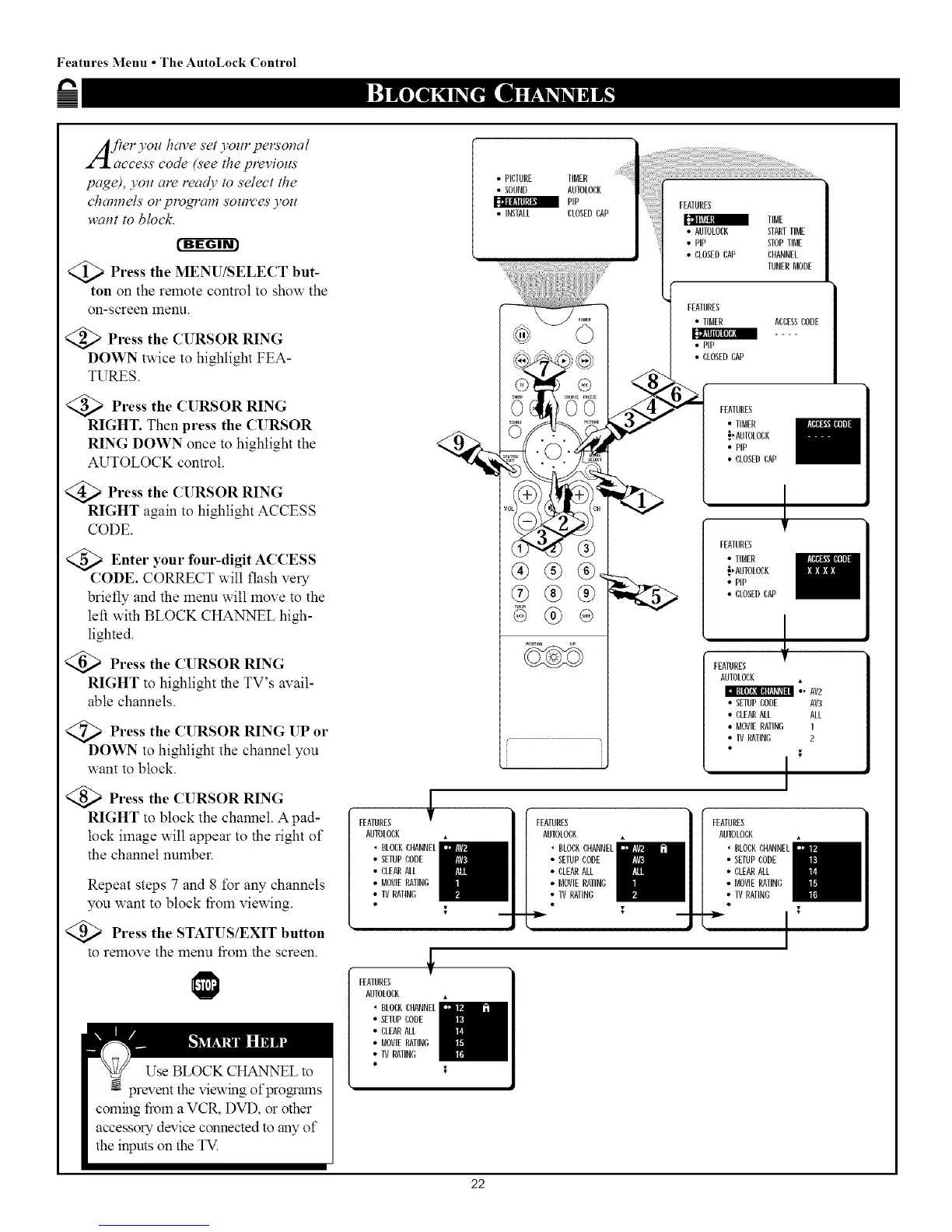
<_ Press the MENU/SELECT but-
ton on the remote control to show the
on-screen 12qenu.
<_ Press the CURSOR RING
DOWN twice to highlight FEA-
TURES.
<_ Press the CURSOR RING
RIGHT. Then press the CURSOR
RING DOWN once to highlight the
AUTOLOCK control.
<_ Press the CURSOR RING
RIGHT again to highlight ACCESS
CODE.
Enter your fom'-digit
ACCESS
CODE. CORRECT will flash very
briefly and the menu will move to the
left with BLOCK CHANNEL high-
lighted.
Press the CURSOR RING
RIGHT to highlight the TV's avail-
able channels.
<Q_ Press the CURSOR RING UP
or
DOWN to highlight the channel you
want to block.
Press the CURSOR RING
RIGHT to block the channel. A pad-
lock image will appear to the right of
the channel number.
Repeat steps 7 and 8 for any channels
you want to block fiom viewing.
<_ Press the STATUS/EXIT button
to remove the menu fiom the screen.
FEATURES
AUTOLOCK
• CLOCKCHANNEL
• SETUPCODE
• CLEARALL
• MOVIERATING
• IV RATING
• PICTURE TIBER
• SOUND AUTOLOCK
PiP
• INSTALL CLOSEDCAP
_%f '\v!!'
®®®
®®®
®
FEATURES
TIBE
• AUTOLOCK STARTTIME
• PiP
[[llll_lli
STOPTIE
• CLOSEDCAP CHANNEL
TUNER_ODE
FEATURES
• TIBER ACCESSCODE
I]_Jll [I]I[IF_[|
• PiP
• CLOSEDCAP
FEATURES
• TIBER
_,ANTOLOCK
• PiP
• CLOSEDCAP
!
FEATURES
• TIBER
_,ANTOLOCK
• PIP
• CLOSEDCAP
FEATURES
AUTOLOCK
• " AV2
• SETUPCODE AV3
• CLEANALL ALL
• MOVIERATING 1
• IV RATING 2
I
FEATURES
AUTOLOCK
' BLOCKCHANNEL
• SETUPCODE
• CLEARALL
• MOVIERATING
• IV RATING
FEATURES
AUTOLOCK
• BLOCKCHANNEL
• SETUPCODE
• CLEARALL
• MOVIERATING
• IV RATING
FEATURES
AUTOLOCK
. BLOCKCHANNEL
• SETUPCODE
• CLEARALL
• MOVIERATING
• IV RATING
22



 To Next Page