Remote Control • AutoPicture
loether you're watching a movie
r plcoqng a video game, your
TV has automatic video control set-
tings that will match with your current
program source or content.
AutoPicture quickly resets your TVg'
video controls Jbr a number of diJfer-
ent Ol_es oJl_tvgrams and viewing
conditions that you moo, have in your
home. The Movies, Sports, M_eak
Signal, and Multimedia AutoPicmre
controls have been preset at theJacto-
d' to automatically adjust the TVg'
brightness, coloL picture, shmT_ness,
tint, and color temperature levels. The
Personal AutoPicture settings are the
ones that you made throl_qh the PIC-
TURE options within the on-screen
menu.
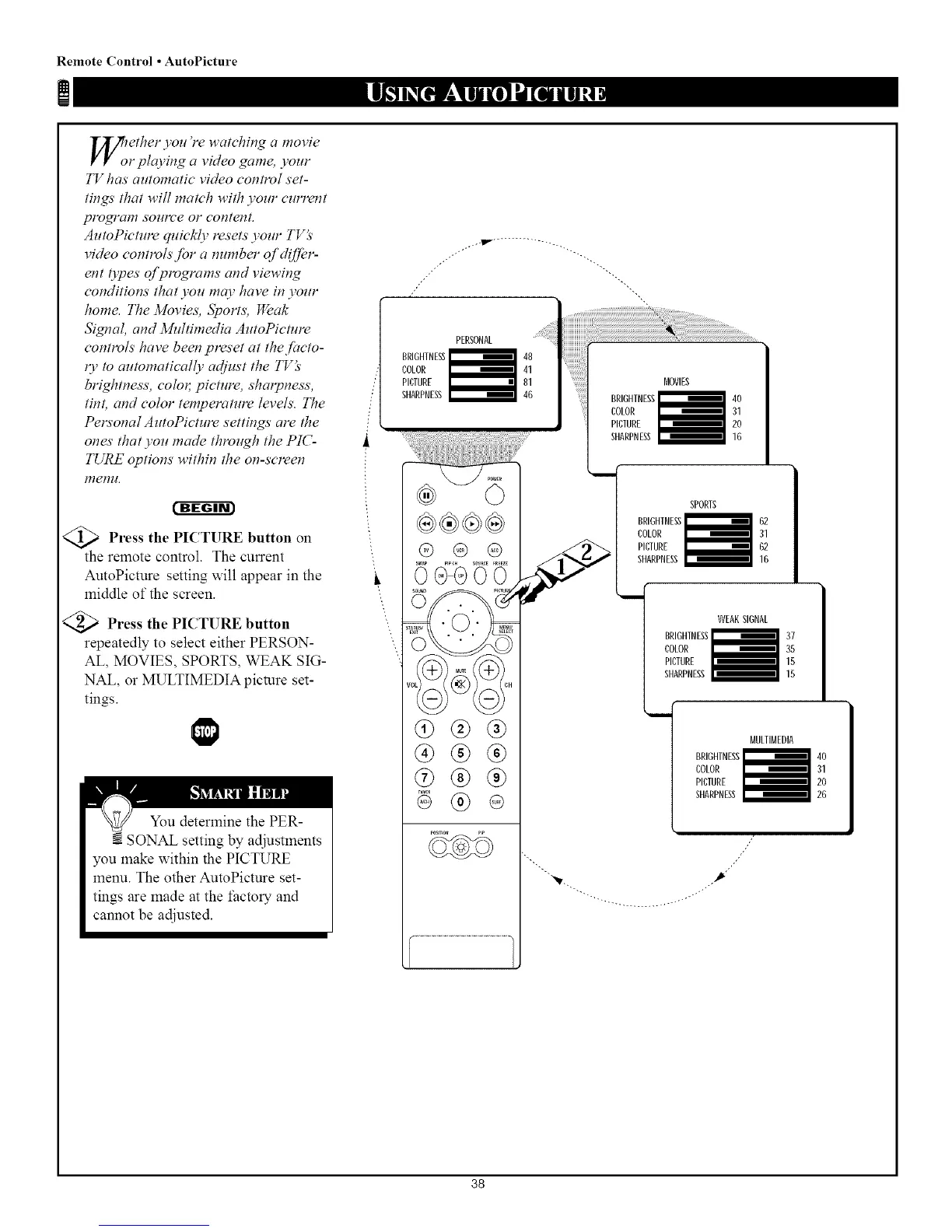
<_ Press the PICTURE button
on
the remote control. The current
AutoPicture setting will appear in the
middle of the screen.
<_ Press the PICTURE button
repeatedly to select either PERSON-
AL, MOVIES, SPORTS, WEAK SIG-
NAL, or MULTIMEDIA picture set-
tings.
| I
You determine the PER-
SONAL setting by adjustments
you make within the PICTURE
menu. The other AutoPicture set-
tings are made at the factory and
cannot be adjusted.
"L
L'L
/"
BRIUHTNEg
COLOR
PICTURE
SHARPNESS
OGGO0
®®®
®
SPORTS
PICIURE _ 62
SHARPNESS_ 16
WEAK SIGNAL
BRIGHTNESSi 37
COLOR 35
PICTURE 15
SHARPNESS 15
BRIGHTNESS
COLOR
PICTURE
SHARPNESS
MULTIMEDIA
____:l4°
31
20
26
//
_,k .,P"
38



 To Next Page