EasyManua.ls Logo

Philips AJ 3800 - Cassette Operation; Cassette Playback; Recording Cassettes; Timed Recording Setup

Philips AJ 3800
16 pages
Print Icon
To Next Page IconTo Next Page
To Previous Page IconTo Previous Page
Loading...
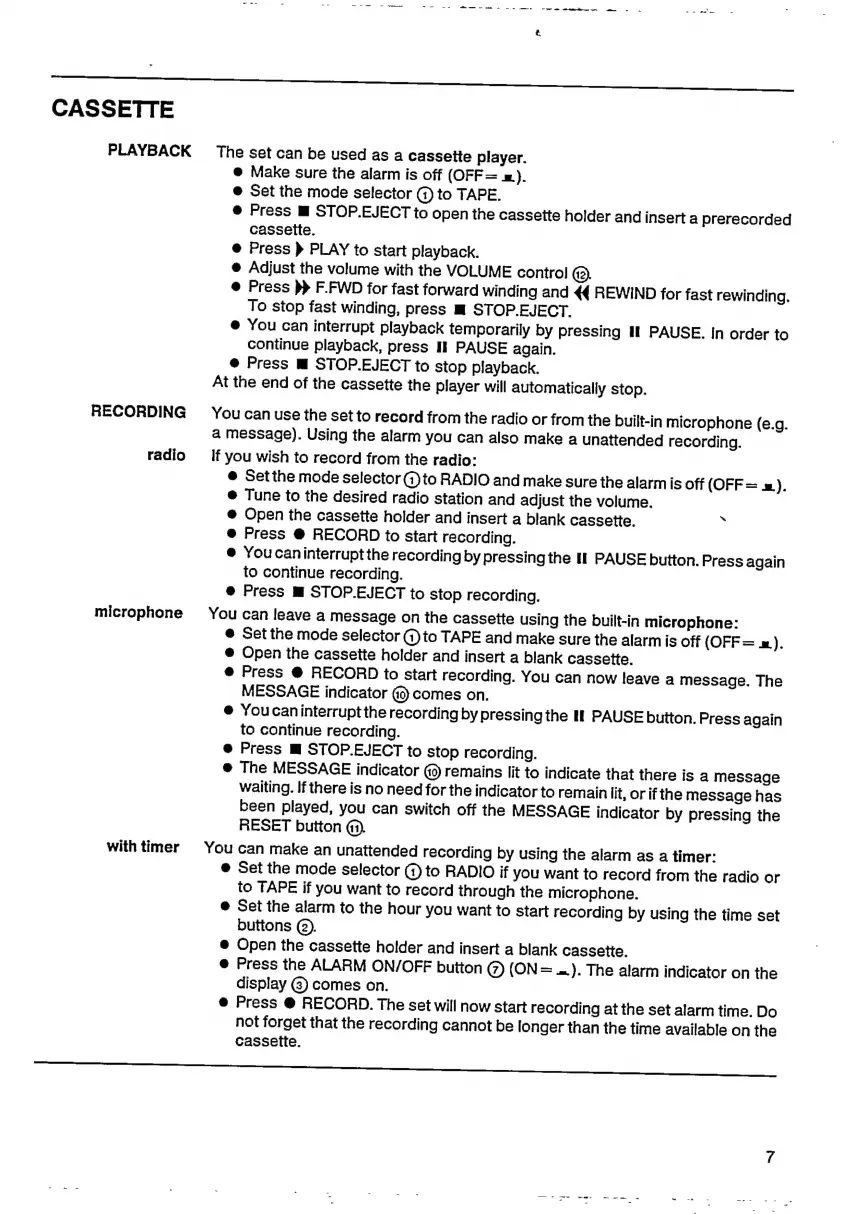
CASSETTE
PLAYBACK
The
set
can
be
used
as
a
cassette
player.
@
Make
sure
the
alarm
is
off
(OFF=
=).
e
Set
the
mode
selector
(1)
to
TAPE.
e
Press
I
STOP.EJECT
to
open
the
cassette
holder
and
insert
a
prerecorded
cassette.
e
Press
(
PLAY
to
start
playback.
@
Adjust
the
volume
with
the
VOLUME
control
(3.
e
Press
>>
F.FWD
for
fast
forward
winding
and
44
REWIND
for
fast
rewinding.
To
stop
fast
winding,
press
IB
STOP.EJECT.
&
You
can
interrupt
playback
temporarily
by
pressing
If
PAUSE.
In
order
to
continue
playback,
press
II
PAUSE
again.
e
Press
W
STOP.EJECT
to
stop
playback.
At
the
end
of
the
cassette
the
player
will
automatically
stop.
RECORDING
You
can use
the
set
to
record
from
the
radio
or
from
the
built-in
microphone
(e.g.
a
message).
Using
the
alarm
you
can
also
make
a
unattended
recording.
radio
If
you
wish
to
record
from
the
radio:
e
Set
the
mode
selector
@to
RADIO
and
make
sure
the
alarm
is
off
(OFF
=
=).
@
Tune
to
the
desired
radio
station
and
adjust
the
volume.
e
Open
the
cassette
holder
and
insert
a
blank
cassette.
b
e
Press
O
RECORD
to
start
recording.
@
Youcaninterruptthe
recording
by
pressing
the
II
PAUSE
button.
Press
again
to
continue
recording.
e
Press
M
STOP.EJECT
to
stop
recording.
microphone
You
can
leave
a
message
on
the
cassette
using
the
built-in
microphone:
e
Setthe
mode
Selector
(1)to
TAPE
and
make
sure
the
alarm
is
off
(OFF=
x).
Open
the
cassette
holder
and
insert
a
blank
cassette.
@
Press
RECORD
to
start
recording.
You
can
now
leave
a
message.
The
MESSAGE
indicator
@
comes
on.
e
Youcaninterruptthe
recording
by
pressing
the
If
PAUSE
button.
Press
again
to
continue
recording.
Press
M
STOP.EJECT
to
stop
recording.
e
The
MESSAGE
indicator
(9)
remains
lit
to
indicate
that
there
is
a
message
waiting.
If
there
is
no
need
for
the
indicator
to
remain
lit,
or
if
the
message
has
been
played,
you
can
switch
off
the
MESSAGE
indicator
by
pressing
the
RESET
button
(1).
with
timer
You
can
make
an
unattended
recording
by
using
the
alarm
as
a
timer:
e
Set
the
mode
selector
(1)
to
RADIO
if
you
want
to
record
from
the
radio
or
to
TAPE
if
you
want
to
record
through
the
microphone.
e
Set
the
alarm
to
the
hour
you
want
to
start
recording
by
using
the
time
set
buttons
(2).
Open
the
cassette
holder
and
insert
a
blank
cassette.
e
Press
the
ALARM
ON/OFF
button
(7)
(ON
=
=).
The
alarm
indicator
on
the
display
(3)
comes
on.
Press
0
RECORD.
The
set
will
now
start
recording
at
the
set
alarm
time.
Do
not
forget
that
the
recording
cannot
be
longer
than
the
time
available
on
the
cassette.
==

Related product manuals