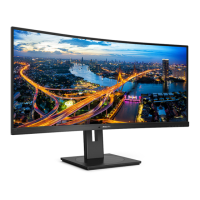
This document describes the Philips B Line 346B1 monitor, a 34-inch (86.36 cm) VA panel display with a W-LED system. It is designed for optimal performance at a native resolution of 3440x1440 at 60Hz, supporting up to 100Hz for digital input. The monitor offers a 21:9 aspect ratio, a pixel pitch of 0.232(W) x 0.232(H), and a typical contrast ratio of 3000:1. It boasts wide viewing angles of 178° (H) / 178° (V) at a contrast ratio greater than 10. The display supports 16.7 million colors (8-bit) and features a vertical refresh rate of 48-100Hz (DP 1.2 / HDMI 2.0 / USB-C 3.2) and a horizontal frequency of 30-160KHz (DP 1.2 / HDMI 2.0 / USB-C 3.2).
Function Description:
The Philips B Line 346B1 is a versatile monitor suitable for various applications, from office work to gaming and multimedia consumption. It integrates several features aimed at enhancing user experience and productivity, including MultiClient Integrated KVM, MultiView, SmartImage, SmartContrast, Adaptive Sync, and PowerSensor. The monitor is designed with user well-being in mind, incorporating technologies to prevent computer vision syndrome (CVS).
Important Technical Specifications:
- Display Panel Type: VA (346B1C)
- Backlight: W-LED system
- Panel Size: 34" W (86.36 cm)
- Aspect Ratio: 21:9
- Optimum Resolution: 3440x1440 @ 60Hz (Recommended), 3440x1440 @ 100Hz (Maximum Digital Input)
- Viewing Angle: 178° (H) / 178° (V) @ C/R > 10 (Typ.)
- Display Colors: 16.7M (8bit)
- Contrast Ratio (typical): 3000:1
- Connectivity:
- DisplayPort 1.2 x 1
- HDMI 2.0 x 1
- USB-C x 1 (upstream)
- USB-B x 1 (upstream)
- USB 3.2 x 4 (downstream, with 1x fast charge B.C 1.2)
- RJ-45 (Ethernet LAN 10M/100M/1000M)
- Audio Out
- USB-C Power Delivery: Up to 90W (5V/3A, 7V/3A, 9V/3A, 10V/3A, 12V/3A, 15V/3A, 20V/4.5A)
- Built-in Speaker: 5W x 2
- Power Consumption (Normal Operation): 63.4 W (typ.) at 100VAC, 50Hz; 63.5 W (typ.) at 115VAC, 60Hz; 63.6 W (typ.) at 230VAC, 50Hz.
- Power Consumption (Sleep/Standby mode): 0.3 W (typ.)
- Power Consumption (Off mode): 0.3 W (typ.)
- Stand Adjustments: Tilt (-5 / +30 degree), Swivel (-180 / +180 degree), Height adjustment (180mm)
- VESA Mounting: 100mm x 100mm
- Dimensions (with stand): 807 x 601 x 250 mm (WxHxD)
- Weight (with stand): 11.49 kg
- Environmental and Energy: ROHS compliant, 100% recyclable packaging, 100% PVC BFR free housing.
Usage Features:
- Installation: The monitor comes with a stand and base assembly that can be easily attached. For VESA mounting, the base assembly can be removed.
- Control Buttons: The monitor features intuitive control buttons on the front bezel for power ON/OFF, OSD menu access, OSD adjustment, user preference key, input source change, and SmartImage hot key.
- OSD Menu: A comprehensive On-Screen Display (OSD) menu allows users to adjust various settings such as audio, color, language, OSD settings, USB settings, and setup options.
- USB-C Driver Installation for RJ45: For USB-C docking, users need to install the USB-C driver, available on the Philips website, to enable the RJ45 Ethernet network adapter.
- USB Hub and Charging: The monitor includes a USB hub with multiple downstream ports, including one with fast charging (B.C 1.2). USB functions can be set to "ON" in the OSD menu to remain active during sleep/standby modes, allowing device charging.
- MultiClient Integrated KVM: This feature allows controlling two separate PCs with one monitor-keyboard-mouse setup, switching between sources via OSD menu settings. It requires connecting USB upstream cables from both devices to the monitor's USB-C and USB-up ports.
- MultiView (PIP/PBP): Enables active dual connect and view, allowing users to display content from multiple sources side-by-side (Picture-in-Picture or Picture-by-Picture). Users can select input sources, adjust window sizes (Small, Middle, Large), and positions (Top-Right, Top-Left, Bottom-Right, Bottom-Left). The "Swap" function allows interchanging main and sub-picture sources, including their audio.
- SmartImage: Offers presets (EasyRead, Office, Photo, Movie, Game, Economy, LowBlue Mode, SmartUniformity, Off) to dynamically optimize display settings (brightness, contrast, color, sharpness) based on content.
- SmartContrast: Dynamically analyzes displayed content to automatically optimize the contrast ratio for maximum visual clarity and viewing enjoyment, adjusting backlighting for clearer images.
- Adaptive Sync: Eliminates screen tearing and reduces stuttering by synchronizing the monitor's refresh rate with the GPU's frame rate, providing a smoother gaming experience. Compatible with AMD Radeon R9 290/300 Series & R7 260 Series graphic cards and Processor A-Series Desktop and Mobility APUs.
- PowerSensor™: Detects user presence via infrared signals and automatically reduces monitor brightness (up to 80% power saving) when the user is away, reducing energy consumption. Detection range is typically 30-100 cm (12-40 inches) from the display. Settings can be adjusted for optimal detection.
- Designs to Prevent Computer Vision Syndrome (CVS): Includes features like anti-glare screen, flicker-free technology, LowBlue Mode (TUV Low Blue Light certified), and EasyRead mode to reduce eye strain and promote comfortable viewing.
- OSD Languages: Supports a wide range of languages including English, German, Spanish, French, Italian, and many others.
- Plug & Play Compatibility: DDC/CI, Mac OS X, sRGB, Windows 10/8.1/8/7.
Maintenance Features:
- Cleaning: For normal cleaning, use a clean, soft cloth. For extensive cleaning, isopropyl alcohol is recommended. Avoid oil-based solutions, organic solvents (alcohol, ammonia-based liquids, acetone, hexane), as they may damage plastic parts and void the warranty.
- Storage and Handling: Keep the monitor away from direct sunlight, strong lights, and heat sources. Avoid exposing it to dust, rain, water, or excessive moisture. When moving, grasp the frame, not the LCD panel. Do not store or use in extreme cold.
- Burn-in/Ghost Image Prevention: Always activate a moving screen saver or a periodic screen refresh application when displaying static content for extended periods to prevent permanent "burn-in" or "ghost image" symptoms.
- Service: The casing cover should only be opened by qualified service personnel. For repair or integration documents, contact the local service center.
- Power Cord: Use only approved power cords provided by Philips.
- PowerSensor Lens: Keep the sensor lens clean; if dirty, wipe with alcohol to avoid reducing detection distance.

 Need help?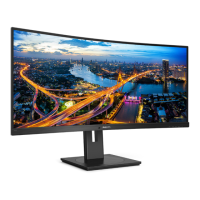








 To Next Page
 General