EN8
3 Get started
Caution
• Make sure that you have read the safety
instructions in Chapter 1 ‘Important
safety instructions’ before you connect
and install your handset.
Connect the base station
Warning
• Risk of product damage! Ensure that the
power supply voltage corresponds to
the voltage printed on the back or the
underside of the phone.
• Use only the supplied power adapter to
charge the batteries.
Note
• Use only the adapters provided.
• Make sure the electrical outlets are not
controlled by wall switches.
• Connect the power adaptor in a vertical
or oor mount position only. The
adapter’s prong is not designed to hold
the weight of unit, so do not connect it
to any ceiling, under-the-table, or cabinet
outlets. Otherwise, the adaptor may not
properly connect to the mains.
• If you subscribe to the digital subscriber
line (DSL) high speed Internet service
through your telephone line, ensure you
install a DSL lter between the telephone
line cord and the power socket. The lter
prevents noise and caller ID problems
caused by the DSL interference. For more
information on the DSL filters, contact
your DSL service provider.
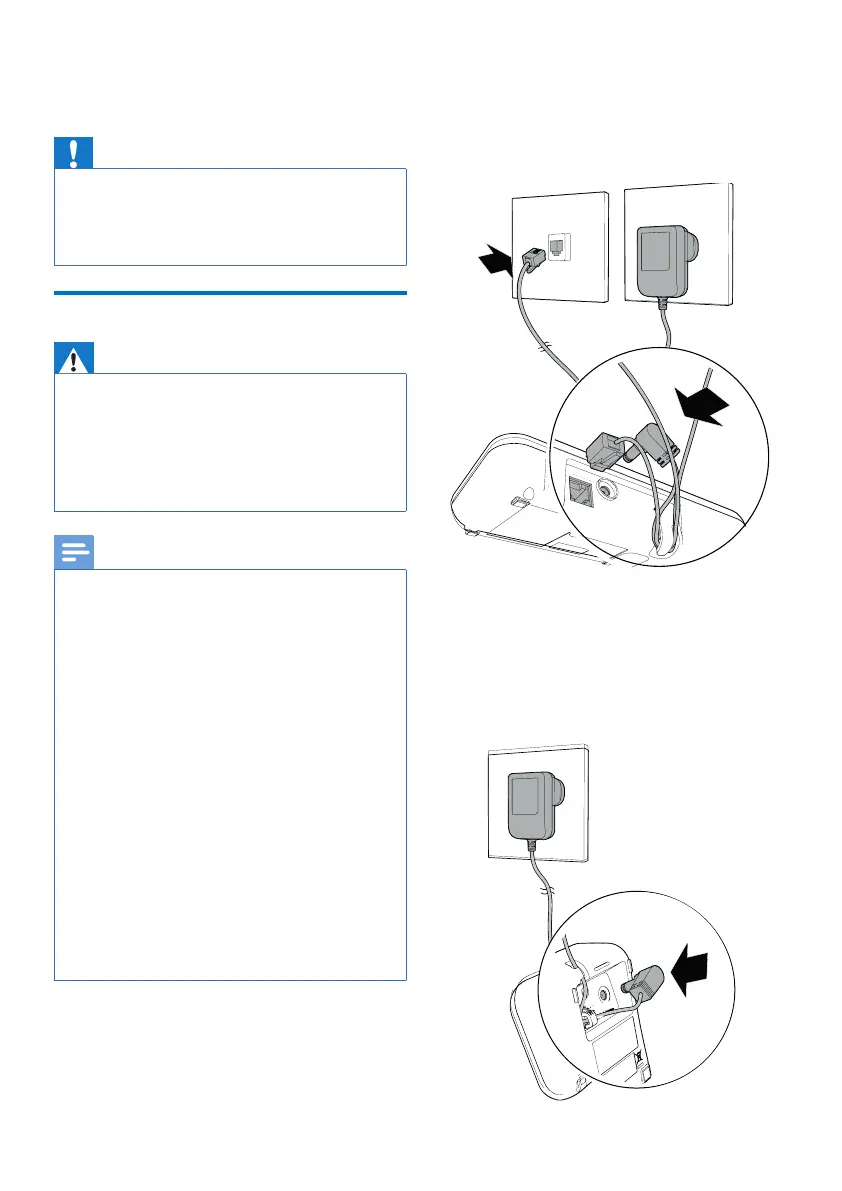
1 Connect each end of the power
adapter to:
•
The DC input jack at the back of the
base station;
•
The power socket on the wall.
2 Connect each end of the line cord
to:
•
The telephone socket at the back of
the base station;
•
The telephone socket on the wall.
3 Connect each end of the power
adapter to (for multi-handset
version only):
•
The DC input jack at the bottom of
the extra handset charger.
•
The power socket on the wall.



 To Next Page