36 Smart Picture, Picture Setting
Just as you can adjust your picture on your TV, you can adjust some picture
elements at the DVD Player. Choose a picture setting that best displays the
Disc you are playing.This feature is known as Smart Picture and can be
adjusted by following these steps.
1
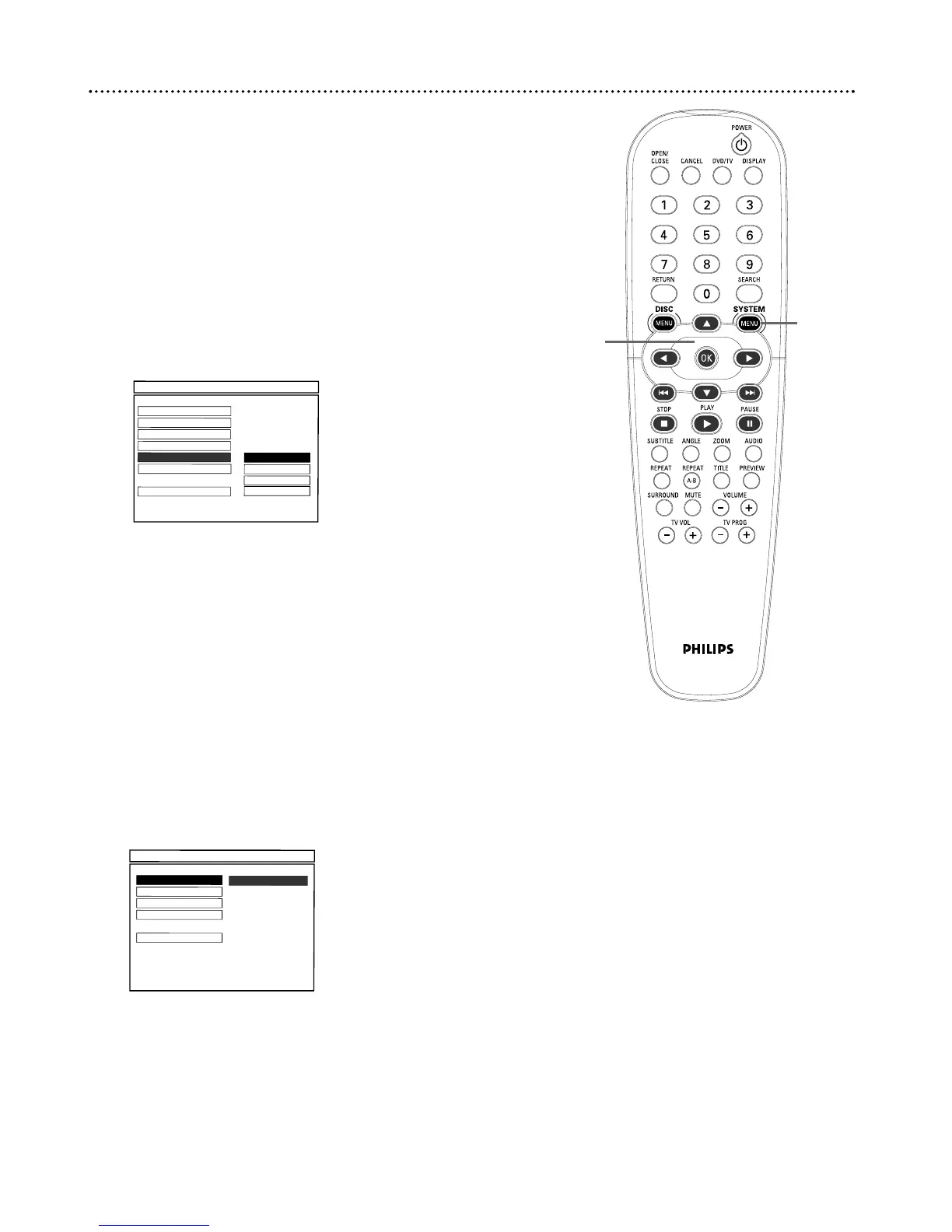
Press SYSTEM MENU.
2
Press 4 to select VIDEO SETUP. Press OK.
3
Press 4 to select SMART PICTURE. Press 2.
4
Press 3 or 4 to select STANDARD, BRIGHT, SOFT, or
PERSONAL, then press OK.
5
If you selected BRIGHT, STANDARD, or SOFT, you are
finished. Press SYSTEM MENU to remove the menus. Yo u
may want to play a Disc for a few minutes in each setting to decide
which you prefer.
If you selected PERSONAL, you can adjust specific picture
elements for your preference. Go to step 6 to adjust these
items.
6
Press 1 to reselect SMART PICTURE.
7
Press 4 to select PICTURE SETTING, then press OK.
8
Press 3 or 4 to select BRIGHTNESS, CONTRAST,TINT, or
COLOR. The current value of the selected item will appear to the
right. Press 2 to continue.



 To Next Page