10
English
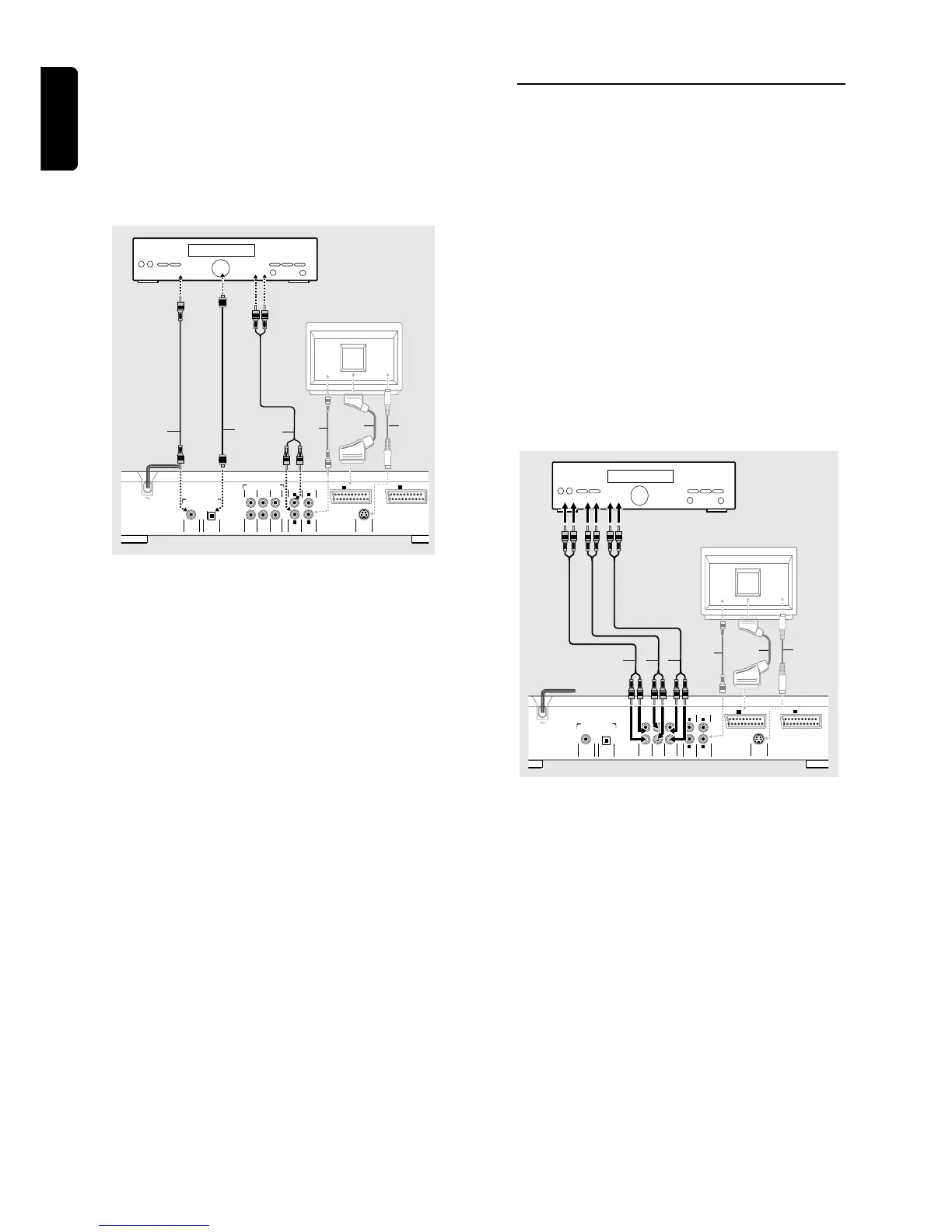
Digital Multi-channel sound
Digital multi-channel connection provides the best sound
quality. For this you need a multi-channel A/V receiver that
supports one or more of the audio formats supported by
your DVD player (MPEG 2, Dolby Digital™ and DTS).
Check the receiver manual and the logos on the front of
the receiver.
TV
Y
X
Z
COAXIAL
DIGITAL AUDIO OUT
PCM-MPEG2-Dolby Digital-DTS
1
R
AUDIO OUT
S-VIDEO
OUT
OPTICAL
RIGHT SUBW.
REAR
RIGHT
FRONT
LEFT CENTER
MULTICHANNEL AUDIO OUT
REAR
LEFT
FRONT
L
2
VIDEO OUT
II
TV OUT
I
AUX/VCR IN
AMPLIFIER
A
G
F
Note:
– If the audio format of the digital output does not match the
capabilities of your receiver, the receiver will produce a strong,
distorted sound or no sound at all.
– Six Channel Digital Surround Sound via digital connection
can only be obtained if your receiver is equipped with a Digital
Multi-channel decoder.
– To see the selected audio format of the current DVD in the
Status Window, press SYSTEM MENU.
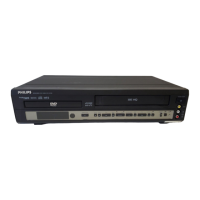
Analog connection to a multi-channel A/V
receiver with 6 Channel connectors (Dolby
Digital / DTS)
This DVD player contains a multi-channel decoder. This
enables playback of DVDs recorded in Multi-channel
Surround without the need for an optional decoder.
1 Connect an optional audio out jacks for the Center speaker
and the Subwoofer connection (C) to the corresponding in
jacks on your receiver.
2 Connect an optional Left and Right audio out jacks for the
Front speaker (B) to the corresponding in jack on your
receiver.
3 Connect an optional Left and Right audio out jacks for
Surround speaker (D) to the corresponding in jacks on
your receiver.
4 Make the appropriate Sound settings for Analog Output
and Speaker Settings in the Personal Preferences menu.
TV
Y
X
Z
COAXIAL
DIGITAL AUDIO OUT
PCM-MPEG2-Dolby Digital-DTS
1
R
AUDIO OUT
S-VIDEO
OUT
OPTICAL
RIGHT SUBW.
REAR
RIGHT
FRONT
LEFT CENTER
MULTICHANNEL AUDIO OUT
REAR
LEFT
FRONT
L
2
VIDEO OUT
II
TV OUT
I
AUX/VCR IN
AMPLIFIER
B
D
C
PREPARATION



 To Next Page