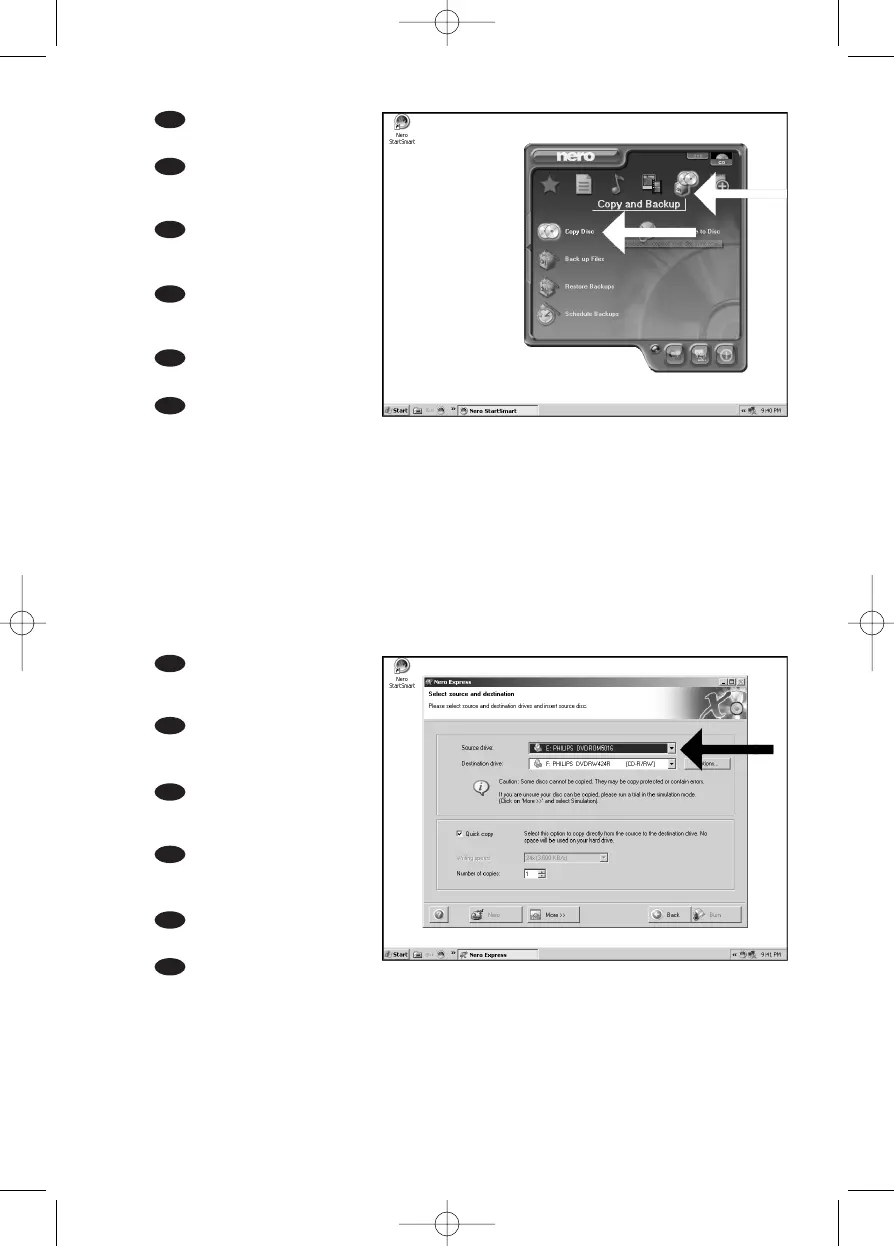
Choose "Copy and Back-
up" and click "Copy Disc".
Wählen Sie "Kopieren und
Sichern" und klicken Sie auf "Disk
kopieren".
Choisissez "Copier et
sauvegarder" puis cliquez sur
"Copier un disque".
Selezionare "Copia e
Backup" e fare clic su "Copia
disco".
Kies "Kopiëren en backup"
en klik op "Schijf kopiëren".
Seleccione "Copiar y copia
seg." y haga clic en "Copiar
disco".
UK
D
F
NL
E
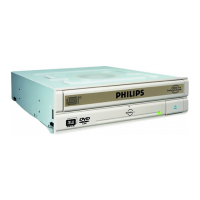
Choose the source drive
and insert the source disc in this
drive.
Wählen Sie das Quelllauf-
werk und legen Sie die Quell-
Disk in dieses Laufwerk ein.
Choisissez le disque sour-
ce puis insérez-le dans le lecteur
source.
Selezionare lettore
sorgente ed inserire il disco di
origini in questa unità.
Kies het bronstation en
leg de bronschijf in dat station.
Seleccione la unidad
origen y coloque el disco de
origen en esta unidad.
UK
D
I
E
4
3
39
I
F
NL



 To Next Page