4-10
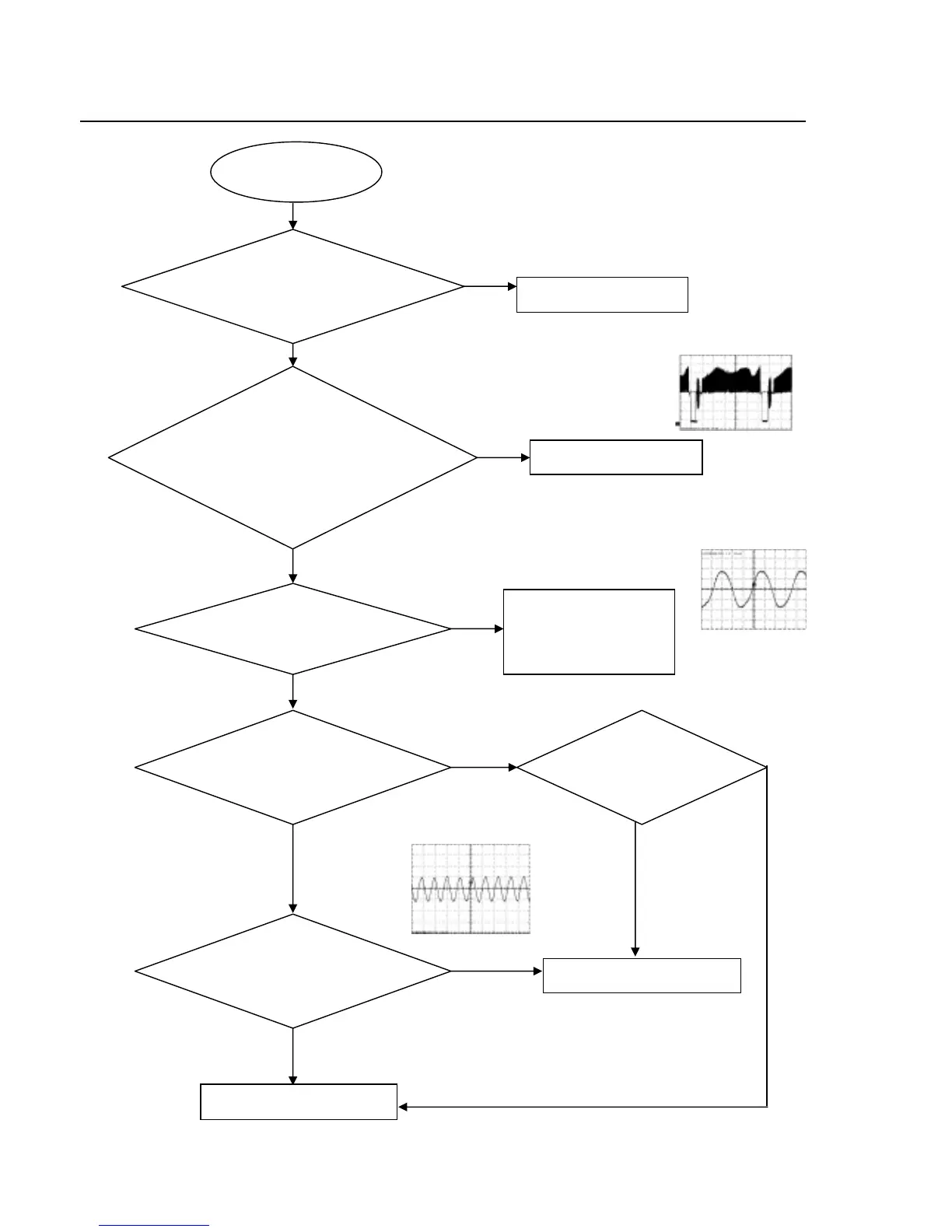
No video picture, no sound.
Change EC9, D1and Q1.
No video picture,
no sound.
Check if the reset circuit
consisting ofEC9, D1 and Q1 is
normal (at a high level for tens
of milliseconds, then constantly
at 0V).
Check whether there is
27MHz signal output.
Check the loaded circuit
Crystal oscillator Y1 and
peripheral components
are defected or eroded.
No
No
No
Yes
Yes
Yes
27Mhz waveform
Check whether all the voltages
from the power board to the
decoder board are normal.
CVBS(R21 point) waveform
Check if there is 135MHz
signal output on R2.
Check whether
short-circuit or bad
solder on U2,U4
SDRAM(R2 PCLK) waveform
Check U1.
No
No
Reconnect the component in
Yes
Yes
Check if short-circuit and
bad solder exist on Pin
151
Yes
No
Trouble shooting chart
Go





 To Next Page