Setup
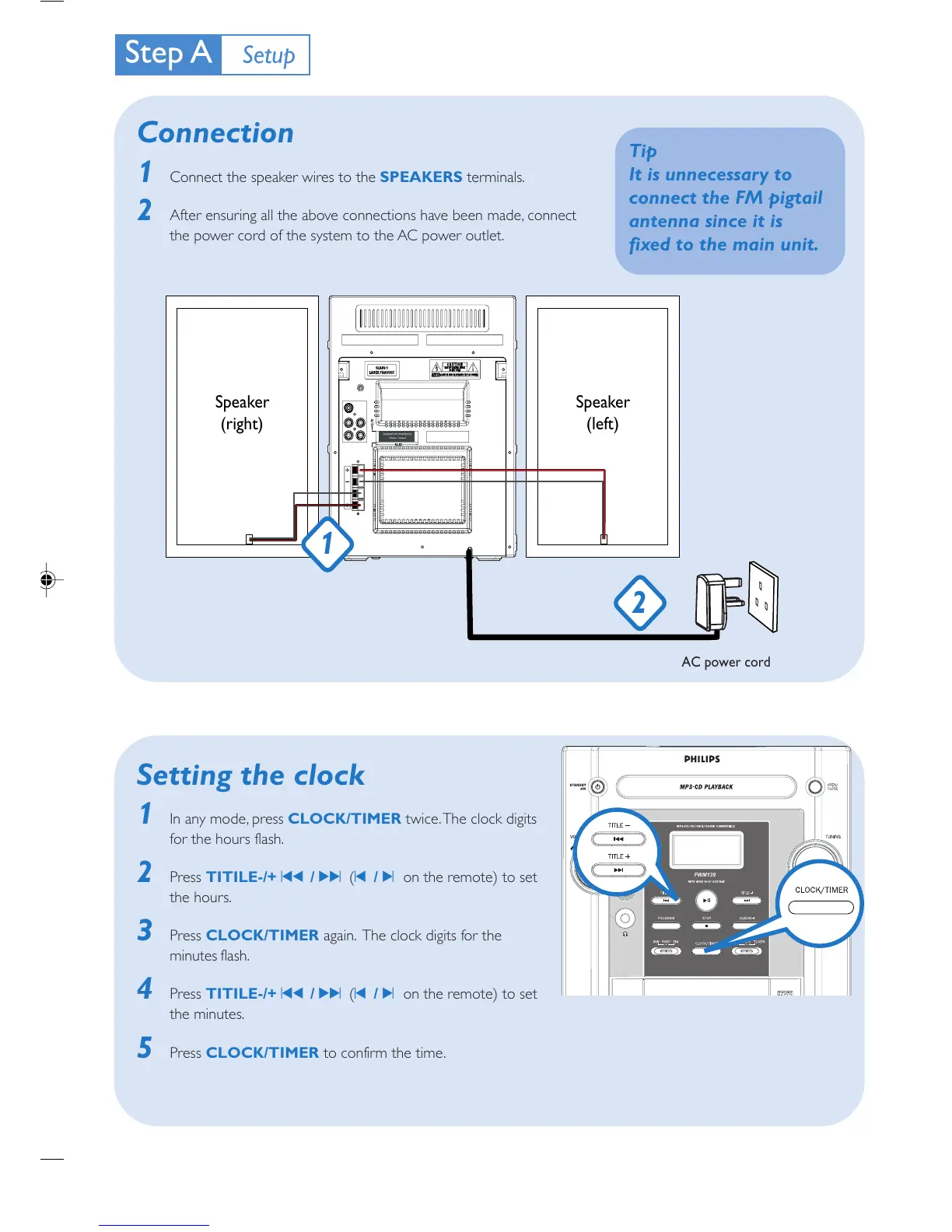
AC power cord
2
Speaker
(right)
Speaker
(left)
1
Tip
It is unnecessary to
connect the FM pigtail
antenna since it is
fixed to the main unit.
Connection
1 Connect the speaker wires to the SPEAKERS terminals.
2 After ensuring all the above connections have been made, connect
the power cord of the system to the AC power outlet.
Setting the clock
1 In any mode, press CLOCK/TIMER twice. The clock digits
for the hours flash.
2 Press TITILE-/+ ¡1 / 2™ (¡ / ™ on the remote) to set
the hours.
3 Press CLOCK/TIMER again. The clock digits for the
minutes flash.
4 Press TITILE-/+ ¡1 / 2™ (¡ / ™ on the remote) to set
the minutes.
5 Press CLOCK/TIMER to confirm the time.


 To Next Page