What’s included
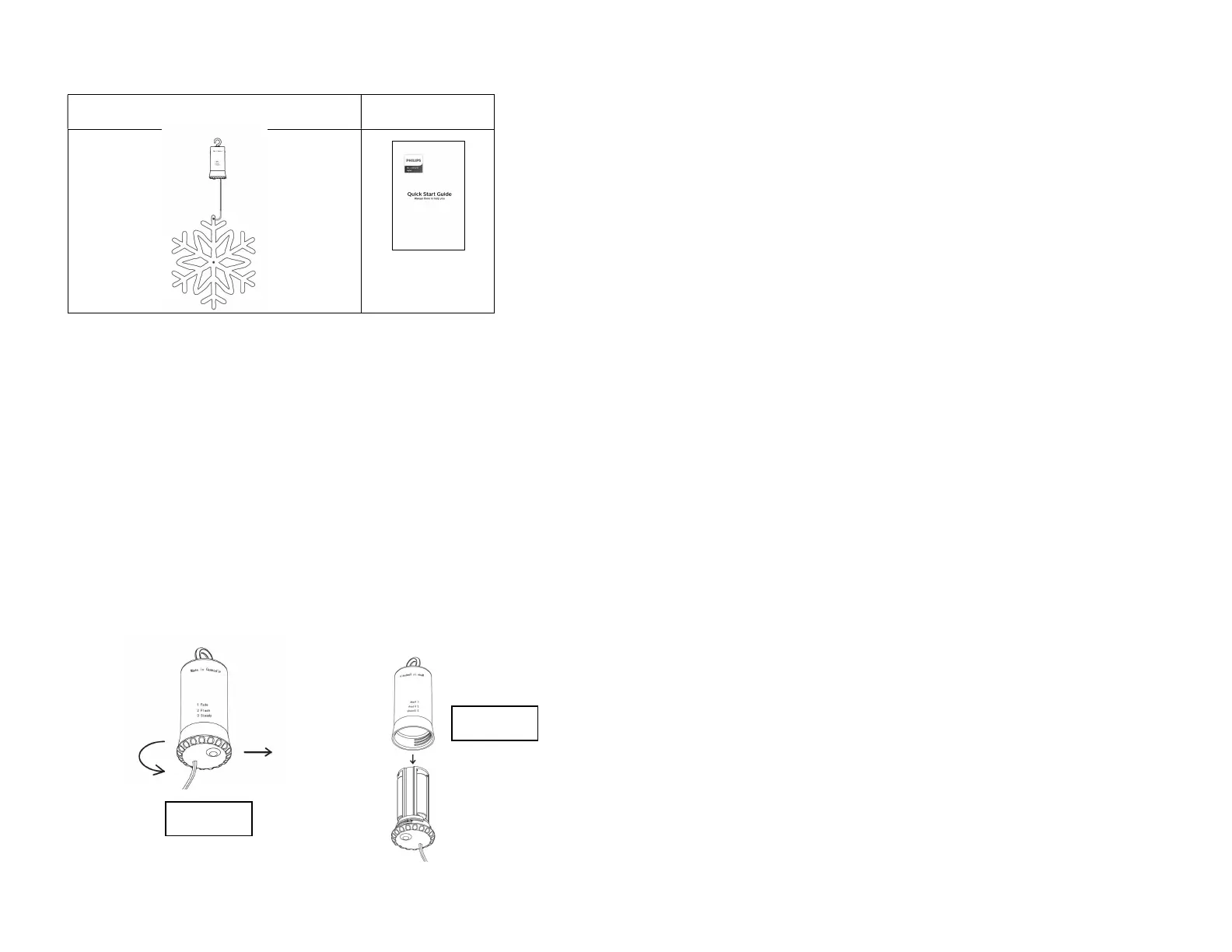
Snowflake (snowflake shape varies by item) Quick Start Guide
Remove the product and parts from packaging.
Install the batteries (not included) following the battery installation instructions
below.
Decorate your home with the snowflake.
To create a light show, use multiple snowflakes set in flash or fade mode
Battery Installation Instructions
1. 3 “AA” 1.5V batteries are required (not included) for each snowflake
alkaline batteries for best performance.
2. Unscrew the battery box as shown in Figure 1 below.
3. Remove the battery compartment as shown in Figure 2 below.
4. Clean the battery contacts and also those of the device prior to battery
installation.
5. Insert 3 new “AA” batteries matching the polarity shown inside the battery
compartment. Replace all batteries at the same time with a set of new
batteries of the same brand.
6. Close cover, ensuring firm contact is made. The unit will turn on once
batteries are inserted, and the 6 hour timer will start running.
WARNING: Risk of fire, personal injury, and electric shock.
Do not mix old and new batteries.
Do not mix Alkaline, Standard (Carbon-Zinc.), Lithium, or Rechargeable
(Nickel-Cadmium or other types) batteries.
Remove batteries when not used for an extended period of time, or when
depleted. Batteries will corrode over time and may cause permanent damage
to unit.
Risk of Fire - Do not use rechargeable batteries.
Dispose of batteries properly by following directions on batteries.
Replace batteries only with a set of 3 new batteries of the same brand.
For decoration only, not intended for use by children.
Switch Operation
Starting in the off mode:
Press 1 time – Fade
Press 2 times – Flash
Press 3 times – Steady
Timer Mode –
o
This item utilizes an always enabled timer, as soon as batteries are inserted into
the battery box the timer starts. The timer will run for 6 hours and turn off for 18
hours, turning back on for 6 hours the next day, repeating the cycle.
Trouble shooting
1. If light set does not work:
a) Press the switch several times to alternate between functions.
b) Make sure all batteries are new (and installed as a set). Do not mix new
and old batteries or batteries of different types or brands.
c) Make sure the batteries are installed correctly and match polarity
indicated in the battery compartment (if any are installed in reverse, the
unit will not work).
2. If light set is dim (or not all colors turn on – multi color sets only):
a) Clean battery and battery compartment contact to ensure proper
electrical contact.
b) Replace batteries with 3 new “AA” 1.5V batteries following directions
above.
c) For multi color lights - If not all light colors turn on, it is time to install 3
new batteries.
Call Customer Service at 1-800-763-6177 Monday-Friday 9:00am – 5:00pm CST or
visit our website at www.seasonalspecialties.com for additional information and
questions.
2022
Page 1 of 4
2022
Page 2 of 4
640731-132, 640733-132
640731-132, 640733-132
Figure 1
Figure 2


 To Next Page
 Loading...