EasyManua.ls Logo

Philips HP6390 - Page 9

Philips HP6390
10 pages
Print Icon
To Next Page IconTo Next Page
To Previous Page IconTo Previous Page
Loading...
Meijer.com
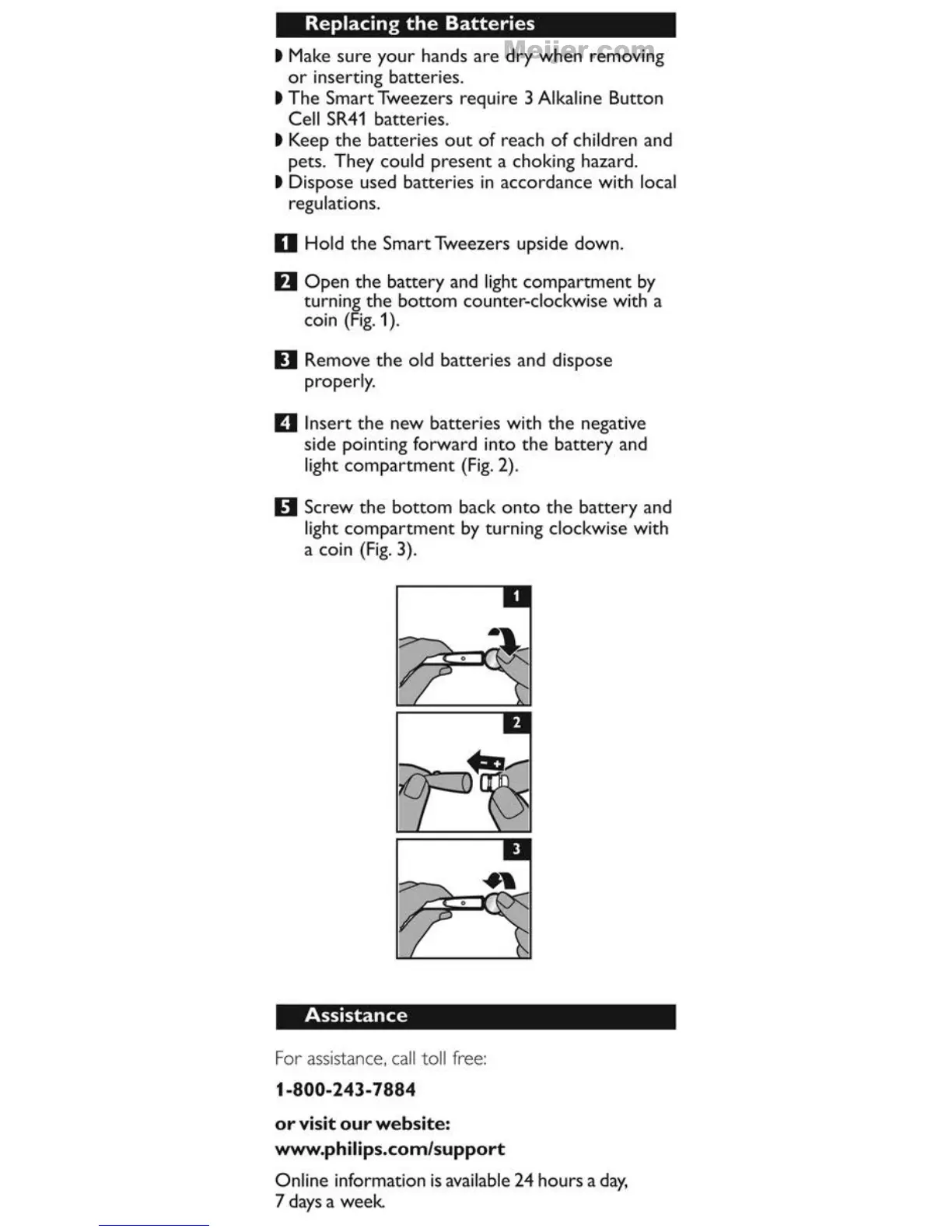
Replacing
the
Batteries
t
Make
sure
your
hands
are
dry
when
removing
or
inserting batteries.
t
The
Smart
Tweezers requi
re
3 Alkaline Button
Ce
ll
SR41
batteries.
t Keep
the
batteries
out
of
reach
of
children and
pets. They could
present
a
chok
ing hazard.
t Dispose used batteries in accordance with local
regulations.
D
Ho
ld
the
Smart Tweezers upside down.
D
Open
the
battery
and light
compartment
by
turning
the
bottom
counter-clockwi
se
with a
coin
(Fig.
1 ).
0 Remove
the
old batteries and dispose
proper
l
y.
D Insert
the
new
batteries with
the
negative
side pointing f
orward
into
the
battery
and
li
ght
compartment
(Fig.
2).
D Screw
the
bottom
back
onto
the
battery
and
light
compartment
by turning clockwise with
a coin
(Fig.
3).
Assistance
For
assistance,
call
toll
free:
1-800-243-7884
or
visit
our
website:
www.philips.com/support
Online information
is
ava
ilable 24 hours a
day,
7 days a
week

Related product manuals