7EN
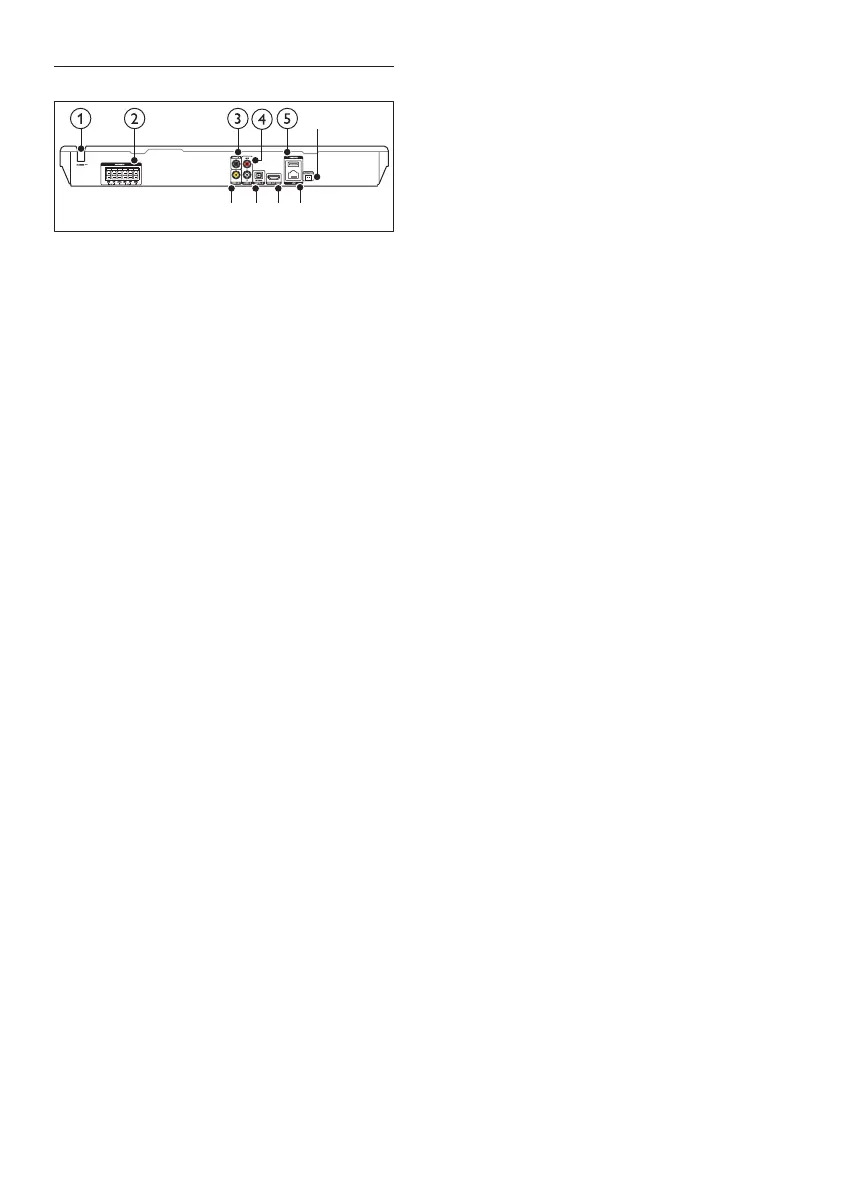
Rear connectors
a AC MAINS
Fixed AC power cable.
b SPEAKERS
Connect to the supplied speakers and
subwoofer.
c DIGITAL IN-COAXIAL
Connect to a coaxial audio output on the
TV or a digital device.
d AUDIO IN-AUX
Connect to an analog audio output on the
TV or an analog device.
e USB(VOD)
Slot for a USB storage device. The USB
storage device is used to rent online
videos.
f FM ANTENNA
Connect to the supplied FM antenna.
g VIDEO OUT
Connect to the composite video input on
the TV.
h DIGITAL IN-OPTICAL
Connect to an optical audio output on the
TV or a digital device.
i HDMI OUT (ARC)
Connect to the HDMI input on the TV.
j LAN
Connect to the LAN input on a
broadband modem or router.
ghij
f



 To Next Page