5 Fast forward and fast rewind
5. Fast forward
5.2 Fast rewind
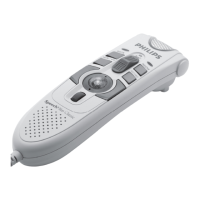
Move the 4-position slide switch (2) to the ┤ position. The ┤ symbol appears on the
screen.
2 When rewinding reaches the desired position, move the 4-position slide switch back to the
STOP or PLAY position.
4 Playback
The 4-position slide switch (2) must be in the STOP position.
2 Press the + and - buttons (5) to select the file number to play back.
3 Move the 4-position slide switch to the PLAY position to start playback.
4 Press the + and - buttons to adjust the playback volume during playback.
5 Move the 4-position slide switch to the STOP position to stop playback.
D Note: Press the SPEED smart button (2b) to adjust slower or faster file playback.
The 4-position slide switch (2) must be in the STOP or PLAY position.
2 Press and hold the FAST FORWARD (8) button. The ┢ symbol appears on the screen.
3 When forwarding reaches the desired position, release the FAST FORWARD button. The
Digital Pocket Memo returns to stop or playback mode.
9600_qrg_20070108.indb 11 22/02/2007 14:32:47



 To Next Page
 Loading...