3 Recording
3. Record for the first time
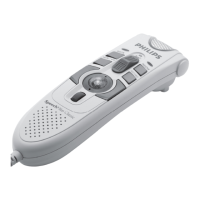
Follow these steps to create your first recording with the Digital Pocket Memo:
E Tip: For best results, speak clearly and keep the microphone about four inches (ten
centimeters) away from your mouth.
3.2 Record a spoken instruction
Spoken instructions are recorded comments by the author that are directed to the person
transcribing the dictation. To insert a spoken instruction into your dictation:
The 4-position slide switch (2) must be in the REC position.
2 Press and hold the INSTR smart button (2b).
3 Dictate the instruction. The instruction will be recorded into the dictation without
overwriting your dictation.
4 Release the INSTR smart button when the spoken instruction is complete. The spoken
instruction is displayed as a solid line on the file position bar.
5 Continue dictating or move the 4-position slide switch to the STOP position to stop
recording.
A memory card must be inserted into the memory card slot (7). (The Digital Pocket Memo
is packaged with a SecureDigital (SD) memory card).
2 Slide the On/O switch (3) to the ON position to switch on the Digital Pocket Memo.
3 Move the 4-position slide switch (2) to the REC position and start dictating. The status LED
(0) glows in red (in overwrite mode) or green (in insert mode) while recording.
4 For short pauses, move the 4-position slide switch to the STOP position. To continue
recording, move the 4-position slide switch back into the REC position.
5 To stop recording, move the 4-position slide switch to the STOP position.
9600_qrg_20070108.indb 9 22/02/2007 14:32:46



 To Next Page
 Loading...