EasyManua.ls Logo

Philips RC328 - Page 9

Philips RC328
28 pages
Print Icon
To Next Page IconTo Next Page
To Previous Page IconTo Previous Page
Loading...
ef
__
Le
{@
00
|ooOGO
_
lm
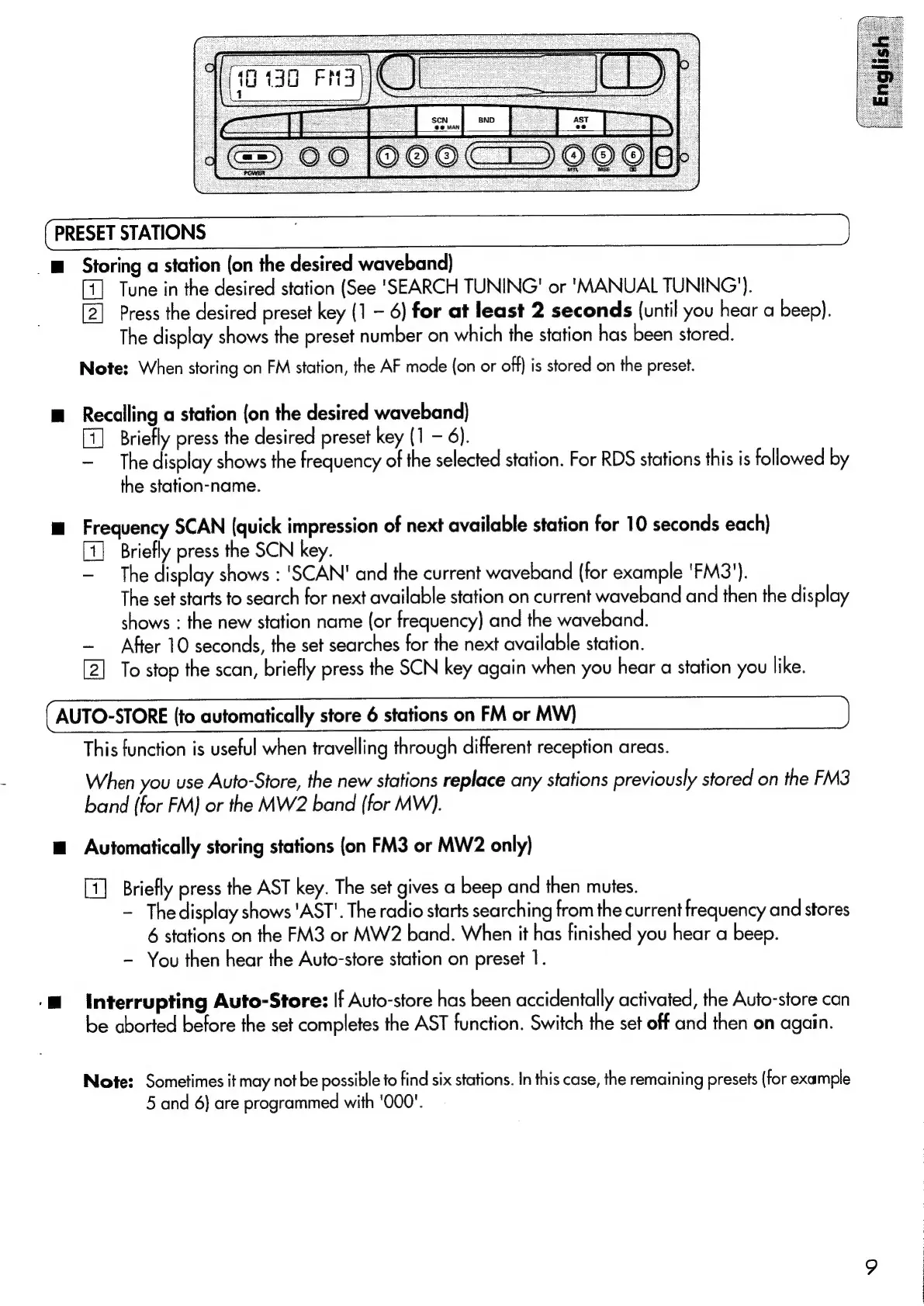
Storing
a
station
(on
the
desired
waveband)
Tune
in
the
desired
station
(See
'SEARCH
TUNING!
or
'MANUAL
TUNING’).
Press
the
desired
preset
key
(1
-
6)
for
at
least
2
seconds
(until
you
hear
a
beep).
The
display
shows
the
preset
number
on
which
the
station
has
been
stored.
ae
ee
Note:
When
storing
on
FM
station,
the
AF
mode
(on
or
off)
is
stored
on
the
preset.
m
Recalling
a
station
(on
the
desired
waveband)
Briefly
press
the
desired
preset
key
(1
6).
The
display
shows
the
frequency
of
the
selected
station.
For
RDS
stations
this
is
followed
by
the
station-name.
m
Frequency
SCAN
(quick
impression
of
next
available
station
for
10
seconds
each)
Briefly
press
the
SCN
key.
The
display
shows
:
'SCAN'
and
the
current
waveband
(for
example
'FM3').
The
set
starts
to
search
for
next
available
station
on
current
waveband
and
then
the
display
shows
:
the
new
station
name
(or
frequency)
and
the
waveband.
After
10
seconds,
the
set
searches
for
the
next
available
station.
To
stop
the
scan,
briefly
press
the
SCN
key
again
when
you
hear
a
station
you
like.
AUTO-STORE
(to
automatically
store
6
stations
on
FM
or
MW)
This
function
is
useful
when
travelling
through
different
reception
areas.
When
you
use
Auto-Store,
the
new
stations
replace
any
stations
previously
stored
on
the
FM3
band
(for
FM)
or
the
MW2
band
(for
MW).
m
Automatically
storing
stations
(on
FM3
or
MW2
only)
Briefly
press
the
AST
key.
The
set
gives
a
beep
and
then
mutes.
The
display
shows
'AST'.
The
radio
starts
searching
from
the
current
frequency
and
stores
6
stations
on
the
FM3
or
MW2
band.
When
it
has
finished
you
hear
a
beep.
-
You
then
hear
the
Auto-store
station
on
preset
1.
-M
Interrupting
Auto-Store:
If
Auto-store
has
been
accidentally
activated,
the
Auto-store
can
be
aborted
before
the
set
completes
the
AST
function.
Switch
the
set
off
and
then
on
again.
Note:
Sometimes
it
may
not
be
possible
to
find
six
stations.
In
this
case,
the
remaining
presets
(for
example
5
and
6)
are
programmed
with
'000'.

Related product manuals