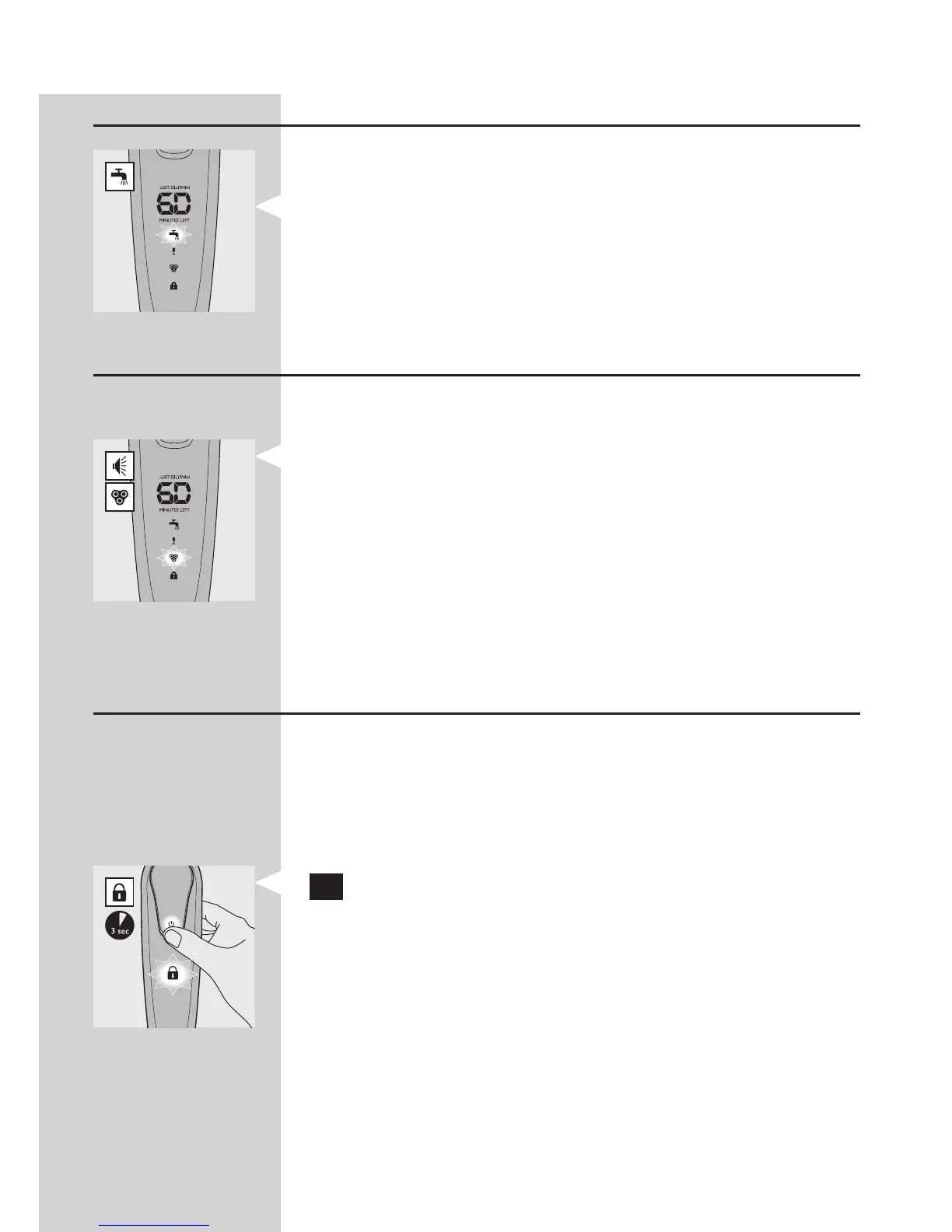
Clean shaver
For optimal shaving performance, we advise you to
clean the shaver after every use.
The tap symbol ashes to remind you to clean the
shaver.
Note: The displays of types RQ1290, RQ1280, RQ1260
and RQ1250 look different, but show the same symbol.
Replace shaving unit
For maximum shaving performance, we advise you
to replace the shaving unit every year.
To remind you to replace the shaving unit, the
shaving unit symbol ashes (all types) and you
hear a beep when you switch off the shaver
(RQ1290/RQ1280 only). This happens at the end
of 7 successive shaves.
Note: The displays of types RQ1290, RQ1280, RQ1260
and RQ1250 look different, but show the same symbol.
Travel lock (RQ1280/RQ1260/RQ1250 only)
You can lock the shaver when you are going to
travel. The travel lock prevents the shaver from being
switched on by accident.
Activating the travel lock
1 Press the on/off button for 3 seconds to enter
the travel lock mode.
RQ1280: The display starts to count down
from 3. At 1, the appliance beeps to indicate that
it is locked.
The lock symbol lights up on the display. After a
few seconds it goes out.
Note: The displays of types RQ1280, RQ1260 and
RQ1250 look different, but show the same symbol.
-
-
,
,
ENGLISH
33



 To Next Page