Philips
Webcam
CIF
CMOS
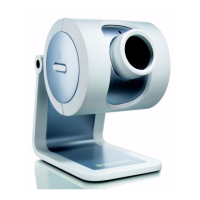
SPC325NC
Start chatting on Skype
The perfect Skype webcam! It’s easy to use, takes great images and has a headset for
echo-free chatting. You can also email, manage and archive snapshots and video clips with
a couple of clicks. Video chatting has never been so easy.
One-to-one video chatting on Skype
• Multimedia headset and head mic for best sound quality
• 30 frames per second video at Skype resolutions
• VGA resolution (640x480) for sharp images
• Automatic Picture Optimizer for super image quality
• Rotating lens for perfect aiming and natural images
Perfectly user-friendly
• Stable mount on any monitor laptop or desk
• Installation manager for easy set-up
• Perfectly compatible with Skype and other messaging services
• Compatible with all available imaging software
• Snapshot button lets you take great instant photos
• Take, archive and manage images & V-mails with VLounge
• VLounge QuickLaunch button for instant operation

 Need help?
 Video & Snapshot Capturing
 System Requirements

 To Next Page