22
U_ed along with the Clock fea-
ure, you can select a specific
time the television will turn on
when the Timer Active control is
turned ON.
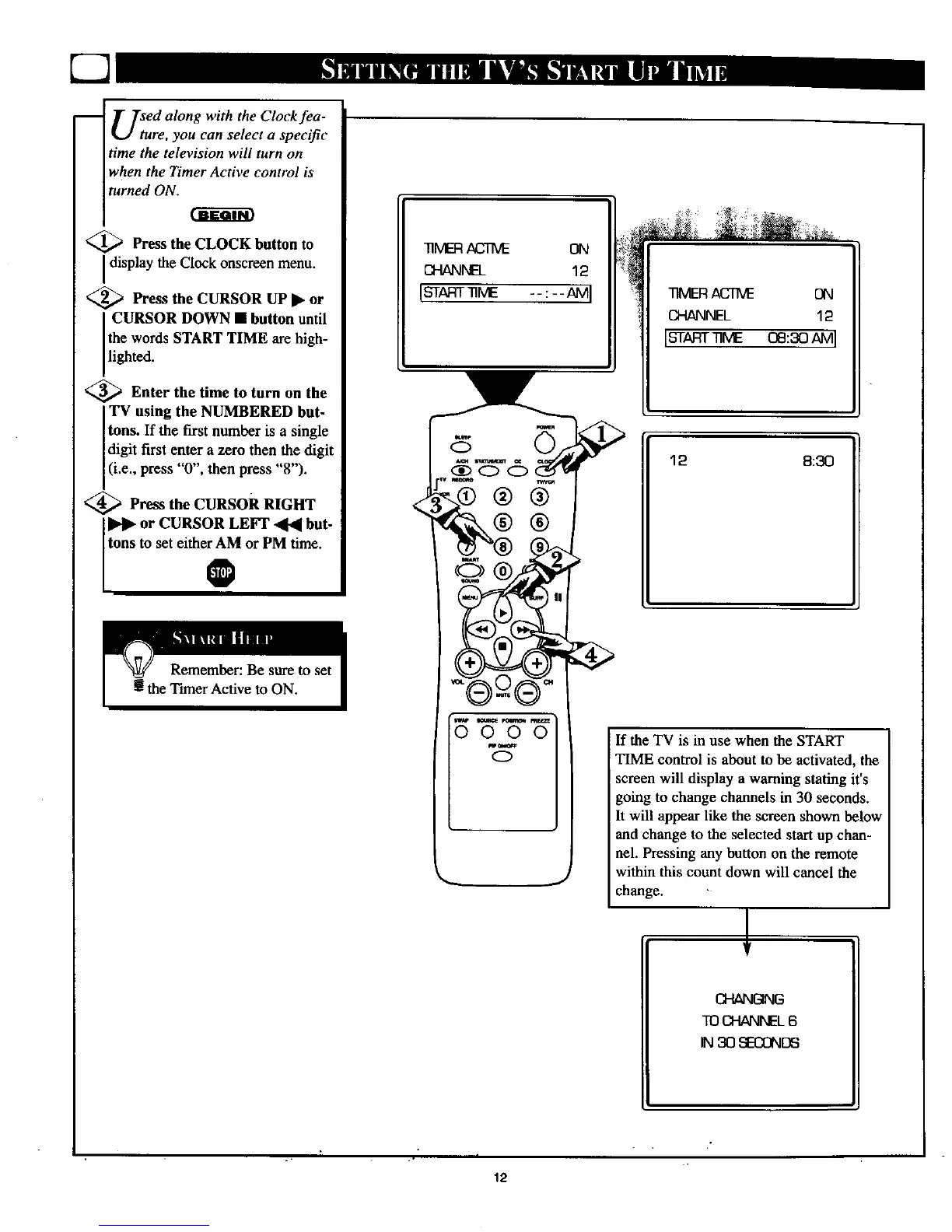
<_ Press the CLOCK button to
ndisplay the Clock onscreen menu•
<_ Press the CURSOR UP • or
CURSOR DOWN • button until
the words START TIME arehigh-
lighted.
<_ Enter the time to turn on the
TV using the NUMBERED but-
tons. If the first number is a single
digit first enter a zero then the digit
(i.e., press "0", then press "8").
<_ Press the CURsoR RIGHT
or CURSOR LEFT _ but-
tons to set either AM or PM time.
®
_MER ACTM_ ON
CH/_NEL 12
Isr rr --:--AMI
TIMERACTIVE ON
CHANNEL 12
[STAFrr_ME oe:3oAMI
12 8:30
0000
0
If the TV is in use when the START
TIME control is about to be activated, the
screen will display a warning stating it's
going to change channels in 30 seconds.
It will appear like the screen shown below
and change to the selected start up chan-
nel. Pressing any button on the remote
within this count down will cancel the
change.
!,
CHANGING
TO CHANNEL 6
IN 30 SECONDS
12



 To Next Page