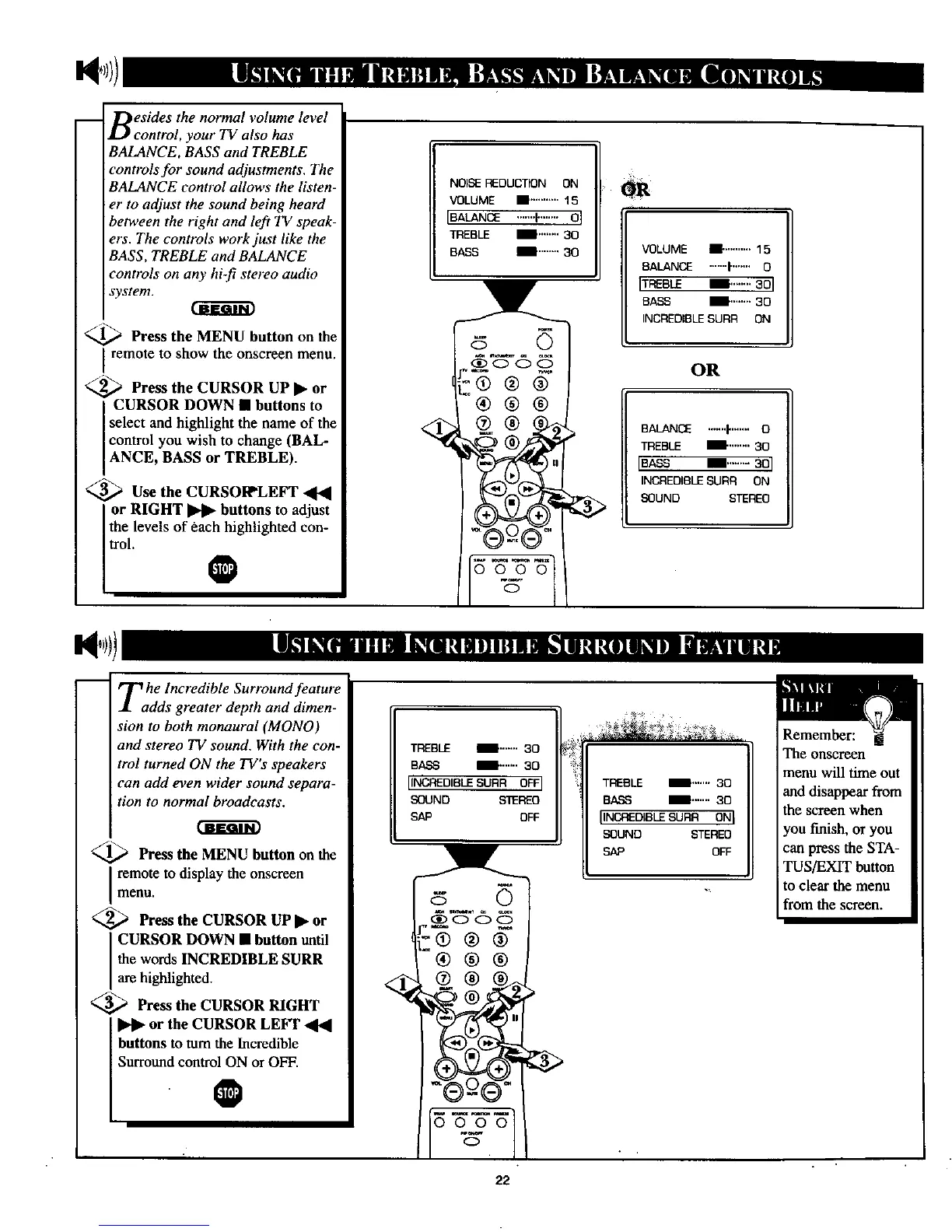
Besides the normal volume level
control, your TV also has
BALANCE, BASS and TREBLE
controls for sound adjustments. The
BALANCE control allows the listen-
er to adjust the sound being heard
between the right and left TV speak-
ers. The controls work just like the
BASS, TREBLE and BALANCE
controls on any hi-fi stereo audio
system.
_ Press the MENU button on the
remote to show the onscreen menu.
<._ Press the CURSOR UP • or
CURSOR DOWN • buttons to
select and highlight the name of the
control you wish to change (BAL-
ANCE, BASS or TREBLE).
<_Use the CURSOI_LEFT
or RIGHT _ buttons to adjust
_el!evels of each highlighted con-
o
NOISEI:EDUCTION ON
VOLUME • ...........15
IBALANCE .......I........ 0 I
TREBLE II"'""' 30
BASS ll'"""' 30
VOLUME I! ..........15
BALANCE .......I"....... 0
ITREBLE II........ 301
BASS II'"'"" 30
INCREDIBLE SURR ON
OR
BALANCE .......I"....... 0
TREBLE II.,.,.,,. 30
[BASS II...,..... 30I
INCREDIBLE SURR ON
SOUND STEREO
Tahe Incredible Surround feature
dds greater depth and dimen-
sion to both monaural (MONO)
and stereo TV sound. With the con-
trol turned ON the TV's speakers
can add even wider sound separa-
tion to normal broadcasts.
_,_ Press the MENU button on the
remote to display the onscreen
menu.
<_ Press the CURSOR UP • or
CURSOR DOWN • button until
the words INCREDIBLE SURR
are highlighted.
<_ Press the CURSOR RIGHT
or the CURSOR LEI_I" _41
buttons to turn the Incredible
Surrotmd eontre_N or OFF.
TREBLE _'""" 30
BASS _"""" 30
IINCAEDIBLESURR OFFI
SOUND STEREO
SAP OFF
5
-®®®
®®®
q
gooo
o
TREBLE I'-'"' 30
BASS !'""" 30
IINCREDIBLESURR ONI
SOUND STEREO
SAP OFF
Remember:
The onscreen
menu will time out
and disappear from
the screen when
you fmish, or you
can press the STA-
TUS/EXIT button
to clear the menu
from the screen.
22



 To Next Page