The TV's Audio/Video Input jacks
are for direct picture and sound
connections between the TV and
a VCR (o1 similar" device) that
has Audio/Video Output jacks.
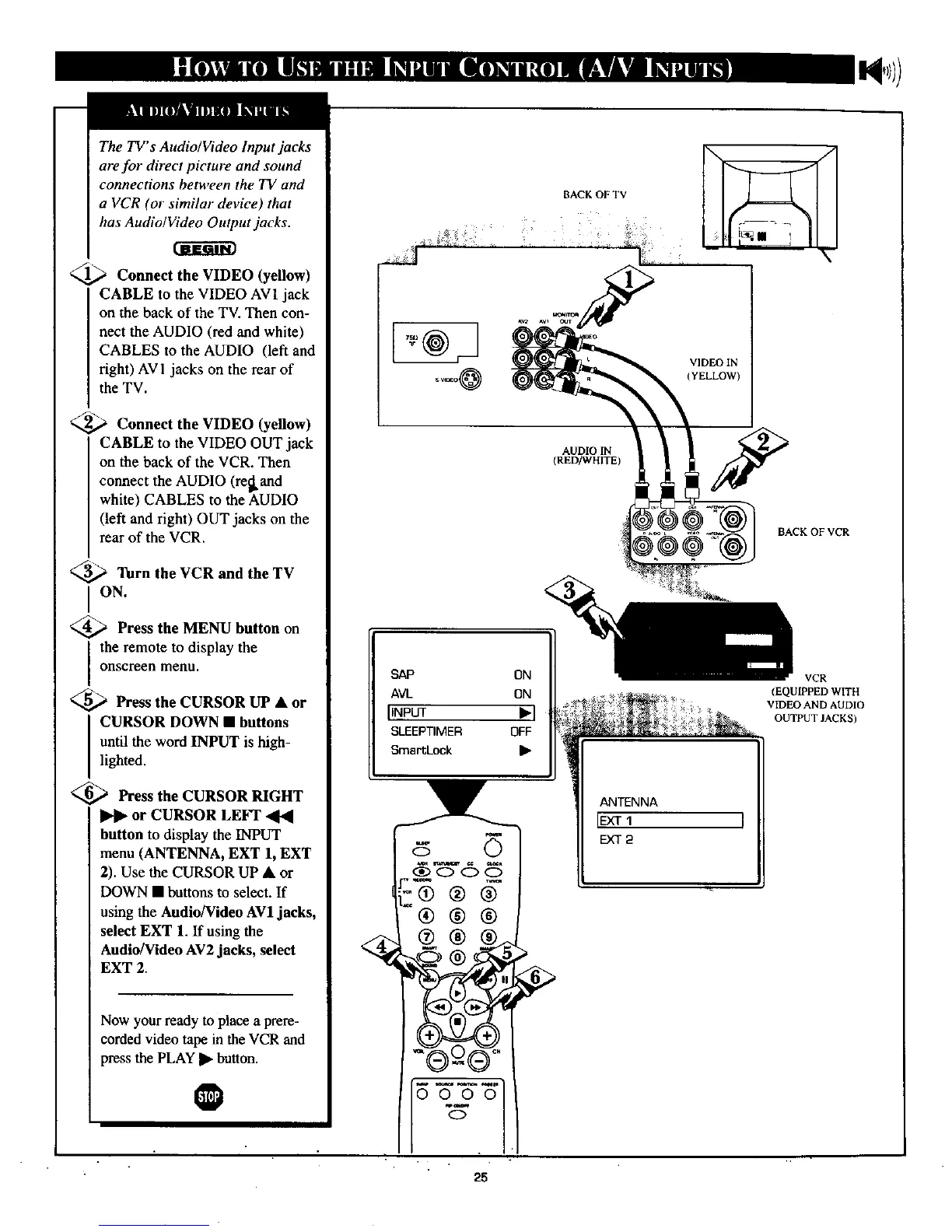
__,,,_ Connect the VIDEO (yellow)
CABLE to the VIDEO AV1 jack
on the back of the TV. Then con-
nect the AUDIO (red and white)
CABLES to the AUDIO (left and
right) AV1 jacks on the rear of
the TV.
_ Connect the VIDEO (yellow)
CABLE to the VIDEO OUT jack
on the back of the VCR. Then
connect the AUDIO (refkand
white) CABLES to the AUDIO
(left and right) OUT jacks on the
rear of the VCR.
3_,_ Turn the VCR and the TV
ION.
_,_ Press the MENU button on
the remote to display the
onscreen menu.
_,_ Press the CURSOR UP • or
CURSOR DOWN • buttons
until the word INPUT is high-
lighted.
<_ Press the CURSOR RIGHT
or CURSOR LEFT
button to display the INPUT
menu (ANTENNA, EXT 1, EXT
2). Use the CURSOR UP • or
DOWN • buttons to select. If
using the Audio/Video AV1 jacks,
select EXT 1. If using the
Audio/Video AV2 jacks, select
EXT 2.
Now your ready to place a prere-
corded video tape in the VCR and
press the PLAY • button.
@
BACK OF TV
\ •
VIDEO IN
(YELLOW)
AUDIO IN
(RED/WHITE)
BAUKOFVCR
SAP ON
AVL ON
IINPUT Jl_]
SLEEPTIMER OFF
SmartLock •
ANTENNA
IEXT1 I
EXT2
VCR
(EQUIPPED WITH
VIDEO AND AUDIO
OUTPUTJACKS)



 To Next Page