[_ IIIII IRIPI1
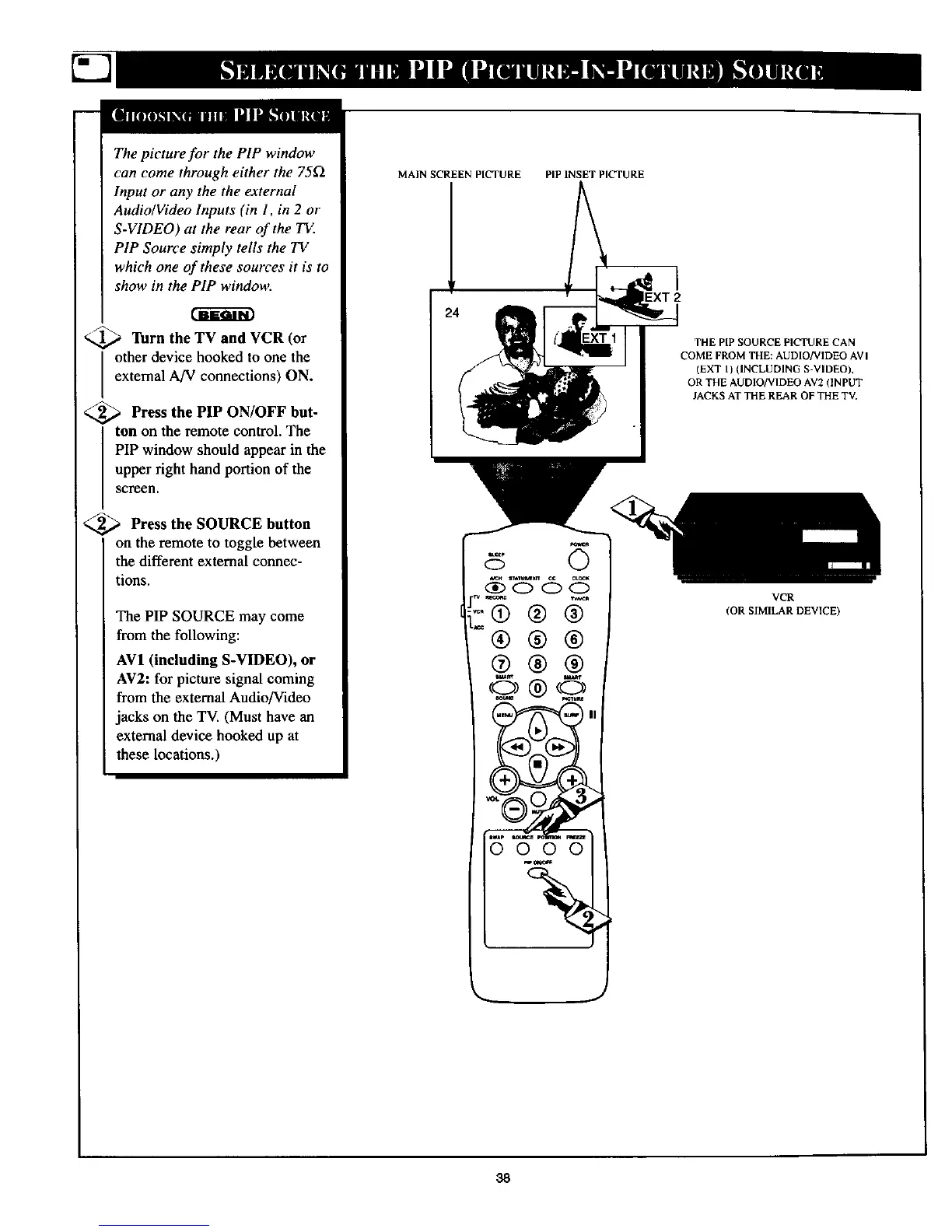
The picture for the PIP window
can come through either the 75f2
Input or any the the external
Audio/Video Inputs (in 1, in 2 or
S-VIDEO) at the rear of the T_
PIP Source simply tells the TV
which one of these sources it is to
show in the PIP window.
_._ Turn the TV and VCR
(or
other device hooked to one the
external A/V connections) ON.
<_ Press the PIP ON/OFF but-
ton on the remote control. The
PIP window should appear in the
upper right hand portion of the
screen.
<_ Press the SOURCE button
on the remote to toggle between
the different external connec-
tions.
The PIP SOURCE may come
from the following:
AV1 (including S-VIDEO), or
AV2: for picture signal coming
from the external Audio]Video
jacks on the TV. (Must have an
external device hooked up at
these locations.)
MAIN SCREEN PICTURE PIP INSET PICTURE
_R
©
-®®®
®®®
@@@
0000 t
_ J
THE PIP SOURCE PICTURE CAN
COME FROM THE: AUDIO/VIDEO AV I
(EXT I) (INCLUDING S-VIDEO),
OR THE AUDIO/VIDEO AV2 (INPUT
JACKS AT THE REAR OF THE TV,
VCR
(OR SIMILAR DEVICE)
38



 To Next Page