FOre r reasons such as poor cable
eeption, the picture can some-
times appear slightly "speckled" (or
signal noise shown in the picture). The
NOISE REDUCTION control can help
eliminate this type of interference and
improve the quality of the picture.
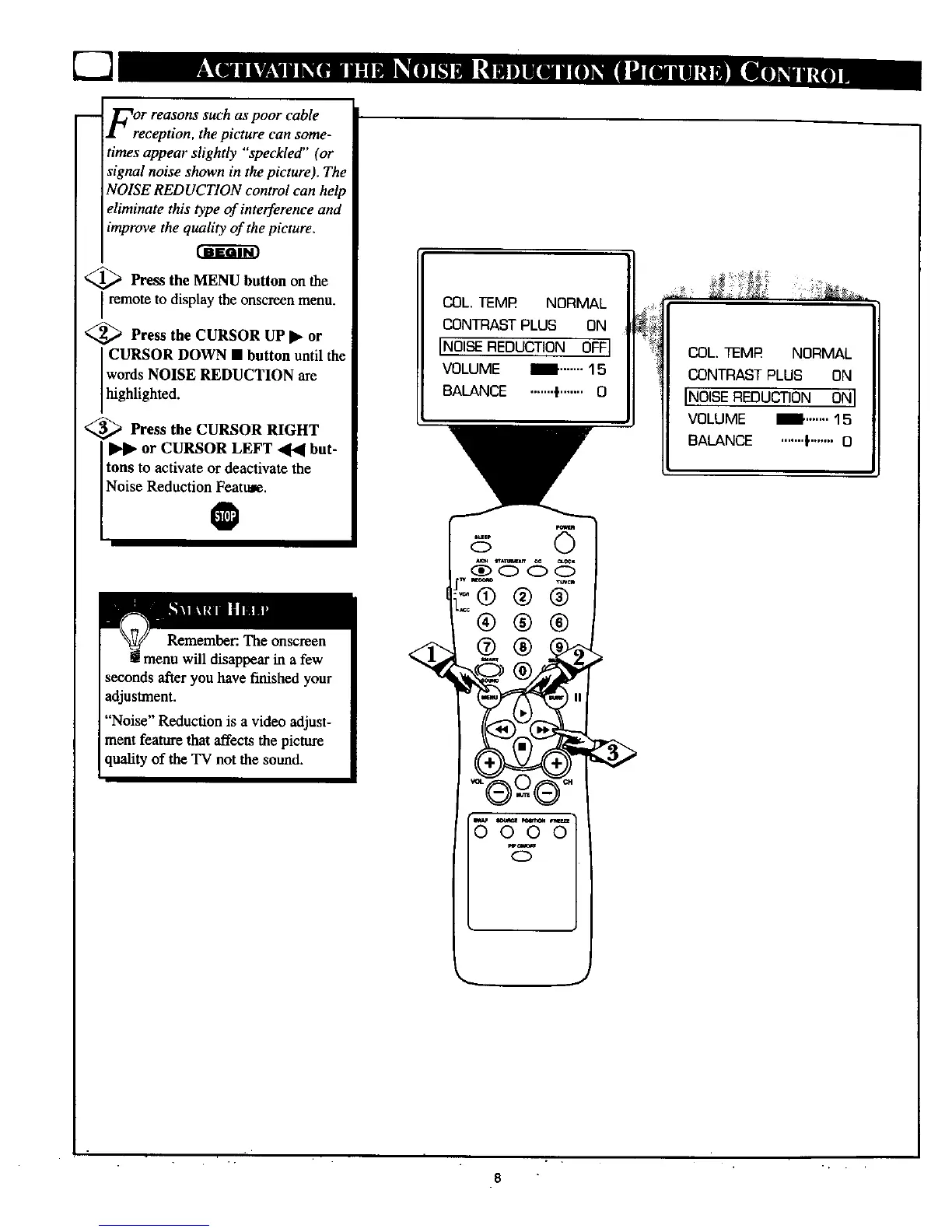
<_ Press the MENU button on the
remote to display the onscre_n menu.
<_ Press the CURSOR UP • or
CURSOR DOWN • button until the
words NOISE REDUCTION are
highlighted.
<_ Press the CURSOR RIGHT
or CURSOR LEFT _ but-
tons to activate or deactivate the
Noise Reduction_tu_.
Remember: The onscreen
menu will disappear in a few
seconds afar you have finished your
adjustment.
"Noise" Reduction is a video adjust-
ment feature that affects the picture
quality of the TV not the sound.
COL. TEMP NORMAL
CONTRAST PLUS ON
IN01SE REDUCTION OFF]
VOLUME _ ....... 1 5
BALANCE ......._....... 0
COL.TEMR NORMAL
CONTRASTPLUS ON
INOISEREDUCTION ONI
VOLUME m .......1s
BALANCE .......F....... O
_w
0
8



 To Next Page