W
ould you like to hear TV
programs through your
audio hi-fi system? The TV's
Audio output jacks can be used to
perform this TV sound replay
option.
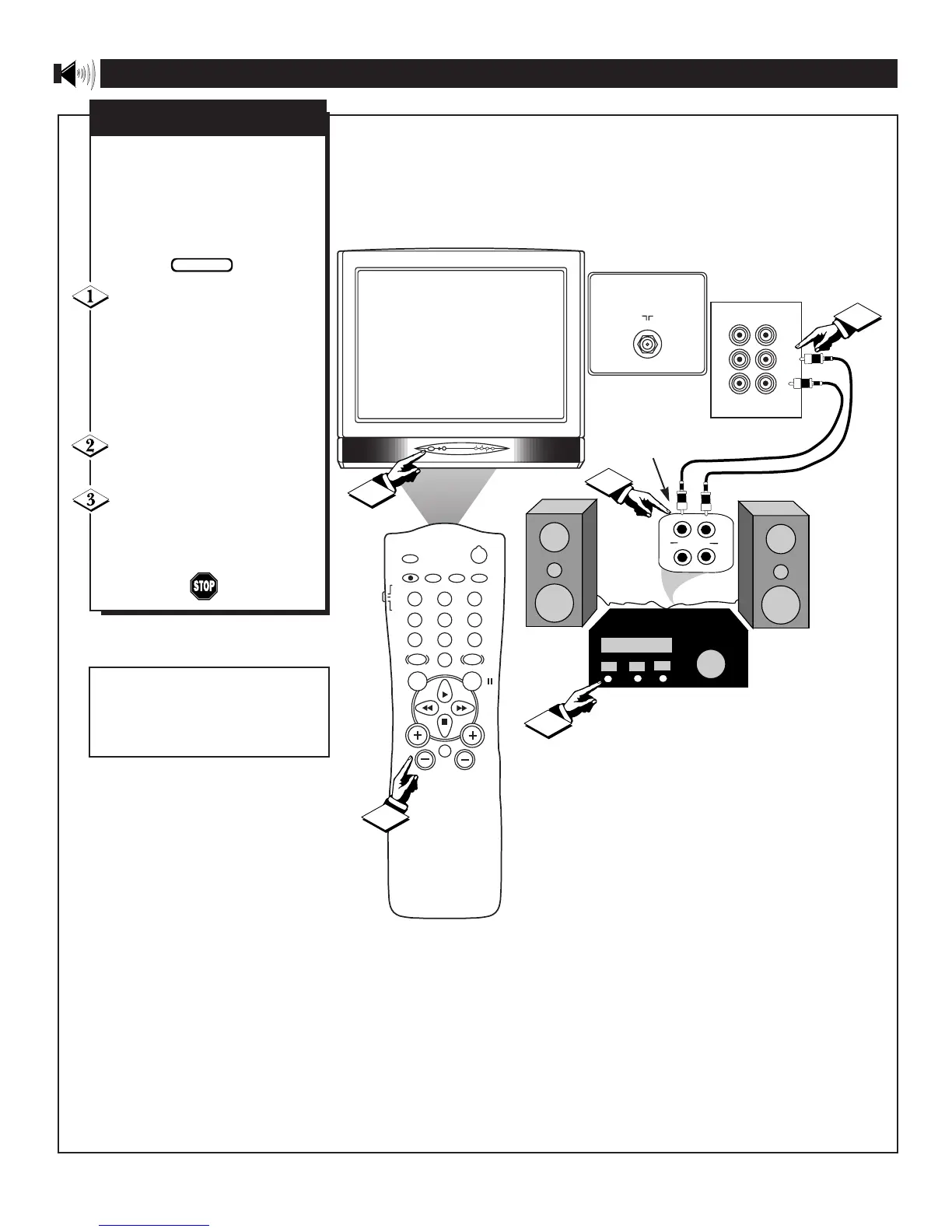
Connect the R(ight) and L(eft)
AUDIO OUT jacks on the TV
to the R and L Audio Input jacks
on you amplifier or sound sys-
tem. Set the audios system's vol-
ume to a normal listening level.
Turn the TV and the audio
system ON.
You can now adjust the sound
level coming from the audio sys-
tem with the VOLUME (+) or
(–) buttons on the remote.
AUDIO IN
(RED/WHITE)
USING THE AUDIO OUPUT JACKS
STEREO AUDIO SYSTEM
(EQUIPPED WITH AUDIO
INPUT JACKS)
BACK OF
ACCESSORY
A/V OUTPUTS
BACK OF TV
Note: The Video and Audio Output
Jacks can be used as a direct con-
nection to a VCR for the recording
of programs to video tapes.









 To Next Page