19
4. USAGE AND OPERATION
M
SET
℃℃
M
SET
℃℃
Press“ ”
Cooling mode
Heating mode
M
SET
M
SET
℃
Press“ ”
or“ ”
the temp.
Value
M
SET
℃℃
M
Electric heating mode
M
SET
℃
2.2 Modes switching
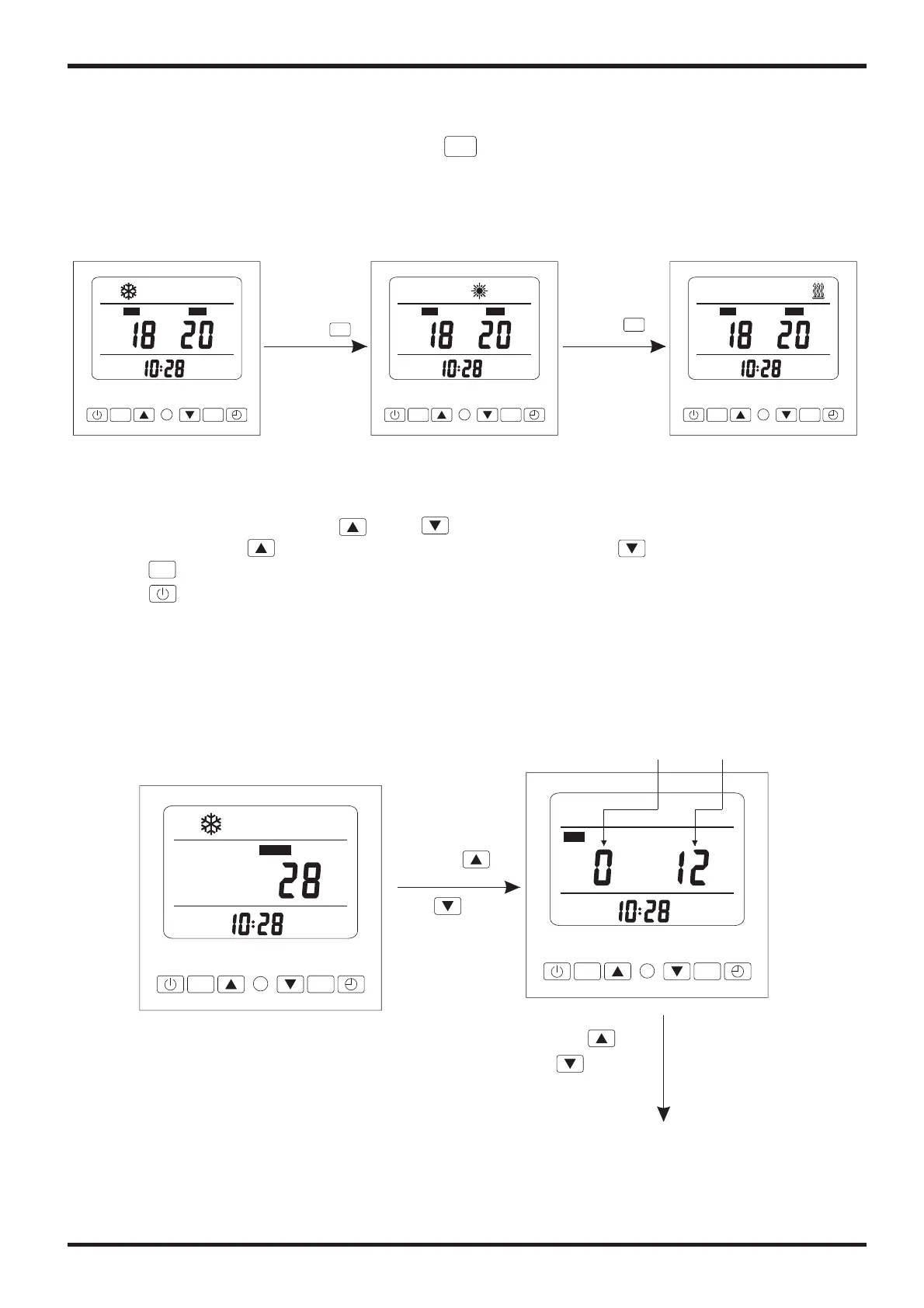
If it is cold/ heat unit, in the main interface, you can switch different modes of cooling,
heating, mode by pressing“ ”.Electric heating
Attention:The modes switching is useless if the unit you buy is single-cold/ single-heat unit.
For example:
M
Press“ ”
2.3 Temperature setting
In the main interface,press“ ”or“ ” and the current mode target-temperature
flashes, then press“ ”to increase the temp.value, or press“ ”to decrease it.
Press“ ”can save setting parameter and back to the main interface;
Press“ ”can not save setting parameter but back to the main interface;
Attention:If there is no operation for 5s,system would remember parameter setting and
back to the main interface.
NO
.
Off unit
Press“ ”
or“ ”


 To Next Page
 Loading...