IN OUT IN OUT
IN OUTIN OUT
IN OUT IN OUT
4. USAGE AND OPERATION
22
M
SET
℃℃
M
SET
℃℃
Flashing
Press“ ”
M
SET
℃℃
M
SET
℃℃
Press“ ”
to save hour
M
SET
℃℃
M
SET
℃℃
Flashing
Press“ ”
or“ ”
Flashing
Flashing
Flashing
Fla-
shing
Press“ ”
or“ ”
Flashing
Flashing
Press“ ”
to save minute
Fla-
shing
Flashing
Press“ ”
or“ ”
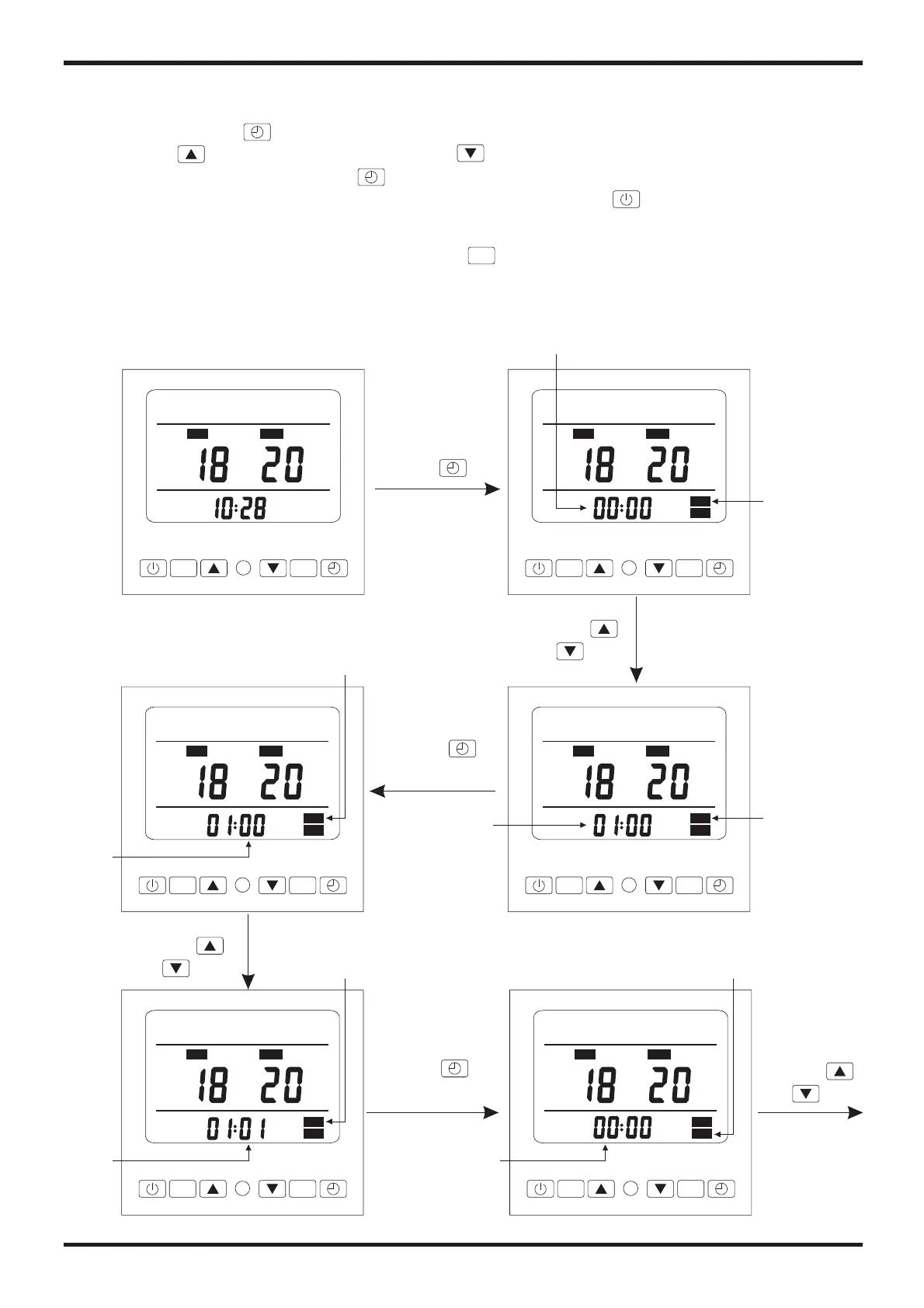
2.5 Timer setting
You can set a timer on or timer off by the wire controller.
Pressing the " ", you will find that the icon ON and the hour of timer on flashing, then
press the " " (increse what you set)and " "(decrease what you set) ,you can set the
hour of timer on, and press the " " to save the hour ,repeat it again to set the others.
Attention please: you can save what you set by pressing the " ",
Without any pressing in 5 seconds , the system will save the timer and
exit to the main display automatically.
During the timer setting , you can press the" " to cancel what you set.
SET


 To Next Page
 Loading...