EasyManua.ls Logo

Phoenix Mecano OKIN Refined RF3409 - User Manual

Phoenix Mecano OKIN Refined RF3409
4 pages
Print Icon
To Next Page IconTo Next Page
Loading...
Issue Department Date
2018.11.15
System Instruction
Author
Instruction of RF3409
Edition
1.1
Page 1 of 4
1/4
Instruction of RF3409
1 Key description
1.1 appearance
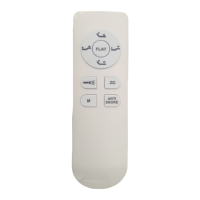
Figure1buttonofremote
FCC ID: PCU-RF3409
IC21319-RF3409
FCC IDPCU-CB1220
IC: 21319-CB1220
1
2 3
4
5
6
7
8
9
Question and Answer IconNeed help?

Do you have a question about the Phoenix Mecano OKIN Refined RF3409 and is the answer not in the manual?

Overview

This document describes the RF3409 system, which appears to be a remote-controlled adjustable bed system. The system includes a remote control, a control box, various actuators (head, foot, tilt, lumbar), and an under-bed light.

Function Description:

The RF3409 system allows users to adjust the position of a bed using a wireless remote control. It supports various pre-set positions and individual adjustments for different sections of the bed. The system includes:

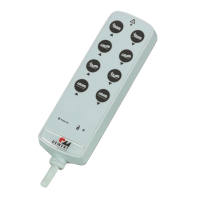
  • Remote Control: A handheld device with multiple buttons for controlling bed functions.
  • Control Box: The central unit that receives signals from the remote control and operates the actuators.
  • Actuators: Motors that move different parts of the bed, including head, foot, tilt, and lumbar sections.
  • Under Bed Light: An integrated light feature that can be turned on and off.

Important Technical Specifications:

  • Model: RF3409
  • FCC ID: PCU-CB1220
  • IC: 21319-CB1220
  • Power Supply: The system uses an SMPS (Switched-Mode Power Supply) and can be connected via an AC cable. A USB transformer and DC extension cable are also part of the power delivery system.
  • Communication: Wireless communication between the remote control and the control box.
  • Safety/Compliance: Complies with FCC Part 15 rules and ISED RSS standards for radio devices, ensuring it does not cause harmful interference and accepts any received interference. It also meets ISED RF exposure requirements.

Usage Features:

The remote control offers a range of features for adjusting the bed:

  • ZG Button:

    • Click: Moves the bed to the ZG (Zero Gravity) position. Movement stops if any button is clicked during the process.
    • Press and Hold (5s): Records the current bed position as the new ZG position. The timer LED on the remote flashes to indicate this action.
    • Movement Sequence: When moving to memory positions, head and foot actuators move first, followed by tilt and lumbar actuators.
  • AntiSnore Button:

    • Click: Moves the bed to the AntiSnore position. Movement stops if any button is clicked during the process.
    • Press and Hold (5s): Records the current bed position as the new AntiSnore position. The timer LED on the remote flashes.
    • Movement Sequence: Similar to ZG, head and foot actuators move first, then tilt and lumbar actuators.
  • Memory A Button (MA):

    • Click: Moves the bed to the MA (Memory A) position. Movement stops if any button is clicked during the process.
    • Press and Hold (5s): Records the current bed position as the new MA position. The timer LED on the remote flashes.
    • Movement Sequence: Similar to ZG, head and foot actuators move first, then tilt and lumbar actuators.
  • Reset All Memory Positions:

    • Press and Hold ZG + FLAT Buttons (5s): Resets all stored memory positions (ZG, AntiSnore, MA) to their default factory settings. The timer LED on the remote flashes.
  • Head Up/Down:

    • Press and Hold HEAD UP: Moves the head actuator outwards (up). Movement stops when the button is released.
    • Press and Hold HEAD DOWN: Moves the head actuator inwards (down). Movement stops when the button is released.
  • Foot Up/Down:

    • Press and Hold FOOT UP: Moves the foot actuator outwards (up). Movement stops when the button is released.
    • Press and Hold FOOT DOWN: Moves the foot actuator inwards (down). Movement stops when the button is released.
    • Movement Sequence to Flat: When moving to the flat position, lumbar and tilt actuators move first, and after 500ms, head and foot actuators begin moving.
  • Flat Button:

    • Click: Moves the bed to a completely flat position. Movement stops if any button is clicked during the flattening process.
  • Under Bed Light Button:

    • Click: Toggles the under-bed light on or off. If the light is turned on manually and not turned off, it will automatically switch off after 5 minutes.

Maintenance Features:

The document does not explicitly detail maintenance features for the end-user. However, the compliance statements indicate that the device is designed to operate reliably within specified radio frequency parameters. Any changes or modifications not expressly approved by the manufacturer could void the user's authority to operate the equipment, suggesting that user-level modifications are not supported or recommended. The system is designed for ease of use through its remote control, with memory functions for personalized comfort settings.

Phoenix Mecano OKIN Refined RF3409 Specifications

General IconGeneral
BrandPhoenix Mecano
ModelOKIN Refined RF3409
CategoryRemote Control
LanguageEnglish

Related product manuals