Linkwise Technology Pte Ltd REX User Manual
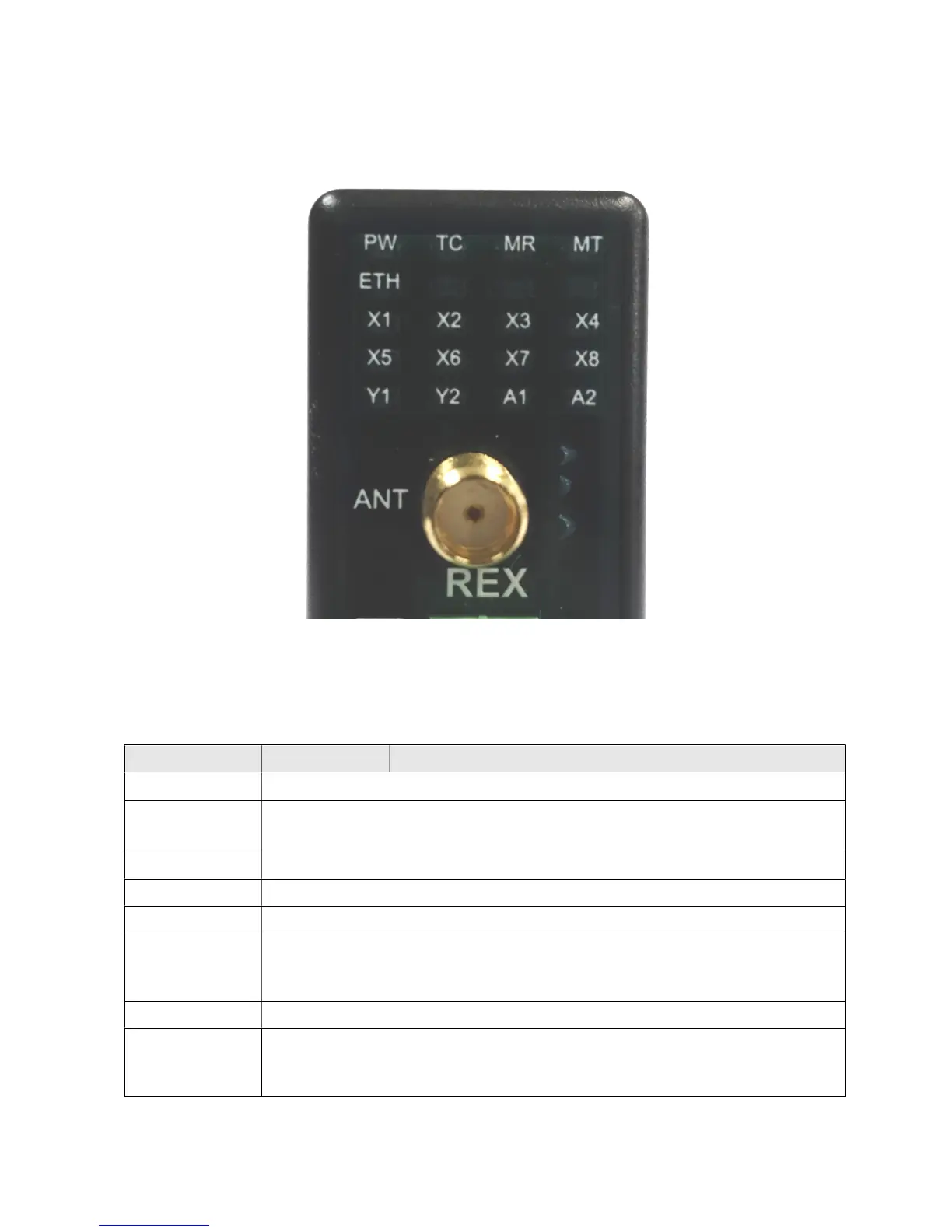
LED Indicators Description
Table 3.3 shows the description of the LED Indicators and its functions.
Name Colour Function
PW OFF = Power Off, ON = Device is Turned ON
TC
No SIM (Fast blinking, 50ms On, 50ms Off)
Network Signal Low, <30% (Slow blink 200ms On, 200ms Off)
Network Signal Good, Steady On
ETH OFF = Ethernet cable unplugged. On = Cable Plugged, Blinking = Network activity
MR OFF = RS485 Idle. Blinking. Data Received.
MT OFF = RS485 Idle. Blinking. Data Transmitted.
X1 - X8
OFF = Input contact is Open, No Alarm
ON = Input contact is Closed, No Alarm
Fast Blinking (100ms On, 100ms Off), Input Contact is Closed, Alarm condition
Slow Blinking (800ms On, 200ms Off), Input Contact is Open, Alarm condition
Y1, Y2 OFF=Relay Off (Contact Open), ON = Relay On (Contact Closed)
A1, A2
OFF = No input
On = Analog Input Present, no alarm
Fast Blinking (100ms On, 100ms Off), Input Contact is Closed, Alarm condition
Slow Blinking (800ms On, 200ms Off), Input Contact is Open, Alarm condition


 To Next Page